
VidAI
VidAI: Supercharge your YouTube content creation with AI. Enhance video titles, boost SEO, streamline translation.
As of June 2026, VidAI has 7,000 users and a 4.76/5 rating from 49 reviews in the Social & Communication category.
Usersno change0%
7.0K
7,000
Ratingdown 1.0 percent−1.0%
4.76
49 reviews
Reviewsup 2.1 percent+2.1%
49
Version
1.8.17
Manifest V3
90-day change · In the last 90 days this extension 4 version updates.
History
7 snapshotsTracking since Apr 16, 2026.
View as table
| Date | Users | Rating | Reviews | Version |
|---|---|---|---|---|
| Apr 16, 2026 | 7.0K | 4.81 | 48 | 1.8.13 |
| May 2, 2026 | 7.0K | 4.81 | 48 | 1.8.13 |
| May 23, 2026 | 7.0K | 4.81 | 48 | 1.8.14 |
| May 28, 2026 | 7.0K | 4.76 | 49 | 1.8.14 |
| Jun 6, 2026 | 7.0K | 4.76 | 49 | 1.8.15 |
| Jun 10, 2026 | 8.0K | 4.76 | 49 | 1.8.15 |
| Jun 22, 2026 | 8.0K | 4.76 | 49 | 1.8.16 |
| Now | 7.0K | 4.76 | 49 | 1.8.17 |
Changelog
- Jun 22, 2026description
VidAI: 🚀 The All-in-One YouTube Studio Assistant

VidAI lives right inside YouTube Studio and helps creators ship faster - better titles, better descriptions, smarter comment replies, and one-click translations into 100+ languages.

✨ WHAT YOU CAN DO

🤖 AI Comment Replies
Generate authentic, on-brand replies to viewer comments without ever leaving Studio. Per-channel persona, audience tuning, language matching, banned phrases, default instructions, and 1/2/3 alternative replies. Speed mode for fast triage, Quality mode for the messages that matter.


🏆 AI Council for Titles
Three AIs draft title options in parallel; a judge model picks the strongest. A/B-test winners, save your best examples, and tune the tone per channel. Built for creators who care about CTR.

📝 AI-Powered Video Metadata
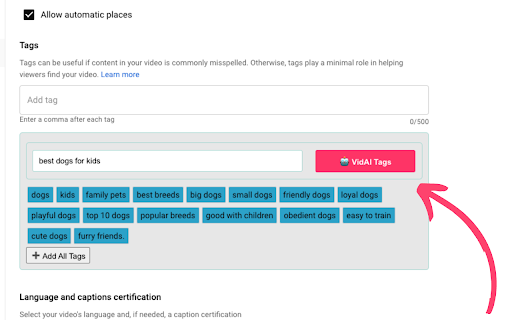
One-click descriptions, tags, hashtags, keywords, and chapters — grounded on your actual video transcript, not just guessed from the title. Optional CTAs, hashtag forcing, chapter formats — all configurable per channel.


🌍 One-Click Translations
Translate titles, descriptions, and subtitles into 100+ languages in seconds. Smart re-translation skips segments you've already localized. Background jobs handle long subtitle files without timing out.


📺 Multi-Channel Oversight
Manage every channel you own from a single panel. Per-channel personas, audience profiles, default instructions — your "cybersec educator" channel and your "cooking with grandma" channel never get mixed up.


🎨 Playlist & Series Tools
Generate playlist titles and descriptions, organize courses and podcasts, with the same per-channel context.


✨ GENEROUS FREE TIER
Monthly title and description translations, daily AI requests, and full per-channel settings — all on the free tier.

⬆️ Upgrade to PRO for AI Council, 3-reply comments, advanced tags, and higher monthly limits.

🔒 PRIVACY
VidAI only reads YouTube Studio pages you're actively viewing. No data is sold, no third-party tracking. Auth uses Google OAuth on vidai.help — never your YouTube password.


What's new in 1.8.16
  - Stability fixes and improvements: better error messages, draft-edit fixes
VidAI: 🚀 The All-in-One YouTube Studio Assistant

VidAI lives right inside YouTube Studio and helps creators ship faster - better titles, better descriptions, smarter comment replies, and one-click translations into 100+ languages.

✨ WHAT YOU CAN DO

🤖 AI Comment Replies
Generate authentic, on-brand replies to viewer comments without ever leaving Studio. Per-channel persona, audience tuning, language matching, banned phrases, default instructions, and 1/2/3 alternative replies. Speed mode for fast triage, Quality mode for the messages that matter.


🏆 AI Council for Titles
Three AIs draft title options in parallel; a judge model picks the strongest. A/B-test winners, save your best examples, and tune the tone per channel. Built for creators who care about CTR.

📝 AI-Powered Video Metadata
One-click descriptions, tags, hashtags, keywords, and chapters — grounded on your actual video transcript, not just guessed from the title. Optional CTAs, hashtag forcing, chapter formats — all configurable per channel.


🌍 One-Click Translations
Translate titles, descriptions, and subtitles into 100+ languages in seconds. Smart re-translation skips segments you've already localized. Background jobs handle long subtitle files without timing out.


📺 Multi-Channel Oversight
Manage every channel you own from a single panel. Per-channel personas, audience profiles, default instructions — your "cybersec educator" channel and your "cooking with grandma" channel never get mixed up.


🎨 Playlist & Series Tools
Generate playlist titles and descriptions, organize courses and podcasts, with the same per-channel context.


✨ GENEROUS FREE TIER
Monthly title and description translations, daily AI requests, and full per-channel settings — all on the free tier.

⬆️ Upgrade to PRO for AI Council, 3-reply comments, advanced tags, and higher monthly limits.

🔒 PRIVACY
VidAI only reads YouTube Studio pages you're actively viewing. No data is sold, no third-party tracking. Auth uses Google OAuth on vidai.help — never your YouTube password.


What's new in 1.8.16
A big one — VidAI goes from "write my titles" to a full creative workflow:

💡 Ideas — save inspiring videos from YouTube to your own board, see why they won (top keywords + stats), and "Copy for AI" to remix them into your own.
📣 Social posts — generate community posts, comment replies & cross-posting copy in your voice, with reusable per-channel templates.
🌐 Channel Localization — translate your channel's name & description into many languages, right from Studio.
🏷️ Multilingual tags — SEO keywords across the world's most-spoken languages.
👁️ Cleaner Video Info on YouTube — real tags, top keywords, and a one-click Copy-for-AI.

Plus smarter playlist titles, instant language switching, and lots of fixes.
- Jun 10, 2026description
VidAI: 🚀 The All-in-One YouTube Studio Assistant

VidAI lives right inside YouTube Studio and helps creators ship faster - better titles, better descriptions, smarter comment replies, and one-click translations into 100+ languages.

✨ WHAT YOU CAN DO

🤖 AI Comment Replies
Generate authentic, on-brand replies to viewer comments without ever leaving Studio. Per-channel persona, audience tuning, language matching, banned phrases, default instructions, and 1/2/3 alternative replies. Speed mode for fast triage, Quality mode for the messages that matter.


🏆 AI Council for Titles
Three AIs draft title options in parallel; a judge model picks the strongest. A/B-test winners, save your best examples, and tune the tone per channel. Built for creators who care about CTR.

📝 AI-Powered Video Metadata
One-click descriptions, tags, hashtags, keywords, and chapters — grounded on your actual video transcript, not just guessed from the title. Optional CTAs, hashtag forcing, chapter formats — all configurable per channel.


🌍 One-Click Translations
Translate titles, descriptions, and subtitles into 100+ languages in seconds. Smart re-translation skips segments you've already localized. Background jobs handle long subtitle files without timing out.


📺 Multi-Channel Oversight
Manage every channel you own from a single panel. Per-channel personas, audience profiles, default instructions — your "cybersec educator" channel and your "cooking with grandma" channel never get mixed up.


🎨 Playlist & Series Tools
Generate playlist titles and descriptions, organize courses and podcasts, with the same per-channel context.


✨ GENEROUS FREE TIER
Monthly title and description translations, daily AI requests, and full per-channel settings — all on the free tier.

⬆️ Upgrade to PRO for AI Council, 3-reply comments, advanced tags, and higher monthly limits.

🔒 PRIVACY
VidAI only reads YouTube Studio pages you're actively viewing. No data is sold, no third-party tracking. Auth uses Google OAuth on vidai.help — never your YouTube password.


What's new in 1.8.15
  - 💬 AI Comment Replies — per-channel persona, audience tuning, language matching, multi-reply (1/2/3) and Speed/Quality modes
  - 🏆 AI Council for Titles — multiple AIs draft & a judge picks the best
  - ⚡ Async pipeline with live progress steps — no more blocking spinners
  - 🔔 Refreshed in-page notifier with sound toggle and rate-limiting
  - 🔐 Smoother sign-in (no infinite spinner, auto-continues after login)
  - 🌐 Polished Ukrainian / English / Russian copy
  - Stability: better error messages, draft-edit fixes, performance & QA hardening
VidAI: 🚀 The All-in-One YouTube Studio Assistant

VidAI lives right inside YouTube Studio and helps creators ship faster - better titles, better descriptions, smarter comment replies, and one-click translations into 100+ languages.

✨ WHAT YOU CAN DO

🤖 AI Comment Replies
Generate authentic, on-brand replies to viewer comments without ever leaving Studio. Per-channel persona, audience tuning, language matching, banned phrases, default instructions, and 1/2/3 alternative replies. Speed mode for fast triage, Quality mode for the messages that matter.


🏆 AI Council for Titles
Three AIs draft title options in parallel; a judge model picks the strongest. A/B-test winners, save your best examples, and tune the tone per channel. Built for creators who care about CTR.

📝 AI-Powered Video Metadata
One-click descriptions, tags, hashtags, keywords, and chapters — grounded on your actual video transcript, not just guessed from the title. Optional CTAs, hashtag forcing, chapter formats — all configurable per channel.


🌍 One-Click Translations
Translate titles, descriptions, and subtitles into 100+ languages in seconds. Smart re-translation skips segments you've already localized. Background jobs handle long subtitle files without timing out.


📺 Multi-Channel Oversight
Manage every channel you own from a single panel. Per-channel personas, audience profiles, default instructions — your "cybersec educator" channel and your "cooking with grandma" channel never get mixed up.


🎨 Playlist & Series Tools
Generate playlist titles and descriptions, organize courses and podcasts, with the same per-channel context.


✨ GENEROUS FREE TIER
Monthly title and description translations, daily AI requests, and full per-channel settings — all on the free tier.

⬆️ Upgrade to PRO for AI Council, 3-reply comments, advanced tags, and higher monthly limits.

🔒 PRIVACY
VidAI only reads YouTube Studio pages you're actively viewing. No data is sold, no third-party tracking. Auth uses Google OAuth on vidai.help — never your YouTube password.


What's new in 1.8.16
  - Stability fixes and improvements: better error messages, draft-edit fixes
- May 28, 2026description
VidAI: 🚀 Best YouTube SEO Extension

With VidAI, you can:

🌍 Translate On-the-Fly: Convert your YouTube video titles, descriptions, and subtitles with a single click.
🤖 AI-Powered SEO: Amplify titles, descriptions, and tags in real-time.
📺 Unified Channel Oversight: Manage all your YouTube channels effortlessly.

✨ Now Offering a Generous Free Tier! Benefit from monthly title & description translations, and daily AI requests, absolutely free.

⬆️ Upgrade for even more power and capabilities.

What's new in 1.8.14?
  - Fixed issue related to A/B test titles (simplified form)
  - Other minor fixes and improvements
VidAI: 🚀 The All-in-One YouTube Studio Assistant

VidAI lives right inside YouTube Studio and helps creators ship faster - better titles, better descriptions, smarter comment replies, and one-click translations into 100+ languages.

✨ WHAT YOU CAN DO

🤖 AI Comment Replies
Generate authentic, on-brand replies to viewer comments without ever leaving Studio. Per-channel persona, audience tuning, language matching, banned phrases, default instructions, and 1/2/3 alternative replies. Speed mode for fast triage, Quality mode for the messages that matter.


🏆 AI Council for Titles
Three AIs draft title options in parallel; a judge model picks the strongest. A/B-test winners, save your best examples, and tune the tone per channel. Built for creators who care about CTR.

📝 AI-Powered Video Metadata
One-click descriptions, tags, hashtags, keywords, and chapters — grounded on your actual video transcript, not just guessed from the title. Optional CTAs, hashtag forcing, chapter formats — all configurable per channel.


🌍 One-Click Translations
Translate titles, descriptions, and subtitles into 100+ languages in seconds. Smart re-translation skips segments you've already localized. Background jobs handle long subtitle files without timing out.


📺 Multi-Channel Oversight
Manage every channel you own from a single panel. Per-channel personas, audience profiles, default instructions — your "cybersec educator" channel and your "cooking with grandma" channel never get mixed up.


🎨 Playlist & Series Tools
Generate playlist titles and descriptions, organize courses and podcasts, with the same per-channel context.


✨ GENEROUS FREE TIER
Monthly title and description translations, daily AI requests, and full per-channel settings — all on the free tier.

⬆️ Upgrade to PRO for AI Council, 3-reply comments, advanced tags, and higher monthly limits.

🔒 PRIVACY
VidAI only reads YouTube Studio pages you're actively viewing. No data is sold, no third-party tracking. Auth uses Google OAuth on vidai.help — never your YouTube password.


What's new in 1.8.15
  - 💬 AI Comment Replies — per-channel persona, audience tuning, language matching, multi-reply (1/2/3) and Speed/Quality modes
  - 🏆 AI Council for Titles — multiple AIs draft & a judge picks the best
  - ⚡ Async pipeline with live progress steps — no more blocking spinners
  - 🔔 Refreshed in-page notifier with sound toggle and rate-limiting
  - 🔐 Smoother sign-in (no infinite spinner, auto-continues after login)
  - 🌐 Polished Ukrainian / English / Russian copy
  - Stability: better error messages, draft-edit fixes, performance & QA hardening
- May 2, 2026description
VidAI: 🚀 Best YouTube SEO Extension

With VidAI, you can:

🌍 Translate On-the-Fly: Convert your YouTube video titles, descriptions, and subtitles with a single click.
🤖 AI-Powered SEO: Amplify titles, descriptions, and tags in real-time.
📺 Unified Channel Oversight: Manage all your YouTube channels effortlessly.

✨ Now Offering a Generous Free Tier! Benefit from monthly title & description translations, and daily AI requests, absolutely free.

⬆️ Upgrade for even more power and capabilities.

What's new in 1.8.13?
  - Fixed issue related to A/B test titles
VidAI: 🚀 Best YouTube SEO Extension

With VidAI, you can:

🌍 Translate On-the-Fly: Convert your YouTube video titles, descriptions, and subtitles with a single click.
🤖 AI-Powered SEO: Amplify titles, descriptions, and tags in real-time.
📺 Unified Channel Oversight: Manage all your YouTube channels effortlessly.

✨ Now Offering a Generous Free Tier! Benefit from monthly title & description translations, and daily AI requests, absolutely free.

⬆️ Upgrade for even more power and capabilities.

What's new in 1.8.14?
  - Fixed issue related to A/B test titles (simplified form)
  - Other minor fixes and improvements
Permissions & access
- Permissions
- storagetabsidentity
- Host access
- None declared
Screenshots




About
VidAI: 🚀 The All-in-One YouTube Studio Assistant

VidAI lives right inside YouTube Studio and helps creators ship faster - better titles, better descriptions, smarter comment replies, and one-click translations into 100+ languages.

✨ WHAT YOU CAN DO

🤖 AI Comment Replies
Generate authentic, on-brand replies to viewer comments without ever leaving Studio. Per-channel persona, audience tuning, language matching, banned phrases, default instructions, and 1/2/3 alternative replies. Speed mode for fast triage, Quality mode for the messages that matter.


🏆 AI Council for Titles
Three AIs draft title options in parallel; a judge model picks the strongest. A/B-test winners, save your best examples, and tune the tone per channel. Built for creators who care about CTR.

📝 AI-Powered Video Metadata
One-click descriptions, tags, hashtags, keywords, and chapters — grounded on your actual video transcript, not just guessed from the title. Optional CTAs, hashtag forcing, chapter formats — all configurable per channel.


🌍 One-Click Translations
Translate titles, descriptions, and subtitles into 100+ languages in seconds. Smart re-translation skips segments you've already localized. Background jobs handle long subtitle files without timing out.


📺 Multi-Channel Oversight
Manage every channel you own from a single panel. Per-channel personas, audience profiles, default instructions — your "cybersec educator" channel and your "cooking with grandma" channel never get mixed up.


🎨 Playlist & Series Tools
Generate playlist titles and descriptions, organize courses and podcasts, with the same per-channel context.


✨ GENEROUS FREE TIER
Monthly title and description translations, daily AI requests, and full per-channel settings — all on the free tier.

⬆️ Upgrade to PRO for AI Council, 3-reply comments, advanced tags, and higher monthly limits.

🔒 PRIVACY
VidAI only reads YouTube Studio pages you're actively viewing. No data is sold, no third-party tracking. Auth uses Google OAuth on vidai.help — never your YouTube password.


What's new in 1.8.16
A big one — VidAI goes from "write my titles" to a full creative workflow:

💡 Ideas — save inspiring videos from YouTube to your own board, see why they won (top keywords + stats), and "Copy for AI" to remix them into your own.
📣 Social posts — generate community posts, comment replies & cross-posting copy in your voice, with reusable per-channel templates.
🌐 Channel Localization — translate your channel's name & description into many languages, right from Studio.
🏷️ Multilingual tags — SEO keywords across the world's most-spoken languages.
👁️ Cleaner Video Info on YouTube — real tags, top keywords, and a one-click Copy-for-AI.

Plus smarter playlist titles, instant language switching, and lots of fixes.
Technical
- Version
- 1.8.17
- Manifest
- V3
- Size
- 3.26MiB
- Min Chrome
- 88
- Languages
- 1
- Featured
- Yes
Metadata
- ID
- hphfliggkgombflhagnibkclkllpbkpk
- Developer ID
- ub02f0510fa9d7e34f0bc7800cc614128
- Developer Email
- [email protected]
- Created
- May 18, 2023
- Last Updated (Store)
- Jun 18, 2026
- Last Scraped
- Jun 22, 2026
- Website
- https://vidai.help/
- Support URL
- https://vidai.help/
- Privacy Policy
- https://vidai.help/privacy
Similar extensions
Alternatives to VidAI, ranked by description similarity.

TubeNXT – YouTube SEO Tool (Better than vidIQ?)
Boost YouTube views with AI titles, SEO tools, keyword and competitor insights—TubeNXT helps you grow smarter
1.0K
★ 4.6

VidTechy
Grow Your YouTube Channel with VidTechy
410
★ 5.0

AI YouTube Description Generator
Enhance your video reach and attract more viewers with the AI powered YouTube Description Generator.
59

vidIQ Vision for YouTube
Uncover the secrets to success behind your favorite YouTube videos.
3.0M
★ 4.5

Tagistaan
Uncover what helps YouTube videos win and turn every upload into a smarter growth move.
8

AI YouTube Hashtag Generator
Generate SEO-friendly hashtags for YouTube videos using AI to boost video reach and discoverability.
44

VidNinjas — YouTube Analytics & AI Creator Tools
Ninja Score on every video, Views Per Hour, AI scripts, SEO analysis, transcript copy & competitor tracking.
1.0K
★ 5.0

TubeBuddy for YouTube™
Supercharge your YouTube channel: grow views and subs with extended capabilities, insights and automation tools. Solo to Enterprise.
1.0M
★ 4.5
Data sourced from the Chrome Web Store · last verified Jun 22, 2026.