
YouTube Screenshot Pro
Capture high-quality screenshots from YouTube videos with customizable formats and playback speed controls
As of May 2026, YouTube Screenshot Pro has 30 users in the Productivity category.
Usersup 11.1 percent+11.1%
30
30
Ratingno change0%
—
— reviews
Reviewsno change0%
—
Version
1.0.2
Manifest V3
History
3 snapshotsTracking since Apr 20, 2026.
View as table
| Date | Users | Rating | Reviews | Version |
|---|---|---|---|---|
| Apr 20, 2026 | 27 | — | — | 1.0.2 |
| May 6, 2026 | 31 | — | — | 1.0.2 |
| May 30, 2026 | 29 | — | — | 1.0.2 |
| Now | 30 | — | — | 1.0.2 |
Permissions & access
- Permissions
- storage
- Host access
- None declared
Screenshots
About
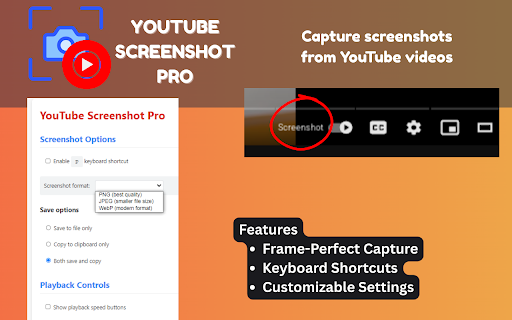
YouTube Screenshot Pro transforms how you capture images from YouTube videos. With our intuitive overlay controls, you can precisely navigate to the exact frame you need, adjust playback speed for perfect timing, and capture crystal-clear screenshots in your preferred format and resolution.

Perfect for creating thumbnails, collecting reference material, extracting educational content, or preserving memorable moments from your favorite videos. Unlike browser screenshots that capture the entire page, our extension focuses only on the video content, providing clean, professional-quality images every time.

Key Features
•	Frame-Perfect Capture - Navigate videos frame-by-frame to capture the exact moment you need
•	Multiple Format Options - Save screenshots as PNG, JPEG, or WebP with adjustable quality settings
•	Playback Speed Control - Adjust video playback from 0.1x to 2x speed for precise navigation
•	Keyboard Shortcuts - Capture screenshots and control playback with convenient hotkeys
•	Non-Intrusive Interface - Subtle, collapsible control panel that won't disrupt your viewing
•	Customizable Settings - Personalize your experience through the options page

How to Use
1.	Navigate to YouTube - The extension automatically activates on YouTube pages
2.	Play Any Video - Controls appear when you hover near the bottom of the video player
3.	Find Your Frame - Use playback controls or frame-by-frame navigation to find the perfect moment
4.	Take Screenshot - Click the camera icon or use the keyboard shortcut (default: Alt+S)
5.	Customize Options - Right-click the extension icon for advanced settings
Technical
- Version
- 1.0.2
- Manifest
- V3
- Size
- 45.46KiB
- Min Chrome
- 88
- Languages
- 29
- Featured
- No
Metadata
- ID
- hpfjfoknalaogihkkehaikkchfdblaio
- Developer ID
- u92d0698d3636aefba50449621fa321cb
- Developer Email
- [email protected]
- Created
- Apr 29, 2025
- Last Updated (Store)
- May 17, 2025
- Last Scraped
- May 30, 2026
- Website
- —
- Support URL
- —
- Privacy Policy
- —
Similar extensions
Alternatives to YouTube Screenshot Pro, ranked by description similarity.

YouTube Screenshot Pro
Capture YouTube screenshots with color filters, subtitles, and your own branding logo.
41
★ 3.7

YouTube Screenshot
Capture YouTube video screenshots with YouTube Screenshot. Fast, easy, and powerful tool screenshot youtube generator.
304
★ 4.0

OneClick Screenshot YouTube
Capture photos from YouTube videos with one click. Screenshot and download full-resolution frames easily.
33

YouTube Screenshot
Capture screenshots of YouTube videos with one click.
8
★ 5.0

Video Snapshot Pro
Capture, View, and Batch Download Video Screenshots from Any Platform
138
★ 5.0

Youshot - YouTube Screenshot Tool
Capture screenshots from YouTube player with annotations
96
★ 4.8

YouTube Screenshot Tool
Extract high-quality frames from YouTube videos without UI elements
46

YouTube Screenshot Capture
Capture high-quality screenshots from YouTube videos instantly with one click or keyboard shortcut
5
Data sourced from the Chrome Web Store · last verified May 30, 2026.