
GateKeeper Password Manager
GateKeeper Password Manager works with the GateKeeper desktop application to provide proximity based access to web passwords.
As of June 2026, GateKeeper Password Manager has 10,000 users and a 5.00/5 rating from 15 reviews in the Workflow & Planning category.
Usersno change0%
10.0K
10,000
Ratingno change0%
5.00
15 reviews
Reviewsno change0%
15
Version
2.3.0
Manifest V3
90-day change · In the last 90 days this extension 1 version update.
History
3 snapshotsTracking since Apr 17, 2026.
View as table
| Date | Users | Rating | Reviews | Version |
|---|---|---|---|---|
| Apr 17, 2026 | 10.0K | 5.00 | 15 | 2.2.10 |
| Apr 27, 2026 | 10.0K | 5.00 | 15 | 2.2.10 |
| Jun 6, 2026 | 10.0K | 5.00 | 15 | 2.2.10 |
| Now | 10.0K | 5.00 | 15 | 2.3.0 |
Permissions & access
- Permissions
- tabsactiveTabcontextMenusnativeMessagingstoragealarmswebRequestwebNavigationscripting
- Host access
- http://*/*, https://*/*
Screenshots


About
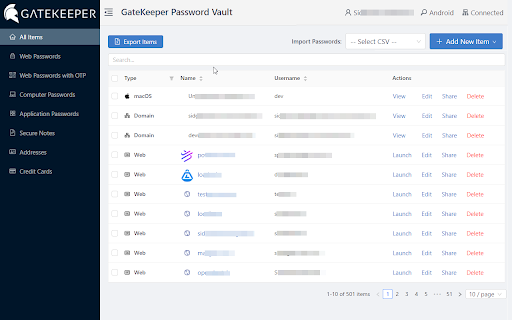
Login to websites with your phone or a Bluetooth token. The GateKeeper Chrome extension gives proximity access to web credentials, including one-time-passwords (OTPs) when using a GateKeeper key and software for secure access to your computer.

The extension enhances the user's ability to manage their web passwords in their GateKeeper profiles. It communicates with the GateKeeper desktop application to allow users to save and retrieve their web credentials on any computer they log on to using their GateKeeper proximity token. For enterprise users, this extension provides access to web credentials for all users on every computer on the network once the user is authenticated on to the machine using their GateKeeper proximity token.

Once a user logs on to any computer on the network using their GateKeeper proximity token, all their web credentials are available for them to use through this extension. Additionally, by registering web applications that support Time-Based One-Time-Passwords, the extension provides the 6-digit OTP in addition to the username and password for the web application, automatically. With GateKeeper, you will have on-demand and secure access to your computer, web and 2-FA OTP codes in one place.

For any questions regarding proximity lock and unlock with GateKeeper, please email us at [email protected] or visit https://gkaccess.com.
Technical
- Version
- 2.3.0
- Manifest
- V3
- Size
- 15.86MiB
- Min Chrome
- 88
- Languages
- 1
- Featured
- No
Metadata
- ID
- hpabmnfgopbnljhfamjcpmcfaehclgci
- Developer ID
- uffc6790f4456d6d002eaf692882c1fe6
- Developer Email
- [email protected]
- Created
- May 3, 2018
- Last Updated (Store)
- Jun 4, 2026
- Last Scraped
- Jun 25, 2026
- Website
- gkaccess.com
- Support URL
- https://gkaccess.com/support/
- Privacy Policy
- https://gkaccess.com/privacy-statement
Similar extensions
Alternatives to GateKeeper Password Manager, ranked by description similarity.

Everykey for Chrome
Sign in effortlessly, generate passwords and passkeys, and store them securely. The Everykey browser experience.
1.0K
★ 3.0

Passwordstate
Passwordstate for Chrome is a form filler extension that obtains credentials from Passwordstate.
100.0K
★ 3.2

LoginTC
LoginTC multi-factor authentication
2.0K
★ 4.0

TeamPassword
Password sharing for collaborative teams.
7.0K
★ 4.6

TapSafe Extension
Manager your password easily
4

Netwrix Password Secure
Enterprise Password Management
60.0K
★ 4.3

Power LogOn Extension
Google Chrome Extension for Power LogOn.
57

True Key™ by McAfee
Go ahead - forget your passwords. With the True Key app, you are the password.
600.0K
★ 4.7
Data sourced from the Chrome Web Store · last verified Jun 25, 2026.