
PDF Pen — Sign & Fill Instantly
Sign and annotate PDFs directly in Chrome with signatures, text, and checkboxes.
As of June 2026, PDF Pen — Sign & Fill Instantly has 12 users in the Productivity category.
Usersup 9.1 percent+9.1%
12
12
Ratingno change0%
—
— reviews
Reviewsno change0%
—
Version
1.0.0
Manifest V3
History
7 snapshotsTracking since Apr 16, 2026.
View as table
| Date | Users | Rating | Reviews | Version |
|---|---|---|---|---|
| Apr 16, 2026 | 11 | — | — | 1.0.0 |
| Apr 24, 2026 | 13 | — | — | 1.0.0 |
| May 1, 2026 | 15 | — | — | 1.0.0 |
| May 12, 2026 | 16 | — | — | 1.0.0 |
| May 18, 2026 | 17 | — | — | 1.0.0 |
| May 27, 2026 | — | — | — | 1.0.0 |
| Jun 5, 2026 | 15 | — | — | 1.0.0 |
| Now | 12 | — | — | 1.0.0 |
Permissions & access
- Permissions
- activeTabscripting
- Host access
- None declared
Screenshots


About
PDF Pen lets you sign, fill, and annotate PDF documents without ever leaving Chrome — and without uploading your files anywhere.

Unlike other PDF tools that require you to upload sensitive documents to their servers, PDF Pen works entirely on your device. Your contracts, tax forms, and personal documents never touch a remote server.

FEATURES

  Sign in Seconds
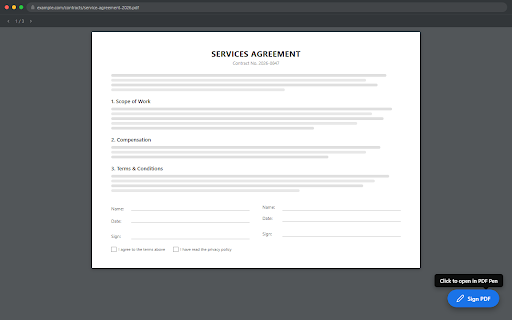
  Click "Sign PDF" on any PDF to open our clean, fast viewer. Type your name, pick from beautiful handwriting fonts, place your signature anywhere, resize it — done.

  Fill Forms & Add Text
  Click to place text anywhere on the page. Type directly on the document — perfect for filling in forms, adding dates, or writing notes. Multi-line support with Enter.

  Check Boxes
  One-click X marks to fill in existing checkboxes on any form or document.

  Resize & Reposition
  Drag to move any annotation. Resize signatures and text with the corner handle — aspect ratio always locked for a clean look.

  Save as Standard PDF
  All annotations are embedded directly into the PDF. The output is a standard PDF that works everywhere — email it, print it, upload it.

HOW IT WORKS

  1. Open any PDF in Chrome
  2. Click the blue "Sign PDF" button in the corner
  3. Add your signature, text, or checkmarks
  4. Click Save to download the signed PDF

WHY PDF PEN

  100% Private — Your files never leave your device
  No Account Required — Install and start signing immediately
  No Watermarks — Your signed documents are clean and professional
  No Upload Limits — Works with any file size, instantly
  Works Offline — No internet connection needed after install
  Completely Free — No premium tier, no trial, no upsell
Technical
- Version
- 1.0.0
- Manifest
- V3
- Size
- 1.67MiB
- Min Chrome
- 88
- Languages
- 1
- Featured
- No
Metadata
- ID
- homfkcnioefcmlobgiogajonnkheafoh
- Developer ID
- ue12fddafec472603d60bb0b29b520c89
- Developer Email
- [email protected]
- Created
- Feb 14, 2026
- Last Updated (Store)
- Feb 14, 2026
- Last Scraped
- Jun 5, 2026
- Website
- —
- Support URL
- —
- Privacy Policy
- —
Similar extensions
Alternatives to PDF Pen — Sign & Fill Instantly, ranked by description similarity.

Express PDF Draw
Draw, annotate, sign, and export PDFs — offline.
56
★ 5.0

PDF Sign
Boost productivity with PDF Sign editor: Easily sign documents online and fill forms. Streamline workflow with a pdf signer tool.
651
★ 5.0

QuickPDF
QuickPDF: Sign & Annotate PDFs + Image to PDF with Crop. Add signatures, text, highlights. 100% local.
22
★ 5.0

Online PDF Signature
Sign directly on PDFs and adjust the size and thickness of your signature brush. All operations are local, ensuring your privacy.
826
★ 5.0

Signature on PDF
Use Signature on PDF to quickly add signature on pdf document. Simplify document sign tasks — fast, secure, and easy to use.
461
★ 5.0

MicroPDF
The lightweight, 100% private PDF editor. Sign and edit offline.
12

LocalSign – Free PDF Signer | Edit & Write in PDF
Free PDF signer – Edit and write in PDF documents directly in your browser. Your files never leave your computer.
40
★ 5.0

Sign PDF Online
Use Sign PDF Online - fast, secure tool for document signature. This online PDF signer for edit and share your files seamlessly.
166
★ 5.0
Data sourced from the Chrome Web Store · last verified Jun 5, 2026.