
ZIP Maker
You may use an easy-to-use interface right in your browser to create zip files!
As of June 2026, ZIP Maker has 363 users and a 4.56/5 rating from 9 reviews in the Workflow & Planning category.
Usersup 4.9 percent+4.9%
363
363
Ratingno change0%
4.56
9 reviews
Reviewsno change0%
9
Version
0.1
Manifest V3
History
3 snapshotsTracking since Apr 23, 2026.
View as table
| Date | Users | Rating | Reviews | Version |
|---|---|---|---|---|
| Apr 23, 2026 | 346 | 4.56 | 9 | 0.1 |
| May 12, 2026 | 354 | 4.56 | 9 | 0.1 |
| Jun 7, 2026 | 346 | 4.56 | 9 | 0.1 |
| Now | 363 | 4.56 | 9 | 0.1 |
Permissions & access
- Permissions
- storagecontextMenus
- Host access
- None declared
Screenshots
About
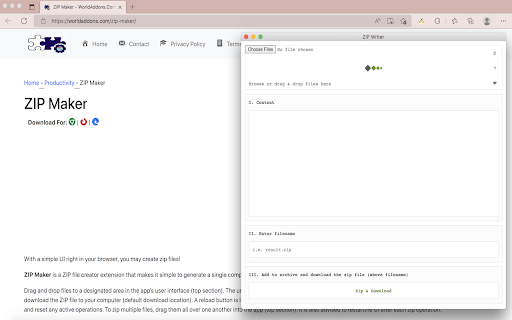
The extension "ZIP Maker" converts your file(s) into a single compressed file (.zip) automatically.

Drag & drop files to a designated area in the app's UI (top section) for uploading. The UI will display all of the uploaded items. You may now use the - Zip & Download - button to download the ZIP file to your computer (default download location). A reload symbol is located at the top-right corner of the app's UI. When you click on this symbol, the program is refreshed and all current operations are reset. To zip multiple files, simply drop them into one folder on your computer (top section). It is also suggested that you reload the application after each zipping operation.

Note 1: This plugin isn't meant to work with multiple types of files. It's only designed to compress zip files.

Note 2: This add-on uses an open-source JavaScript library for the zip operation. You may learn more about this library at https://github.com/gildas-lormeau/zip.js
Technical
- Version
- 0.1
- Manifest
- V3
- Size
- 174KiB
- Min Chrome
- 88
- Languages
- 1
- Featured
- No
Metadata
- ID
- hoekoogjfoffklkhomcmjhdkgmfgemeh
- Developer ID
- u856f7a278c96a3295b6814bda7dd5d58
- Developer Email
- [email protected]
- Created
- Jun 26, 2022
- Last Updated (Store)
- Jun 26, 2022
- Last Scraped
- Jun 7, 2026
- Website
- —
- Support URL
- https://worldaddons.com/contact/
- Privacy Policy
- https://worldaddons.com/privacy-policy/
Similar extensions
Alternatives to ZIP Maker, ranked by description similarity.

Thingiverse Downloader
A plugin to quickly download files from thingiverse model!
922
★ 5.0

Create Zip File
Quick tool to create zip file, compress documents, and manage extracted folders.
343
★ 5.0

Zip and send
Select one or many Google Docs and have it converted to PDF, Zipped up and emailed to you.
302
★ 2.4
Zip & Unzip Files
Extract zipped files with ease!
140
★ 1.8

Open in Winzip
Easily open desired links in Winzip
10.0K
★ 3.7

ShareMe for PC Windows - 100% Free Download-latest version
ShareMe For PC: Share files Smoothly on PC, Windows, and Mac with Share it - Lightning-fast, secure and free
1.0K
★ 5.0

Zip & Unzip Files
Extract zipped files and compress files with ease!
10.0K
★ 2.0

pixieDownloader
Download albums from any Pixieset gallery as a handy ZIP.
To use, just click the icon from the extensions menu.…
4.0K
★ 3.5
Data sourced from the Chrome Web Store · last verified Jun 7, 2026.