
GoEN Sudoku Shortcuts
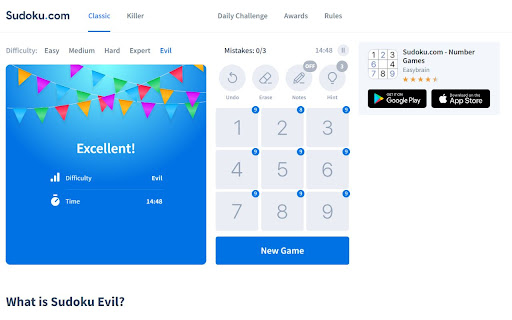
Play Sudoku.com online with keyboard shortcuts
As of June 2026, GoEN Sudoku Shortcuts has 3,000 users and a 4.83/5 rating from 6 reviews in the fun category.
Usersno change0%
3.0K
3,000
Ratingno change0%
4.83
6 reviews
Reviewsno change0%
6
Version
1.0.8
Manifest V3
90-day change · In the last 90 days this extension 2 version updates.
History
3 snapshotsTracking since Apr 23, 2026.
View as table
| Date | Users | Rating | Reviews | Version |
|---|---|---|---|---|
| Apr 23, 2026 | 3.0K | 4.83 | 6 | 1.0.6 |
| May 12, 2026 | 3.0K | 4.83 | 6 | 1.0.6 |
| Jun 15, 2026 | 3.0K | 4.83 | 6 | 1.0.7 |
| Now | 3.0K | 4.83 | 6 | 1.0.8 |
Changelog
- Jun 15, 2026description
Play Sudoku easier and faster with your keyboard! Could Sudoku.com become the best Sudoku website with keyboard shortcuts for pencil marks?

Shortcuts:
- Hold Shift and press number keys: to place a number as a pencil note (use Shift shortcut for pencil marks)
- Key ` (the key is on the left of key number 1): to toggle pencil marks on and off
- Arrow keys (↑ ↓ → ←): to move the current cursor (active cell).
- Number keys (1 to 9): to place a number. (use Alt shortcut for Digits mode)
- Key - (underscore): to Undo (also use Ctrl + Z)
- Key = (equal): to display Hint
- Key Backspace: to clear (Erease)
- Key X: turn on pencil marks (Notes mode)
- Key C: turn off pencil marks (Digits mode)

What’s New:
- [v1.0.5] Support Numpad
- [v1.0.6] Improve UX of pencil marks, add game tips.

Sponsor: Your support keeps us going and makes a difference.
- Support GoEN on Ko-fi: https://ko-fi.com/goenlab
Play Sudoku easier and faster with your keyboard! Could Sudoku.com become the best Sudoku website with keyboard shortcuts for pencil marks?

Shortcuts:
- In pencil mode, Hold Shift + number: instantly fills a digit.
- In digit mode, Hold Shift + number: instantly places a pencil note.
- Key ` (left of 1): to toggle pencil marks on and off
- Key X: turn on pencil marks
- Key C: turn off pencil marks (back to digit mode)
- Number keys (1–9) and Numpad: enter a digit or pencil note
- Arrow keys (↑ ↓ → ←): move the active cell
- Key - (minus): Undo (also Ctrl + Z)
- Key = (equal): Hint
- Key Backspace: Clear cell

What’s New:
- [v1.0.8] Hold Shift + number to instantly enter a digit or pencil note without switching modes.

Sponsor: Your support keeps us going and makes a difference.
- Support GoEN on Ko-fi: https://ko-fi.com/goenlab
- May 12, 2026description
Play Sudoku easier and faster with your keyboard! Could Sudoku.com become the best Sudoku website with keyboard shortcuts for pencil marks?

Shortcuts:
- Hold Shift and press number keys: to place a number as a pencil note (use Shift shortcut for pencil marks)
- Key ` (the key is on the left of key number 1): to toggle pencil marks on and off
- Arrow keys (↑ ↓ → ←): to move the current cursor (active cell).
- Number keys (1 to 9): to place a number. (use Alt shortcut for Digits mode)
- Key - (underscore): to Undo (also use Ctrl + Z)
- Key = (equal): to display Hint
- Key Backspace: to clear (Erease)
- Key X: turn on pencil marks (Notes mode)
- Key C: turn off pencil marks (Digits mode)

What’s New:
- [v1.0.5] Support Numpad
- [v1.0.6] Improve UX of pencil marks, add game tips.

Sponsor: Your support keeps us going and makes a difference.
- Support GoEN on Ko-fi: https://ko-fi.com/goenlab
- Support GoEN on Patreon: https://patreon.com/goenlab
Play Sudoku easier and faster with your keyboard! Could Sudoku.com become the best Sudoku website with keyboard shortcuts for pencil marks?

Shortcuts:
- Hold Shift and press number keys: to place a number as a pencil note (use Shift shortcut for pencil marks)
- Key ` (the key is on the left of key number 1): to toggle pencil marks on and off
- Arrow keys (↑ ↓ → ←): to move the current cursor (active cell).
- Number keys (1 to 9): to place a number. (use Alt shortcut for Digits mode)
- Key - (underscore): to Undo (also use Ctrl + Z)
- Key = (equal): to display Hint
- Key Backspace: to clear (Erease)
- Key X: turn on pencil marks (Notes mode)
- Key C: turn off pencil marks (Digits mode)

What’s New:
- [v1.0.5] Support Numpad
- [v1.0.6] Improve UX of pencil marks, add game tips.

Sponsor: Your support keeps us going and makes a difference.
- Support GoEN on Ko-fi: https://ko-fi.com/goenlab
Permissions & access
- Permissions
- tabs
- Host access
- None declared
Screenshots
About
Play Sudoku easier and faster with your keyboard! Could Sudoku.com become the best Sudoku website with keyboard shortcuts for pencil marks?

Shortcuts:
- In pencil mode, Hold Shift + number: instantly fills a digit.
- In digit mode, Hold Shift + number: instantly places a pencil note.
- Key ` (left of 1): to toggle pencil marks on and off
- Key X: turn on pencil marks
- Key C: turn off pencil marks (back to digit mode)
- Number keys (1–9) and Numpad: enter a digit or pencil note
- Arrow keys (↑ ↓ → ←): move the active cell
- Key - (minus): Undo (also Ctrl + Z)
- Key = (equal): Hint
- Key Backspace: Clear cell

What’s New:
- [v1.0.8] Hold Shift + number to instantly enter a digit or pencil note without switching modes.

Sponsor: Your support keeps us going and makes a difference.
- Support GoEN on Ko-fi: https://ko-fi.com/goenlab
Technical
- Version
- 1.0.8
- Manifest
- V3
- Size
- 27.1KiB
- Min Chrome
- 88
- Languages
- 1
- Featured
- Yes
Metadata
- ID
- hoadndnimhpnempojchlgpcolfjpljhi
- Developer ID
- u570fb8cd1ef17134fc711f96ee06d7ed
- Developer Email
- [email protected]
- Created
- Apr 7, 2023
- Last Updated (Store)
- Jun 14, 2026
- Last Scraped
- Jun 15, 2026
- Website
- goenlab.com
- Support URL
- —
- Privacy Policy
- —
Similar extensions
Alternatives to GoEN Sudoku Shortcuts, ranked by description similarity.

Sudoku Master: Daily Brain Puzzle
Play Sudoku offline! Daily challenges, 4 levels, smart notes & dark mode. Train your brain with this logic puzzle.
54

Sudoku Mood
Quick access to daily Sudoku challenges from Sudoku Mood
15
Sudoku On The Rocks
Sudoku on the rocks! Twist, clear, cheer - brain fun unleashed
875
★ 4.7

Sudoku Scanner
A chrome extension that can scan and solve sudoku puzzles
141
★ 5.0

Sudoku Zen: Logic Master - Puzzle Game
Relax and sharpen your mind with Sudoku Zen, a puzzle game offering classic logic puzzles in a clean, distraction-free environment.
78

Sudoku Solver
Detect sudoku puzzle from screen and suggest next steps to solve the sudoku puzzle.
61
★ 1.0

Drawasaurusuh
Improves the user interface when playing at drawasaurus.org
164
★ 4.0

Chess Notation, Analysis & Time Alerts
Highlights chess notation on your board, alerts you on low time, and offers free Lichess analysis.
64
★ 4.0
Data sourced from the Chrome Web Store · last verified Jun 15, 2026.