
Campus Switcher for Kiron
Bidirectional switcher between Kiron Campus and Backend - Switch seamlessly between live pages and their backend counterparts
As of June 2026, Campus Switcher for Kiron has 17 users in the Developer Tools category.
Usersno change0%
17
17
Ratingno change0%
—
— reviews
Reviewsno change0%
—
Version
1.0.0
Manifest V3
History
5 snapshotsTracking since Apr 20, 2026.
View as table
| Date | Users | Rating | Reviews | Version |
|---|---|---|---|---|
| Apr 20, 2026 | — | — | — | 1.0.0 |
| May 5, 2026 | 18 | — | — | 1.0.0 |
| May 15, 2026 | 16 | — | — | 1.0.0 |
| May 29, 2026 | 13 | — | — | 1.0.0 |
| Jun 9, 2026 | 15 | — | — | 1.0.0 |
| Now | 17 | — | — | 1.0.0 |
Permissions & access
- Permissions
- activeTabstoragetabsnotificationsclipboardWritescripting
- Host access
- <all_urls>
Screenshots
About
For all my fellow Learning Designers working with the Kiron Campus Software <3

**Campus Switcher - Hilfe & Dokumentation**

Campus Switcher ist ein Firefox Add-on, das Ihnen ermöglicht, schnell zwischen Kiron Campus-Seiten und dem Kiron Backend zu wechseln. Mit einem einzigen Klick können Sie von einer Live-Seite zur entsprechenden Bearbeitungsseite im Backend navigieren und umgekehrt.

**Hauptfunktionen**

* Bidirektionale Navigation: Wechseln Sie von Campus zu Backend und zurück
* Multi-Client Support: Funktioniert mit allen Kiron Campus-Installationen
* Intelligente Kontexterkennung: Merkt sich, von wo Sie gekommen sind
* Programm-Verknüpfungen: Speichert Zuordnungen zwischen Live- und Backend-IDs

**Unterstützte Seitentypen**

* Kurse: /course/{id}
* Units (Kurse im Programm-Kontext): /certificate-program/{id}/unit/{id}
* Lektionen: /course/{id}/lesson/{id}
* Programme: /certificate-program/{id}

**Einstellungen**

Passen Sie Campus Switcher an Ihre Bedürfnisse an:

* Sprache: Deutsch oder Englisch
* Tab-Verhalten: Öffnen Sie Links im gleichen oder in einem neuen Tab
* Programm-Hinweise: Zeigen Sie die Anleitung für Programm-Verknüpfungen an oder aus

**Grundlegende Navigation**

Klicken Sie einfach auf das Campus Switcher Icon in Ihrer Toolbar, während Sie sich auf einer unterstützten Seite befinden:
Beispiel - Kurs: https://campus.kiron.ngo/course/123 → https://internal.kiron.ngo/backend/kiron/curriculum/courses/update/123

**Programme verknüpfen**

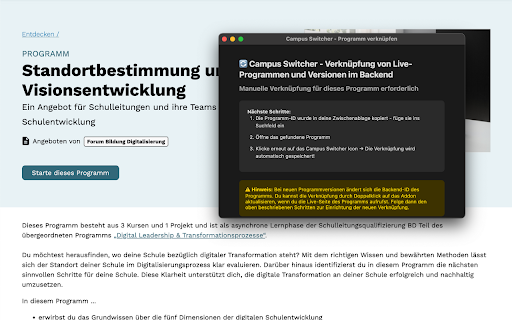
Programme benötigen eine einmalige manuelle Verknüpfung, da sie unterschiedliche IDs in Live und Backend haben:

* Besuchen Sie die Live-Programm-Seite
* Klicken Sie auf das Campus Switcher Icon
* Die Programm-ID wird automatisch kopiert
* Suchen Sie das Programm im Backend mit der kopierten ID
* Öffnen Sie das Programm
* Klicken Sie erneut auf das Icon - die Verknüpfung wird gespeichert!

Hinweis: Bei neuen Programmversionen müssen Sie die Verknüpfung aktualisieren. Doppelklicken Sie dazu auf das Icon, während Sie auf der Live-Programm-Seite sind.


**Fehlerbehebung**

* „Kein Kontext verfügbar": Diese Meldung erscheint, wenn Sie versuchen, vom Backend zu einer Campus-Seite zu wechseln, aber das Add-on nicht weiß, von welcher Domain Sie kommen. Besuchen Sie zuerst eine Campus-Seite.
* Programm-Verknüpfung funktioniert nicht: Stellen Sie sicher, dass Sie die Schritte in der richtigen Reihenfolge ausführen und dass Sie das richtige Programm im Backend geöffnet haben.

Viel Spaß!

ENGLISH VERSION:

**Campus Switcher - Help & Documentation**


Campus Switcher is a Firefox add-on that allows you to quickly switch between Kiron Campus pages and the Kiron backend. With a single click, you can navigate from a live page to the corresponding editing page in the backend and vice versa.

**Main features**

* Bidirectional navigation: Switch from campus to backend and back again
* Multi-client support: Works with all Kiron Campus installations
* Intelligent context detection: Remembers where you came from
* Program links: Stores mappings between live and backend IDs

**Supported page types**

* Courses: /course/{id}
* Units (courses in program context): /certificate-program/{id}/unit/{id}
* Lessons: /course/{id}/lesson/{id}
* Programs: /certificate-program/{id}

**Settings**

Customize Campus Switcher to suit your needs:

* Language: German or English
* Tab behavior: Open links in the same or a new tab
* Program notes: Show or hide instructions for program links

**Basic navigation**

Simply click on the Campus Switcher icon in your toolbar while you are on a supported page:
Example - Course: https://campus.kiron.ngo/course/123 → https://internal.kiron.ngo/backend/kiron/curriculum/courses/update/123

**Linking programs**

Programs require a one-time manual link because they have different IDs in Live and Backend:

* Visit the Live program page
* Click on the Campus Switcher icon
* The program ID will be copied automatically
* Search for the program in the backend using the copied ID
* Open the program
* Click on the icon again—the link will be saved!

Note: You will need to update the link for new program versions. To do this, double-click on the icon while you are on the Live Program page.

**Troubleshooting**

* “No context available”: This message appears when you try to switch from the backend to a campus page, but the add-on does not know which domain you are coming from. Visit a campus page first.
* Program link not working: Make sure you follow the steps in the correct order and that you have the correct program open in the backend.

Enjoy!
Technical
- Version
- 1.0.0
- Manifest
- V3
- Size
- 33.62KiB
- Min Chrome
- 88
- Languages
- 2
- Featured
- No
Metadata
- ID
- hnkoelpagcmogphleghbdcbapaofjjkl
- Developer ID
- u5d61d74fe30ea54ef3abdc566e130f48
- Developer Email
- [email protected]
- Created
- Aug 1, 2025
- Last Updated (Store)
- Sep 10, 2025
- Last Scraped
- Jun 9, 2026
- Website
- —
- Support URL
- —
- Privacy Policy
- —
Similar extensions
Alternatives to Campus Switcher for Kiron, ranked by description similarity.

GTM & CMP Helper
Reset consent state for 60+ CMPs and / or inject GTM container, push dataLayer events, or execute JS on selected pages.
1.0K
★ 4.4

TYPO3 - ENV Switcher
Streamline your TYPO3 workflow. Hyperjump to different environments of a TYPO3 site. Get the UID of the current page.
6

AEM Chrome Extension - SourcedCode
AEM Chrome Extension for AEM Content Authors, Developers, and CMS Admins for the AEM platform, all versions of AEM + AEMaaaCS.
3.0K
★ 5.0

The Switcher[Change Domains]
Partially replace the URL of the currently open web page and open it in another tab. Please use it for switching domains. etc...
1.0K
★ 4.3

CopyAndPaste Extension
Quickly paste text content to your paste service and get shareable URLs
10

JSON-LD Tester
JSON LD Test and Viewer
8.0K
★ 4.9

URL Checker Navigator
Navigate through website URLs one by one for testing. Check if all pages work properly with customizable timing intervals.
7
★ 5.0

SEOMURAI SEO Extension
Professionelle SEO-Analyse mit Dashboard, Tech SEO Validierung, Content-Check, Link-Analyse, Schema-Prüfung und KI-Tools.
226
★ 5.0
Data sourced from the Chrome Web Store · last verified Jun 9, 2026.