
Nirikshak — XPath & Locator Recorder
Click-to-capture XPath, CSS, Playwright & Selenium locators. Export to CSV, JSON, Excel or .spec.ts per website & flow.
As of June 2026, Nirikshak — XPath & Locator Recorder has — users in the Developer Tools category.
Usersno change0%
—
—
Ratingno change0%
—
— reviews
Reviewsno change0%
—
Version
2.0.0
Manifest V3
History
1 snapshotsTracking since Jun 7, 2026.
Not enough history yet for this metric — the chart fills in as we collect more snapshots.
View as table
| Date | Users | Rating | Reviews | Version |
|---|---|---|---|---|
| Jun 7, 2026 | — | — | — | 2.0.0 |
| Now | — | — | — | 2.0.0 |
Permissions & access
- Permissions
- contextMenusstorageactiveTabtabsscriptingsidePanel
- Host access
- <all_urls>
Screenshots


About
Recorder Xpath is a click-to-capture locator recorder built for QA engineers, SDETs, and developers who need stable XPath, CSS, Playwright, and Selenium selectors without hand-writing them.

Just click an element on any page — the extension captures it, generates multiple resilient locator strategies, and organizes everything by website and flow so you can export ready-to-use test code in seconds.

— WHAT YOU CAN DO —

• Click-to-record locators
  Start a recording, click any element on any site, and capture it instantly. The recorder runs inside every frame, including iframes.

• Multi-strategy locator generation
  Every captured element ships with multiple alternatives — accessible name & role, data-testid / data-qa, aria-label, associated label, semantic attributes, scoped CSS, and XPath — ranked for stability so brittle index-based selectors are avoided where possible.

• Organize by website and flow
  Captures are auto-grouped by domain. Inside each domain you can create named flows (e.g. "Login", "Add to Cart", "Checkout") to keep test scenarios separate and exportable as cohesive specs.

• Live recording HUD
  A compact heads-up display shows recording state, elapsed timer, flow name, capture count, and a live list of the locators captured in the current session.

• Locator Finder
  Paste any XPath, CSS, or Playwright locator into the finder bar to test it against the current page — instantly see whether it resolves, how many matches it has, and what it points to.

• Export to the format your team uses
  - Playwright .spec.ts files
  - Selenium scripts
  - CSV
  - JSON
  - Excel (XLSX)
  Download locally, or push directly to a Nirikshak Dashboard if your team uses one.

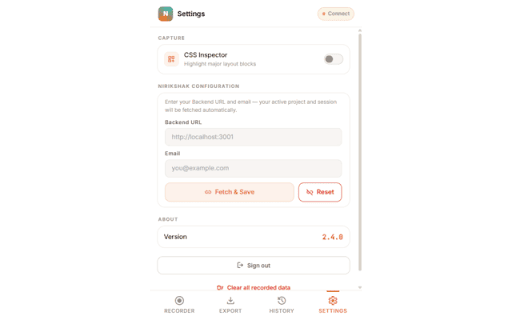
• CSS Inspector
  Toggle a layout overlay that highlights major page blocks — handy for understanding structure before you start clicking.

• History & search
  Browse every site you've ever recorded on, filter by recent, search by domain or flow, and bulk-delete what you no longer need.

• Local-first storage
  Everything is stored in your browser's local storage by default. No account required to record and export. Optional dashboard sync is opt-in and configured per user.

— WHO IT'S FOR —

• QA engineers writing Playwright, Selenium, or Cypress tests
• SDETs maintaining locator catalogs across many sites
• Developers debugging brittle selectors
• Test automation architects designing locator strategies
• Anyone tired of opening DevTools and hand-crafting XPath

— WHY USERS PICK STABLE LOCATORS WITH THIS —

The recorder prioritizes locators in this order:
  1. Stable IDs
  2. data-testid / data-qa attributes
  3. ARIA roles + accessible names
  4. aria-label / associated label
  5. Semantic attributes (placeholder, name, type)
  6. Scoped CSS
  7. Structural XPath (last resort)

Dynamic IDs, generated class names, and nth-child index selectors are deprioritized so your tests survive UI refactors.

— PRIVACY —

• All locator data is stored locally in your browser using chrome.storage.local.
• No telemetry, no tracking, no third-party analytics.
• Optional dashboard sync only sends data when you explicitly upload or configure a backend URL in Settings.

— PERMISSIONS, EXPLAINED —

• activeTab + tabs — read the current tab's URL so captures are grouped under the correct domain.
• scripting + <all_urls> — inject the click-capture script into the page you're recording on.
• storage — save your captured locators, flows, and settings locally.
• contextMenus — provide right-click menu entries for the extension.

— GETTING STARTED —

1. Pin the extension to your toolbar.
2. Open the site you want to record on.
3. Click the extension icon, pick or create a flow, and hit "Start Recording".
4. Click elements on the page. Each capture appears live in the HUD.
5. Stop the recording, switch to the Export tab, choose a format, and download — or send to your Nirikshak Dashboard.

— SUPPORT & FEEDBACK —

Found a bug or have a feature request? Use the support link on this listing — we read every message.
Technical
- Version
- 2.0.0
- Manifest
- V3
- Size
- 322KiB
- Min Chrome
- 114
- Languages
- 1
- Featured
- No
Metadata
- ID
- hngfijhkdpicnobbpgegjmghbjghdmeh
- Developer ID
- ucca1393388ec9cf625fb5c0a24601f1f
- Developer Email
- [email protected]
- Created
- Jun 6, 2026
- Last Updated (Store)
- Jun 6, 2026
- Last Scraped
- Jun 7, 2026
- Website
- —
- Support URL
- —
Data sourced from the Chrome Web Store · last verified Jun 7, 2026.