
SEO SERP Checker
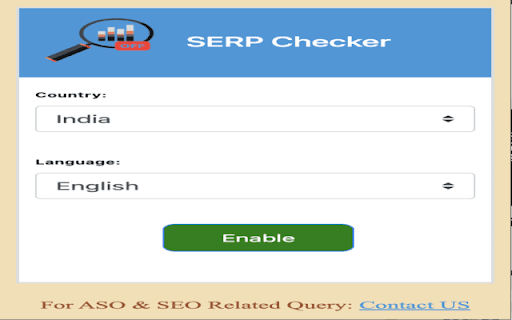
SERP Checker will change location according to country and language
As of June 2026, SEO SERP Checker has 207 users and a 5.00/5 rating from 48 reviews in the Developer Tools category.
Usersup 17.6 percent+17.6%
207
207
Ratingno change0%
5.00
48 reviews
Reviewsno change0%
48
Version
1.3.0
Manifest V3
90-day change · In the last 90 days this extension changed permissions.
History
4 snapshotsTracking since Apr 20, 2026.
View as table
| Date | Users | Rating | Reviews | Version |
|---|---|---|---|---|
| Apr 20, 2026 | 176 | 5.00 | 48 | 1.3.0 |
| May 5, 2026 | 172 | 5.00 | 48 | 1.3.0 |
| May 15, 2026 | 189 | 5.00 | 48 | 1.3.0 |
| Jun 9, 2026 | — | — | — | — |
| Now | 207 | 5.00 | 48 | 1.3.0 |
Changelog
- Jun 9, 2026description
(empty)
𝗦𝗘𝗥𝗣 𝗖𝗼𝘂𝗻𝘁𝗲𝗿: 𝗘𝗻𝗵𝗮𝗻𝗰𝗲 𝗬𝗼𝘂𝗿 𝗚𝗼𝗼𝗴𝗹𝗲 𝗦𝗲𝗮𝗿𝗰𝗵 𝗘𝘅𝗽𝗲𝗿𝗶𝗲𝗻𝗰𝗲 🚀

The 𝗦𝗘𝗥𝗣 𝗖𝗼𝘂𝗻𝘁𝗲𝗿 𝗖𝗵𝗿𝗼𝗺𝗲 𝗘𝘅𝘁𝗲𝗻𝘀𝗶𝗼𝗻 is a powerful serp tracker designed to optimize your Google search experience. By adding numbered counters to search results and highlighting domains, it doubles as a serp rank checker and productivity booster. Whether you’re into seo serp tracking or just want a cleaner Google experience, this extension helps you analyze SERPs with ease. 🔍

𝗞𝗲𝘆 𝗙𝗲𝗮𝘁𝘂𝗿𝗲𝘀 🔑

𝗦𝗘𝗥𝗣 𝗛𝗶𝗴𝗵𝗹𝗶𝗴𝗵𝘁𝗶𝗻𝗴: Highlight specific domains in search results. Just type a domain, press Enter, and the extension adds a customizable counter to each matching result.

𝗤𝘂𝗶𝗰𝗸 𝗡𝗮𝘃𝗶𝗴𝗮𝘁𝗶𝗼𝗻: Use the Ctrl+Shift+H hotkey to cycle through highlighted results for faster access.

𝗖𝘂𝘀𝘁𝗼𝗺𝗶𝘇𝗮𝗯𝗹𝗲 𝗖𝗼𝗹𝗼𝗿𝘀: Personalize your counters with different colors to improve visibility and user experience.

𝗕𝗲𝗻𝗲𝗳𝗶𝘁𝘀 🎯

𝗕𝗼𝗼𝘀𝘁 𝗣𝗿𝗼𝗱𝘂𝗰𝘁𝗶𝘃𝗶𝘁𝘆: Save time by spotting the most relevant results instantly.

𝗕𝗲𝘁𝘁𝗲𝗿 𝗩𝗶𝘀𝗶𝗯𝗶𝗹𝗶𝘁𝘆: Monitor and locate domains easily in SERPs with a built-in serp rank tracker.

𝗘𝗳𝗳𝗶𝗰𝗶𝗲𝗻𝗰𝘆: Navigate highlighted results quickly using keyboard shortcuts.

𝗣𝗲𝗿𝘀𝗼𝗻𝗮𝗹𝗶𝘇𝗲𝗱 𝗦𝗲𝗮𝗿𝗰𝗵: Adjust counter colors for a tailored search view.

𝗨𝘀𝗲 𝗖𝗮𝘀𝗲𝘀 💼

𝗦𝗘𝗢 𝗣𝗿𝗼𝗳𝗲𝘀𝘀𝗶𝗼𝗻𝗮𝗹𝘀: Perfect for seo serp tracking—monitor client rankings and analyze domain positions in real-time.

𝗥𝗲𝘀𝗲𝗮𝗿𝗰𝗵𝗲𝗿𝘀: Quickly identify the most relevant sources in Google results.

𝗢𝗻𝗹𝗶𝗻𝗲 𝗦𝗵𝗼𝗽𝗽𝗲𝗿𝘀: Highlight favorite brands to find deals instantly.

𝗚𝗲𝗻𝗲𝗿𝗮𝗹 𝗨𝘀𝗲𝗿𝘀: Improve your overall Google experience with faster navigation.

𝗛𝗼𝘄 𝘁𝗼 𝗨𝘀𝗲 𝗦𝗘𝗥𝗣 𝗖𝗼𝘂𝗻𝘁𝗲𝗿 🛠️

1️⃣ 𝗜𝗻𝘀𝘁𝗮𝗹𝗹 𝘁𝗵𝗲 𝗘𝘅𝘁𝗲𝗻𝘀𝗶𝗼𝗻:: Add the SERP Counter Chrome Extension to your browser.
2️⃣ 𝗛𝗶𝗴𝗵𝗹𝗶𝗴𝗵𝘁 𝗗𝗼𝗺𝗮𝗶𝗻𝘀: Enter a domain in Google search; the extension adds counters to results.
3️⃣ 𝗡𝗮𝘃𝗶𝗴𝗮𝘁𝗲 𝗘𝗮𝘀𝗶𝗹𝘆: Use Ctrl+Shift+H to jump between highlighted results.
4️⃣ 𝗖𝘂𝘀𝘁𝗼𝗺𝗶𝘇𝗲: Choose your preferred counter color for a unique search setup.

Install the SERP Counter – the ultimate serp rank checker and serp tracker – and take your Google search to the next level! 🚀
- Jun 9, 2026short_description
(empty)
SERP Checker will change location according to country and language
- Jun 9, 2026name
Unknown
SEO SERP Checker
- Jun 9, 2026category
(empty)
productivity/developer
- Jun 9, 2026host_permissions
(empty)
https://www.google.ad/*, https://www.google.ae/*, https://www.google.al/*, https://www.google.am/*, https://www.google.as/*, https://www.google.at/*, https://www.google.az/*, https://www.google.ba/*, https://www.google.be/*, https://www.google.bf/*, https://www.google.bg/*, https://www.google.bi/*, https://www.google.bj/*, https://www.google.bs/*, https://www.google.bt/*, https://www.google.by/*, https://www.google.ca/*, https://www.google.cg/*, https://www.google.cf/*, https://www.google.ch/*, https://www.google.ci/*, https://www.google.cl/*, https://www.google.cm/*, https://www.google.co.ao/*, https://www.google.co.bw/*, https://www.google.co.ck/*, https://www.google.co.cr/*, https://www.google.co.id/*, https://www.google.co.il/*, https://www.google.co.in/*, https://www.google.co.jp/*, https://www.google.co.ke/*, https://www.google.co.kr/*, https://www.google.co.ls/*, https://www.google.co.ma/*, https://www.google.co.mz/*, https://www.google.co.nz/*, https://www.google.co.th/*, https://www.google.co.tz/*, https://www.google.co.ug/*, https://www.google.co.uk/*, https://www.google.co.uz/*, https://www.google.co.ve/*, https://www.google.co.vi/*, https://www.google.co.za/*, https://www.google.co.zm/*, https://www.google.co.zw/*, https://www.google.com/*, https://www.google.com.af/*, https://www.google.com.ag/*, https://www.google.com.ai/*, https://www.google.com.ar/*, https://www.google.com.au/*, https://www.google.com.bd/*, https://www.google.com.bh/*, https://www.google.com.bn/*, https://www.google.com.bo/*, https://www.google.com.br/*, https://www.google.com.bz/*, https://www.google.com.co/*, https://www.google.com.cu/*, https://www.google.com.cy/*, https://www.google.com.do/*, https://www.google.com.ec/*, https://www.google.com.eg/*, https://www.google.com.et/*, https://www.google.com.fj/*, https://www.google.com.gh/*, https://www.google.com.gi/*, https://www.google.com.gt/*, https://www.google.com.hk/*, https://www.google.com.jm/*, https://www.google.com.kh/*, https://www.google.com.kw/*, https://www.google.com.lb/*, https://www.google.com.ly/*, https://www.google.com.mm/*, https://www.google.com.mt/*, https://www.google.com.mx/*, https://www.google.com.my/*, https://www.google.com.na/*, https://www.google.com.ng/*, https://www.google.com.ni/*, https://www.google.com.np/*, https://www.google.com.om/*, https://www.google.com.pa/*, https://www.google.com.pe/*, https://www.google.com.pg/*, https://www.google.com.ph/*, https://www.google.com.pk/*, https://www.google.com.pr/*, https://www.google.com.py/*, https://www.google.com.qa/*, https://www.google.com.sa/*, https://www.google.com.sb/*, https://www.google.com.sg/*, https://www.google.com.sl/*, https://www.google.com.sv/*, https://www.google.com.tj/*, https://www.google.com.tr/*, https://www.google.com.tw/*, https://www.google.com.ua/*, https://www.google.com.uy/*, https://www.google.com.vc/*, https://www.google.com.vn/*, https://www.google.cv/*, https://www.google.cz/*, https://www.google.de/*, https://www.google.dj/*, https://www.google.dk/*, https://www.google.dm/*, https://www.google.dz/*, https://www.google.ee/*, https://www.google.es/*, https://www.google.fi/*, https://www.google.fm/*, https://www.google.fr/*, https://www.google.ga/*, https://www.google.ge/*, https://www.google.gl/*, https://www.google.gm/*, https://www.google.gp/*, https://www.google.gr/*, https://www.google.gy/*, https://www.google.hn/*, https://www.google.hr/*, https://www.google.ht/*, https://www.google.hu/*, https://www.google.ie/*, https://www.google.iq/*, https://www.google.is/*, https://www.google.it/*, https://www.google.jo/*, https://www.google.kg/*, https://www.google.ki/*, https://www.google.kz/*, https://www.google.la/*, https://www.google.li/*, https://www.google.lk/*, https://www.google.lt/*, https://www.google.lu/*, https://www.google.lv/*, https://www.google.md/*, https://www.google.mg/*, https://www.google.mk/*, https://www.google.ml/*, https://www.google.mn/*, https://www.google.ms/*, https://www.google.mu/*, https://www.google.mv/*, https://www.google.mw/*, https://www.google.ne/*, https://www.google.nl/*, https://www.google.no/*, https://www.google.nr/*, https://www.google.nu/*, https://www.google.pl/*, https://www.google.ps/*, https://www.google.pt/*, https://www.google.ro/*, https://www.google.rs/*, https://www.google.ru/*, https://www.google.rw/*, https://www.google.sc/*, https://www.google.se/*, https://www.google.sh/*, https://www.google.si/*, https://www.google.sk/*, https://www.google.sm/*, https://www.google.sn/*, https://www.google.so/*, https://www.google.sr/*, https://www.google.td/*, https://www.google.tg/*, https://www.google.tk/*, https://www.google.tl/*, https://www.google.tm/*, https://www.google.tn/*, https://www.google.to/*, https://www.google.tt/*, https://www.google.vg/*, https://www.google.vu/*, https://www.google.ws/*, https://www.google.cat/*, https://www.google.pn/*, https://www.google.cn/*, https://www.google.me/*, https://www.google.je/*, https://www.google.cd/*, https://www.google.gg/*, https://www.google.st/*, https://www.google.im/*
- Jun 9, 2026permissions
(empty)
storage, declarativeNetRequestWithHostAccess
- May 15, 2026description
𝗦𝗘𝗥𝗣 𝗖𝗼𝘂𝗻𝘁𝗲𝗿: 𝗘𝗻𝗵𝗮𝗻𝗰𝗲 𝗬𝗼𝘂𝗿 𝗚𝗼𝗼𝗴𝗹𝗲 𝗦𝗲𝗮𝗿𝗰𝗵 𝗘𝘅𝗽𝗲𝗿𝗶𝗲𝗻𝗰𝗲 🚀

The 𝗦𝗘𝗥𝗣 𝗖𝗼𝘂𝗻𝘁𝗲𝗿 𝗖𝗵𝗿𝗼𝗺𝗲 𝗘𝘅𝘁𝗲𝗻𝘀𝗶𝗼𝗻 is a powerful serp tracker designed to optimize your Google search experience. By adding numbered counters to search results and highlighting domains, it doubles as a serp rank checker and productivity booster. Whether you’re into seo serp tracking or just want a cleaner Google experience, this extension helps you analyze SERPs with ease. 🔍

𝗞𝗲𝘆 𝗙𝗲𝗮𝘁𝘂𝗿𝗲𝘀 🔑

𝗦𝗘𝗥𝗣 𝗛𝗶𝗴𝗵𝗹𝗶𝗴𝗵𝘁𝗶𝗻𝗴: Highlight specific domains in search results. Just type a domain, press Enter, and the extension adds a customizable counter to each matching result.

𝗤𝘂𝗶𝗰𝗸 𝗡𝗮𝘃𝗶𝗴𝗮𝘁𝗶𝗼𝗻: Use the Ctrl+Shift+H hotkey to cycle through highlighted results for faster access.

𝗖𝘂𝘀𝘁𝗼𝗺𝗶𝘇𝗮𝗯𝗹𝗲 𝗖𝗼𝗹𝗼𝗿𝘀: Personalize your counters with different colors to improve visibility and user experience.

𝗕𝗲𝗻𝗲𝗳𝗶𝘁𝘀 🎯

𝗕𝗼𝗼𝘀𝘁 𝗣𝗿𝗼𝗱𝘂𝗰𝘁𝗶𝘃𝗶𝘁𝘆: Save time by spotting the most relevant results instantly.

𝗕𝗲𝘁𝘁𝗲𝗿 𝗩𝗶𝘀𝗶𝗯𝗶𝗹𝗶𝘁𝘆: Monitor and locate domains easily in SERPs with a built-in serp rank tracker.

𝗘𝗳𝗳𝗶𝗰𝗶𝗲𝗻𝗰𝘆: Navigate highlighted results quickly using keyboard shortcuts.

𝗣𝗲𝗿𝘀𝗼𝗻𝗮𝗹𝗶𝘇𝗲𝗱 𝗦𝗲𝗮𝗿𝗰𝗵: Adjust counter colors for a tailored search view.

𝗨𝘀𝗲 𝗖𝗮𝘀𝗲𝘀 💼

𝗦𝗘𝗢 𝗣𝗿𝗼𝗳𝗲𝘀𝘀𝗶𝗼𝗻𝗮𝗹𝘀: Perfect for seo serp tracking—monitor client rankings and analyze domain positions in real-time.

𝗥𝗲𝘀𝗲𝗮𝗿𝗰𝗵𝗲𝗿𝘀: Quickly identify the most relevant sources in Google results.

𝗢𝗻𝗹𝗶𝗻𝗲 𝗦𝗵𝗼𝗽𝗽𝗲𝗿𝘀: Highlight favorite brands to find deals instantly.

𝗚𝗲𝗻𝗲𝗿𝗮𝗹 𝗨𝘀𝗲𝗿𝘀: Improve your overall Google experience with faster navigation.

𝗛𝗼𝘄 𝘁𝗼 𝗨𝘀𝗲 𝗦𝗘𝗥𝗣 𝗖𝗼𝘂𝗻𝘁𝗲𝗿 🛠️

1️⃣ 𝗜𝗻𝘀𝘁𝗮𝗹𝗹 𝘁𝗵𝗲 𝗘𝘅𝘁𝗲𝗻𝘀𝗶𝗼𝗻:: Add the SERP Counter Chrome Extension to your browser.
2️⃣ 𝗛𝗶𝗴𝗵𝗹𝗶𝗴𝗵𝘁 𝗗𝗼𝗺𝗮𝗶𝗻𝘀: Enter a domain in Google search; the extension adds counters to results.
3️⃣ 𝗡𝗮𝘃𝗶𝗴𝗮𝘁𝗲 𝗘𝗮𝘀𝗶𝗹𝘆: Use Ctrl+Shift+H to jump between highlighted results.
4️⃣ 𝗖𝘂𝘀𝘁𝗼𝗺𝗶𝘇𝗲: Choose your preferred counter color for a unique search setup.

Install the SERP Counter – the ultimate serp rank checker and serp tracker – and take your Google search to the next level! 🚀
(empty)
- May 15, 2026short_description
SERP Checker will change location according to country and language
(empty)
- May 15, 2026name
SEO SERP Checker
Unknown
- May 15, 2026category
productivity/developer
(empty)
- May 15, 2026host_permissions
https://www.google.ad/*, https://www.google.ae/*, https://www.google.al/*, https://www.google.am/*, https://www.google.as/*, https://www.google.at/*, https://www.google.az/*, https://www.google.ba/*, https://www.google.be/*, https://www.google.bf/*, https://www.google.bg/*, https://www.google.bi/*, https://www.google.bj/*, https://www.google.bs/*, https://www.google.bt/*, https://www.google.by/*, https://www.google.ca/*, https://www.google.cg/*, https://www.google.cf/*, https://www.google.ch/*, https://www.google.ci/*, https://www.google.cl/*, https://www.google.cm/*, https://www.google.co.ao/*, https://www.google.co.bw/*, https://www.google.co.ck/*, https://www.google.co.cr/*, https://www.google.co.id/*, https://www.google.co.il/*, https://www.google.co.in/*, https://www.google.co.jp/*, https://www.google.co.ke/*, https://www.google.co.kr/*, https://www.google.co.ls/*, https://www.google.co.ma/*, https://www.google.co.mz/*, https://www.google.co.nz/*, https://www.google.co.th/*, https://www.google.co.tz/*, https://www.google.co.ug/*, https://www.google.co.uk/*, https://www.google.co.uz/*, https://www.google.co.ve/*, https://www.google.co.vi/*, https://www.google.co.za/*, https://www.google.co.zm/*, https://www.google.co.zw/*, https://www.google.com/*, https://www.google.com.af/*, https://www.google.com.ag/*, https://www.google.com.ai/*, https://www.google.com.ar/*, https://www.google.com.au/*, https://www.google.com.bd/*, https://www.google.com.bh/*, https://www.google.com.bn/*, https://www.google.com.bo/*, https://www.google.com.br/*, https://www.google.com.bz/*, https://www.google.com.co/*, https://www.google.com.cu/*, https://www.google.com.cy/*, https://www.google.com.do/*, https://www.google.com.ec/*, https://www.google.com.eg/*, https://www.google.com.et/*, https://www.google.com.fj/*, https://www.google.com.gh/*, https://www.google.com.gi/*, https://www.google.com.gt/*, https://www.google.com.hk/*, https://www.google.com.jm/*, https://www.google.com.kh/*, https://www.google.com.kw/*, https://www.google.com.lb/*, https://www.google.com.ly/*, https://www.google.com.mm/*, https://www.google.com.mt/*, https://www.google.com.mx/*, https://www.google.com.my/*, https://www.google.com.na/*, https://www.google.com.ng/*, https://www.google.com.ni/*, https://www.google.com.np/*, https://www.google.com.om/*, https://www.google.com.pa/*, https://www.google.com.pe/*, https://www.google.com.pg/*, https://www.google.com.ph/*, https://www.google.com.pk/*, https://www.google.com.pr/*, https://www.google.com.py/*, https://www.google.com.qa/*, https://www.google.com.sa/*, https://www.google.com.sb/*, https://www.google.com.sg/*, https://www.google.com.sl/*, https://www.google.com.sv/*, https://www.google.com.tj/*, https://www.google.com.tr/*, https://www.google.com.tw/*, https://www.google.com.ua/*, https://www.google.com.uy/*, https://www.google.com.vc/*, https://www.google.com.vn/*, https://www.google.cv/*, https://www.google.cz/*, https://www.google.de/*, https://www.google.dj/*, https://www.google.dk/*, https://www.google.dm/*, https://www.google.dz/*, https://www.google.ee/*, https://www.google.es/*, https://www.google.fi/*, https://www.google.fm/*, https://www.google.fr/*, https://www.google.ga/*, https://www.google.ge/*, https://www.google.gl/*, https://www.google.gm/*, https://www.google.gp/*, https://www.google.gr/*, https://www.google.gy/*, https://www.google.hn/*, https://www.google.hr/*, https://www.google.ht/*, https://www.google.hu/*, https://www.google.ie/*, https://www.google.iq/*, https://www.google.is/*, https://www.google.it/*, https://www.google.jo/*, https://www.google.kg/*, https://www.google.ki/*, https://www.google.kz/*, https://www.google.la/*, https://www.google.li/*, https://www.google.lk/*, https://www.google.lt/*, https://www.google.lu/*, https://www.google.lv/*, https://www.google.md/*, https://www.google.mg/*, https://www.google.mk/*, https://www.google.ml/*, https://www.google.mn/*, https://www.google.ms/*, https://www.google.mu/*, https://www.google.mv/*, https://www.google.mw/*, https://www.google.ne/*, https://www.google.nl/*, https://www.google.no/*, https://www.google.nr/*, https://www.google.nu/*, https://www.google.pl/*, https://www.google.ps/*, https://www.google.pt/*, https://www.google.ro/*, https://www.google.rs/*, https://www.google.ru/*, https://www.google.rw/*, https://www.google.sc/*, https://www.google.se/*, https://www.google.sh/*, https://www.google.si/*, https://www.google.sk/*, https://www.google.sm/*, https://www.google.sn/*, https://www.google.so/*, https://www.google.sr/*, https://www.google.td/*, https://www.google.tg/*, https://www.google.tk/*, https://www.google.tl/*, https://www.google.tm/*, https://www.google.tn/*, https://www.google.to/*, https://www.google.tt/*, https://www.google.vg/*, https://www.google.vu/*, https://www.google.ws/*, https://www.google.cat/*, https://www.google.pn/*, https://www.google.cn/*, https://www.google.me/*, https://www.google.je/*, https://www.google.cd/*, https://www.google.gg/*, https://www.google.st/*, https://www.google.im/*
(empty)
- May 15, 2026permissions
storage, declarativeNetRequestWithHostAccess
(empty)
Permissions & access
- Permissions
- storagedeclarativeNetRequestWithHostAccess
- Host access
- https://www.google.ad/*, https://www.google.ae/*, https://www.google.al/*, https://www.google.am/*, https://www.google.as/*, https://www.google.at/*, https://www.google.az/*, https://www.google.ba/*, https://www.google.be/*, https://www.google.bf/*, https://www.google.bg/*, https://www.google.bi/*, https://www.google.bj/*, https://www.google.bs/*, https://www.google.bt/*, https://www.google.by/*, https://www.google.ca/*, https://www.google.cg/*, https://www.google.cf/*, https://www.google.ch/*, https://www.google.ci/*, https://www.google.cl/*, https://www.google.cm/*, https://www.google.co.ao/*, https://www.google.co.bw/*, https://www.google.co.ck/*, https://www.google.co.cr/*, https://www.google.co.id/*, https://www.google.co.il/*, https://www.google.co.in/*, https://www.google.co.jp/*, https://www.google.co.ke/*, https://www.google.co.kr/*, https://www.google.co.ls/*, https://www.google.co.ma/*, https://www.google.co.mz/*, https://www.google.co.nz/*, https://www.google.co.th/*, https://www.google.co.tz/*, https://www.google.co.ug/*, https://www.google.co.uk/*, https://www.google.co.uz/*, https://www.google.co.ve/*, https://www.google.co.vi/*, https://www.google.co.za/*, https://www.google.co.zm/*, https://www.google.co.zw/*, https://www.google.com/*, https://www.google.com.af/*, https://www.google.com.ag/*, https://www.google.com.ai/*, https://www.google.com.ar/*, https://www.google.com.au/*, https://www.google.com.bd/*, https://www.google.com.bh/*, https://www.google.com.bn/*, https://www.google.com.bo/*, https://www.google.com.br/*, https://www.google.com.bz/*, https://www.google.com.co/*, https://www.google.com.cu/*, https://www.google.com.cy/*, https://www.google.com.do/*, https://www.google.com.ec/*, https://www.google.com.eg/*, https://www.google.com.et/*, https://www.google.com.fj/*, https://www.google.com.gh/*, https://www.google.com.gi/*, https://www.google.com.gt/*, https://www.google.com.hk/*, https://www.google.com.jm/*, https://www.google.com.kh/*, https://www.google.com.kw/*, https://www.google.com.lb/*, https://www.google.com.ly/*, https://www.google.com.mm/*, https://www.google.com.mt/*, https://www.google.com.mx/*, https://www.google.com.my/*, https://www.google.com.na/*, https://www.google.com.ng/*, https://www.google.com.ni/*, https://www.google.com.np/*, https://www.google.com.om/*, https://www.google.com.pa/*, https://www.google.com.pe/*, https://www.google.com.pg/*, https://www.google.com.ph/*, https://www.google.com.pk/*, https://www.google.com.pr/*, https://www.google.com.py/*, https://www.google.com.qa/*, https://www.google.com.sa/*, https://www.google.com.sb/*, https://www.google.com.sg/*, https://www.google.com.sl/*, https://www.google.com.sv/*, https://www.google.com.tj/*, https://www.google.com.tr/*, https://www.google.com.tw/*, https://www.google.com.ua/*, https://www.google.com.uy/*, https://www.google.com.vc/*, https://www.google.com.vn/*, https://www.google.cv/*, https://www.google.cz/*, https://www.google.de/*, https://www.google.dj/*, https://www.google.dk/*, https://www.google.dm/*, https://www.google.dz/*, https://www.google.ee/*, https://www.google.es/*, https://www.google.fi/*, https://www.google.fm/*, https://www.google.fr/*, https://www.google.ga/*, https://www.google.ge/*, https://www.google.gl/*, https://www.google.gm/*, https://www.google.gp/*, https://www.google.gr/*, https://www.google.gy/*, https://www.google.hn/*, https://www.google.hr/*, https://www.google.ht/*, https://www.google.hu/*, https://www.google.ie/*, https://www.google.iq/*, https://www.google.is/*, https://www.google.it/*, https://www.google.jo/*, https://www.google.kg/*, https://www.google.ki/*, https://www.google.kz/*, https://www.google.la/*, https://www.google.li/*, https://www.google.lk/*, https://www.google.lt/*, https://www.google.lu/*, https://www.google.lv/*, https://www.google.md/*, https://www.google.mg/*, https://www.google.mk/*, https://www.google.ml/*, https://www.google.mn/*, https://www.google.ms/*, https://www.google.mu/*, https://www.google.mv/*, https://www.google.mw/*, https://www.google.ne/*, https://www.google.nl/*, https://www.google.no/*, https://www.google.nr/*, https://www.google.nu/*, https://www.google.pl/*, https://www.google.ps/*, https://www.google.pt/*, https://www.google.ro/*, https://www.google.rs/*, https://www.google.ru/*, https://www.google.rw/*, https://www.google.sc/*, https://www.google.se/*, https://www.google.sh/*, https://www.google.si/*, https://www.google.sk/*, https://www.google.sm/*, https://www.google.sn/*, https://www.google.so/*, https://www.google.sr/*, https://www.google.td/*, https://www.google.tg/*, https://www.google.tk/*, https://www.google.tl/*, https://www.google.tm/*, https://www.google.tn/*, https://www.google.to/*, https://www.google.tt/*, https://www.google.vg/*, https://www.google.vu/*, https://www.google.ws/*, https://www.google.cat/*, https://www.google.pn/*, https://www.google.cn/*, https://www.google.me/*, https://www.google.je/*, https://www.google.cd/*, https://www.google.gg/*, https://www.google.st/*, https://www.google.im/*
Screenshots

About
𝗦𝗘𝗥𝗣 𝗖𝗼𝘂𝗻𝘁𝗲𝗿: 𝗘𝗻𝗵𝗮𝗻𝗰𝗲 𝗬𝗼𝘂𝗿 𝗚𝗼𝗼𝗴𝗹𝗲 𝗦𝗲𝗮𝗿𝗰𝗵 𝗘𝘅𝗽𝗲𝗿𝗶𝗲𝗻𝗰𝗲 🚀

The 𝗦𝗘𝗥𝗣 𝗖𝗼𝘂𝗻𝘁𝗲𝗿 𝗖𝗵𝗿𝗼𝗺𝗲 𝗘𝘅𝘁𝗲𝗻𝘀𝗶𝗼𝗻 is a powerful serp tracker designed to optimize your Google search experience. By adding numbered counters to search results and highlighting domains, it doubles as a serp rank checker and productivity booster. Whether you’re into seo serp tracking or just want a cleaner Google experience, this extension helps you analyze SERPs with ease. 🔍

𝗞𝗲𝘆 𝗙𝗲𝗮𝘁𝘂𝗿𝗲𝘀 🔑

𝗦𝗘𝗥𝗣 𝗛𝗶𝗴𝗵𝗹𝗶𝗴𝗵𝘁𝗶𝗻𝗴: Highlight specific domains in search results. Just type a domain, press Enter, and the extension adds a customizable counter to each matching result.

𝗤𝘂𝗶𝗰𝗸 𝗡𝗮𝘃𝗶𝗴𝗮𝘁𝗶𝗼𝗻: Use the Ctrl+Shift+H hotkey to cycle through highlighted results for faster access.

𝗖𝘂𝘀𝘁𝗼𝗺𝗶𝘇𝗮𝗯𝗹𝗲 𝗖𝗼𝗹𝗼𝗿𝘀: Personalize your counters with different colors to improve visibility and user experience.

𝗕𝗲𝗻𝗲𝗳𝗶𝘁𝘀 🎯

𝗕𝗼𝗼𝘀𝘁 𝗣𝗿𝗼𝗱𝘂𝗰𝘁𝗶𝘃𝗶𝘁𝘆: Save time by spotting the most relevant results instantly.

𝗕𝗲𝘁𝘁𝗲𝗿 𝗩𝗶𝘀𝗶𝗯𝗶𝗹𝗶𝘁𝘆: Monitor and locate domains easily in SERPs with a built-in serp rank tracker.

𝗘𝗳𝗳𝗶𝗰𝗶𝗲𝗻𝗰𝘆: Navigate highlighted results quickly using keyboard shortcuts.

𝗣𝗲𝗿𝘀𝗼𝗻𝗮𝗹𝗶𝘇𝗲𝗱 𝗦𝗲𝗮𝗿𝗰𝗵: Adjust counter colors for a tailored search view.

𝗨𝘀𝗲 𝗖𝗮𝘀𝗲𝘀 💼

𝗦𝗘𝗢 𝗣𝗿𝗼𝗳𝗲𝘀𝘀𝗶𝗼𝗻𝗮𝗹𝘀: Perfect for seo serp tracking—monitor client rankings and analyze domain positions in real-time.

𝗥𝗲𝘀𝗲𝗮𝗿𝗰𝗵𝗲𝗿𝘀: Quickly identify the most relevant sources in Google results.

𝗢𝗻𝗹𝗶𝗻𝗲 𝗦𝗵𝗼𝗽𝗽𝗲𝗿𝘀: Highlight favorite brands to find deals instantly.

𝗚𝗲𝗻𝗲𝗿𝗮𝗹 𝗨𝘀𝗲𝗿𝘀: Improve your overall Google experience with faster navigation.

𝗛𝗼𝘄 𝘁𝗼 𝗨𝘀𝗲 𝗦𝗘𝗥𝗣 𝗖𝗼𝘂𝗻𝘁𝗲𝗿 🛠️

1️⃣ 𝗜𝗻𝘀𝘁𝗮𝗹𝗹 𝘁𝗵𝗲 𝗘𝘅𝘁𝗲𝗻𝘀𝗶𝗼𝗻:: Add the SERP Counter Chrome Extension to your browser.
2️⃣ 𝗛𝗶𝗴𝗵𝗹𝗶𝗴𝗵𝘁 𝗗𝗼𝗺𝗮𝗶𝗻𝘀: Enter a domain in Google search; the extension adds counters to results.
3️⃣ 𝗡𝗮𝘃𝗶𝗴𝗮𝘁𝗲 𝗘𝗮𝘀𝗶𝗹𝘆: Use Ctrl+Shift+H to jump between highlighted results.
4️⃣ 𝗖𝘂𝘀𝘁𝗼𝗺𝗶𝘇𝗲: Choose your preferred counter color for a unique search setup.

Install the SERP Counter – the ultimate serp rank checker and serp tracker – and take your Google search to the next level! 🚀
Technical
- Version
- 1.3.0
- Manifest
- V3
- Size
- 333KiB
- Min Chrome
- 88
- Languages
- 1
- Featured
- No
Metadata
- ID
- hncphglplgedlblbagigfbcdckfnfocc
- Developer ID
- u97de76839bcd68fe94d417a5739f131d
- Developer Email
- [email protected]
- Created
- May 17, 2024
- Last Updated (Store)
- Sep 10, 2025
- Last Scraped
- Jun 9, 2026
- Website
- —
- Support URL
- —
- Privacy Policy
- https://www.multivariate.tech/privacy-policy
Similar extensions
Alternatives to SEO SERP Checker, ranked by description similarity.

Bring back Google search result counter and display indexed pages
This free Google Chrome extension brings back the number of results and indexed pages on Google SERP.
1.0K
★ 5.0

HundredRanks – Export Top 100 SERP into CSV
Export top 100 organic Google results to CSV & check domain rankings. Built for SEOs after Google num=100 deprecation.
1.0K
★ 5.0

SEO SERP History Tracker by Digital Forge
Tracks SERP rankings, highlights your domain, saves history, and shows charts. Local storage only.
6

SERP Analyzer
Analyze SERP positions, simulate geolocation, and extract SEO data (PAA, Suggest, Related) with built-in AI writing prompts.
619
★ 5.0

Site counter by title on the SERP 🔢
This extension adds a number in front of each Google search result and displays information about the site. 📔
15
★ 5.0

Easy SERP Preview
Instantly preview how your web pages appear in search results! Perfect for content creators, marketers, and SEO professionals.
32

SERP Title N-grams Extension
Analyze SERP results and extract accurate N-grams from organic meta titles, ignoring modifications by other extensions.
100
★ 5.0

MST SERP Counter - SEO Free SERP Checker Tool
SERP Counter gives accurate search result of searched keyword.We Can see position of result or rank
70.0K
★ 4.3
Data sourced from the Chrome Web Store · last verified Jun 9, 2026.