
Cheaty
Extention for the web that feels illegal
As of June 2026, Cheaty has 12 users in the Developer Tools category.
Usersdown 14.3 percent−14.3%
12
12
Ratingno change0%
—
— reviews
Reviewsno change0%
—
Version
1.0.1
Manifest V3
History
3 snapshotsTracking since Apr 23, 2026.
View as table
| Date | Users | Rating | Reviews | Version |
|---|---|---|---|---|
| Apr 23, 2026 | 14 | — | — | 1.0.1 |
| May 12, 2026 | 10 | — | — | 1.0.1 |
| Jun 7, 2026 | 13 | — | — | 1.0.1 |
| Now | 12 | — | — | 1.0.1 |
Permissions & access
- Permissions
- activeTabclipboardWritestorage
- Host access
- None declared
Screenshots
About
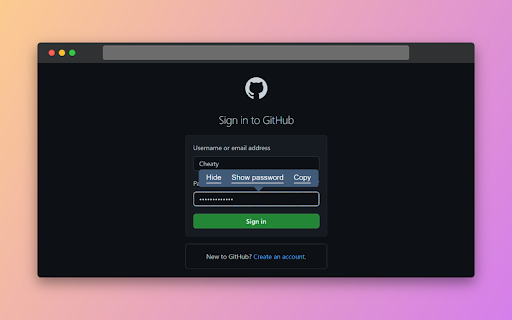
Cheaty is a simple open-source web extension that allows you to do quick actions on HTML components without going into the inspector console.

With Cheaty you can:

Hide or display an HTML component on the page.
Switch a text input between text and password type.
Copy the outer HTML of an HTML component.
Technical
- Version
- 1.0.1
- Manifest
- V3
- Size
- 26.74KiB
- Min Chrome
- 88
- Languages
- 1
- Featured
- Yes
Metadata
- ID
- hmnpfcbdneiomcedoanfmddlejilpieh
- Developer ID
- ube2167f2128b57254987f3b3a947c8f6
- Developer Email
- [email protected]
- Created
- Mar 28, 2023
- Last Updated (Store)
- May 3, 2023
- Last Scraped
- Jun 7, 2026
- Website
- nicolasrenault.com
- Privacy Policy
- —
Similar extensions
Alternatives to Cheaty, ranked by description similarity.

Html Css Online
With html css online, you can directly edit HTML, CSS and JavaScript... Editor left is code and right is preview
232
★ 3.5

Visual HTML
Shows element HTML code when you hover the cursor
14
★ 5.0

Editable HTML to clipboard
Copy or paste source HTML of editable fields to/from clipboard
20
★ 5.0

WebEdit
Edit web page elements freely
3

CSS Inspector
Inspect and copy CSS from any element on any webpage
34

HTML Viewer
Paste HTML and instantly preview it.
153
★ 4.8

Dev Inspector: HTML, CSS & Screenshot
Inspect elements, copy HTML/CSS, and take screenshots.
12

Focus: The Elements - DOM Inspector & Editor
DOM Inspector & Editor, inspect and edit HTML element styles directly on any page.
63
★ 5.0
Data sourced from the Chrome Web Store · last verified Jun 7, 2026.