
JSON Format Converter
Powerful JSON/JSONC/JSON5 editor and converter with syntax highlighting.
As of June 2026, JSON Format Converter has 45 users in the Developer Tools category.
Usersup 28.6 percent+28.6%
45
45
Ratingno change0%
—
— reviews
Reviewsno change0%
—
Version
0.1.2
Manifest V3
History
5 snapshotsTracking since Apr 20, 2026.
View as table
| Date | Users | Rating | Reviews | Version |
|---|---|---|---|---|
| Apr 20, 2026 | 35 | — | — | 0.1.2 |
| May 5, 2026 | 36 | — | — | 0.1.2 |
| May 15, 2026 | 39 | — | — | 0.1.2 |
| May 29, 2026 | 44 | — | — | 0.1.2 |
| Jun 9, 2026 | 48 | — | — | 0.1.2 |
| Now | 45 | — | — | 0.1.2 |
Permissions & access
- Permissions
- None declared
- Host access
- None declared
Screenshots
About
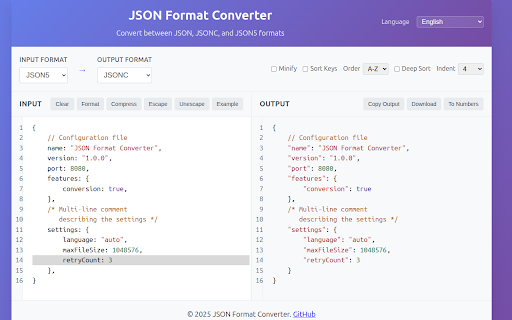
A powerful Chrome extension and standalone web application for converting between JSON, JSONC (JSON with Comments), and JSON5 formats with advanced editing features and comment preservation.

FEATURES

ADVANCED EDITOR
• Syntax highlighting with JSON support
• Line numbers for easy navigation and debugging
• Smart bracket matching and auto-closing
• Instant error detection and highlighting

SMART FORMAT CONVERSION
• JSON ↔ JSONC ↔ JSON5 bidirectional conversion
• Preserve comments when converting between JSONC and JSON5
• Same-format processing preserves all comments and formatting
• Automatic property name quoting/unquoting
• Real-time conversion as you type

PROCESSING TOOLS
• Format and prettify JSON data
• Compress/minify by removing unnecessary whitespace
• Escape/unescape JSON strings for embedding
• Convert numbers ↔ strings

ADVANCED SORTING
• Sort object keys alphabetically (A-Z or Z-A)
• Deep sorting for nested objects
• Preserve or reorganize data structure

FILE OPERATIONS
• Copy to clipboard with one click
• Download converted files
• Support for multiple file formats

CUSTOMIZABLE OPTIONS
• Adjustable indentation (2 spaces, 4 spaces, or tabs)
• Multiple sorting options
• Real-time preview of changes


Bug Reports: https://github.com/idev-sig/json-format-converter/issues
Technical
- Version
- 0.1.2
- Manifest
- V3
- Size
- 134KiB
- Min Chrome
- 88
- Languages
- 11
- Featured
- No
Metadata
- ID
- hmjkpcfhmideofmhbcejbpilnonoladc
- Developer ID
- u9a2d0454e89c9664939aded878a6f36e
- Developer Email
- [email protected]
- Created
- Aug 14, 2025
- Last Updated (Store)
- Aug 22, 2025
- Last Scraped
- Jun 9, 2026
- Website
- idev.top
- Privacy Policy
- https://i.jetsung.com/pages/chrome-privacy.html
Similar extensions
Alternatives to JSON Format Converter, ranked by description similarity.

JSON Viewer Pro Expand,Editor,Auto,Drag-Drop,Output Dump 2 json By PatilWeb
View, format, edit, expand/collapse, drag & drop, and export JSON with advanced features in Chrome.
25
★ 5.0

JSON Master Pro
Professional JSON formatter and converter with auto-formatting, syntax highlighting, and code generation.
2

JSON Formatter and Viewer
Instantly transform raw JSON into a beautifully structured and color-coded format.
307
★ 4.0

JSON Formatter
The most beautiful and customizable JSON / JSONP highlighter, makes JSON / JSONP easy to read. Open source.
49

JSON Format - Easy & Powerful Viewer
Lightweight JSON formatter for Chrome. Features include collapsible trees, history records, and side-by-side comparison.
39
★ 5.0

JSON Formatter
Formats JSON responses automatically with customizable themes and filter results using JSONPath expressions
23

JSON Formatter Pro
Auto-format and validate JSON & API responses instantly. Syntax highlighting, tree view, dark mode. Data never leaves your browser.
3.0K
★ 4.8

JSON Viewer
Most aesthetic & customizable JSON/JSONP viewer with themes, custom search, syntax highlighting/checking & copy features.
6.0K
★ 4.8
Data sourced from the Chrome Web Store · last verified Jun 9, 2026.