
manuXtractor
Preview and export AI response + citations from ChatGPT, Claude, and Google AIO/AI Mode.
As of June 2026, manuXtractor has 7 users in the Productivity category.
Usersdown 12.5 percent−12.5%
7
7
Ratingno change0%
—
— reviews
Reviewsno change0%
—
Version
2.1.0
Manifest V3
History
6 snapshotsTracking since Apr 1, 2026.
View as table
| Date | Users | Rating | Reviews | Version |
|---|---|---|---|---|
| Apr 1, 2026 | 8 | — | — | 2.1.0 |
| Apr 17, 2026 | 8 | — | — | 2.1.0 |
| Apr 24, 2026 | 7 | — | — | 2.1.0 |
| May 24, 2026 | 8 | — | — | 2.1.0 |
| May 31, 2026 | — | — | — | 2.1.0 |
| Jun 6, 2026 | 8 | — | — | 2.1.0 |
| Now | 7 | — | — | 2.1.0 |
Permissions & access
- Permissions
- activeTab
- Host access
- https://chatgpt.com/*, https://chat.openai.com/*, https://claude.ai/*, https://www.google.com/*, https://www.google.co.uk/*, https://www.google.ie/*, https://www.google.fr/*, https://www.google.de/*, https://www.google.it/*, https://www.google.es/*, https://www.google.nl/*, https://www.google.ca/*, https://www.google.com.au/*
Screenshots


About
manuXtractor helps you capture AI-generated answers from supported platforms and save them in a clean, usable format.

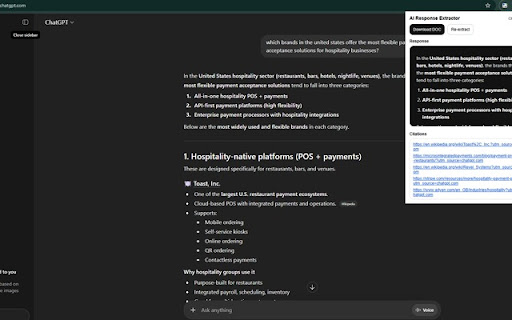
With one click, the extension extracts the latest visible AI response from the current page, shows a preview, gathers the associated citations or source links when available, and lets you copy the content or export it as a DOC file.

Supported platforms: ChatGPT, Claude, Google AI Overviews / AI Mode

Features:
- Extract the latest AI response from the active page
- Preview the response inside the extension popup
- Collect and list citations or source links when available
- Copy the response
- Copy citations separately
- Export the response and citations to a DOC file
- Re-extract content after page updates or navigation changes

How it works
The extension runs only on supported pages and reads the visible AI response currently open in your browser tab. It processes that content locally in the browser to display a preview and generate an exportable document.

Privacy
manuXtractor does not require account creation and does not provide remote cloud processing. It is designed to extract content from the page you are actively viewing so you can copy or export it for your own use.

Reviewer notes
This extension works only on supported AI pages (ChatGPT, Claude, and selected Google domains). It reads the visible AI response in the active tab, extracts the response text/HTML and available citation links, shows them in the popup, and allows the user to copy or export the result as a DOC file. It does not inject ads, alter search rankings, or automate user actions.
Technical
- Version
- 2.1.0
- Manifest
- V3
- Size
- 60.75KiB
- Min Chrome
- 88
- Languages
- 1
- Featured
- No
Metadata
- ID
- hmhjlfomgbahibligdihbdjpkaaehfbc
- Developer ID
- ubc9beaa75189ceb24f605018b69a3168
- Developer Email
- [email protected]
- Created
- Mar 15, 2026
- Last Updated (Store)
- Mar 27, 2026
- Last Scraped
- Jun 6, 2026
- Website
- —
- Support URL
- —
Data sourced from the Chrome Web Store · last verified Jun 6, 2026.