
SaveVid - Video Downloader
SaveVid is an Instagram downloader that helps you easily download your favorite photos or videos from Instagram to your device.
As of May 2026, SaveVid - Video Downloader has 230 users in the Productivity category.
Usersup 6.0 percent+6.0%
230
230
Ratingno change0%
—
— reviews
Reviewsno change0%
—
Version
1.1
Manifest V3
History
2 snapshotsTracking since Apr 25, 2026.
View as table
| Date | Users | Rating | Reviews | Version |
|---|---|---|---|---|
| Apr 25, 2026 | 217 | — | — | 1.1 |
| May 21, 2026 | 231 | — | — | 1.1 |
| Now | 230 | — | — | 1.1 |
Permissions & access
- Permissions
- storage
- Host access
- None declared
Screenshots


About
SaveIG is a revolutionary extension designed to enhance your Instagram experience by allowing you to effortlessly download Videos, Stories, Photos, Reels, and Profile Pictures with ease and speed.

Key Features of SaveIG:

👉 Video Downloader: Download Instagram videos in the highest quality available, up to an impressive 4K resolution.
👉 Photo Downloader: Easily save full-size photos from Instagram posts with just a few clicks.
👉 Stories Downloader: Effortlessly download Instagram Stories and Highlights to ensure you never miss a moment.
👉 Reels Downloader: Download Reels and IGTV videos for free, so your favorite content is always at your fingertips.
👉 Profile Downloader: Save Instagram profile pictures in high-definition quality.

How to Use SaveIG on Chrome Browser?

1. Open Chrome and Navigate to Instagram: Launch your Chrome browser and go to Instagram.com.
2. Select the Desired Content: Browse through Instagram and find the photo or video you wish to download.
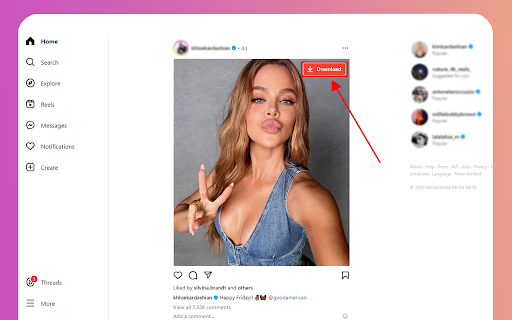
3. Download with Ease: Click the "Download" button located in the top right corner of the selected photo or video.
4. Save to Your Device: A new tab will open displaying the content ready for download. Save it directly to your device from this tab.

Important Note:

After installing the SaveIG extension, be sure to reload the Instagram tab where you wish to download content. This step is crucial for the extension to recognize and process the file correctly.

We highly value your feedback and suggestions to improve SaveIG’s performance. If you encounter any issues or have ideas for enhancement, please do not hesitate to contact us.

Experience the convenience and power of SaveIG today, and never miss out on your favorite Instagram content again!
Technical
- Version
- 1.1
- Manifest
- V3
- Size
- 76.77KiB
- Min Chrome
- 88
- Languages
- 52
- Featured
- No
Metadata
- ID
- hmbnldpjmodjpdhpdogbggihnicgcgkn
- Developer ID
- uc17e2997b76e7187be3e4dfefc7cba89
- Developer Email
- [email protected]
- Created
- Jun 12, 2024
- Last Updated (Store)
- Sep 20, 2024
- Last Scraped
- May 21, 2026
- Website
- savevid.net
- Support URL
- https://savevid.net/contact
- Privacy Policy
- https://savevid.net/privacy-policy
Similar extensions
Alternatives to SaveVid - Video Downloader, ranked by description similarity.

IGSave - Download Video Reels
IGSave is a beneficial download utility, it helps you download Instagram videos, Stories, Reels, quickly and conveniently
53
★ 3.5

SaveInta - Save Video & Photo
SaveInta is a powerful Instagram downloader that helps you download your favorite Instagram photos or videos to your device easily.
88

SaveGram - Media Downloader (Video & Photo)
SaveGram is an online Instagram downloader. Support Instagram users to easily save favorite photos and videos to their devices.
107

SaveFree - I.G Downloader (Video & Photo)
SaveFree is a free Instagram Downloader. Support Instagram users to save favorite photos and videos directly on the web browser.
589

SaveClip: I.G Downloader
SaveClip is a great Instagram Downloader that allows to save and download Video, Photo, Story, IG Reels, Highlights from Instagram.
996
★ 5.0

ClipDown - I.G Downloader
ClipDown is an Instagram downloader that allows you to download your favorite Instagram photos or videos to your device easily.
457

StorySaver - Story Downloader
StorySaver is a powerful Instagram downloader. It allows you to download your favorite Instagram photos, videos and stories easily.
1.0K
★ 4.5

I.G Downloader
I.G Downloader is a tool that helps you download Videos, Photos, Reels, Stories, Profile and audio from IG easily and quickly.
7.0K
★ 1.7
Data sourced from the Chrome Web Store · last verified May 21, 2026.