
KeyPress Live: Instant Keyboard Input Display
Real-Time Keyboard Input Display Extension for Every Webpage
As of May 2026, KeyPress Live: Instant Keyboard Input Display has 366 users and a 3.00/5 rating from 2 reviews in the Productivity category.
Usersdown 0.3 percent−0.3%
366
366
Ratingno change0%
3.00
2 reviews
Reviewsno change0%
2
Version
1.0
Manifest V3
History
2 snapshotsTracking since Apr 25, 2026.
View as table
| Date | Users | Rating | Reviews | Version |
|---|---|---|---|---|
| Apr 25, 2026 | 367 | 3.00 | 2 | 1.0 |
| May 21, 2026 | 368 | 3.00 | 2 | 1.0 |
| Now | 366 | 3.00 | 2 | 1.0 |
Permissions & access
- Permissions
- storage
- Host access
- None declared
Screenshots
About
🔲 Introduction
KeyPress Live is a powerful Google Chrome extension that allows you to display real-time keyboard inputs on any webpage you visit. Whether you're demonstrating steps, recording tutorials, or sharing your web browsing experience with others, this extension provides an intuitive way to showcase your keyboard inputs, ensuring that your audience can clearly follow your actions.

🔲Usage

🔘 Install the Extension: Go to the Chrome Web Store and install the "KeyPress Live" extension.

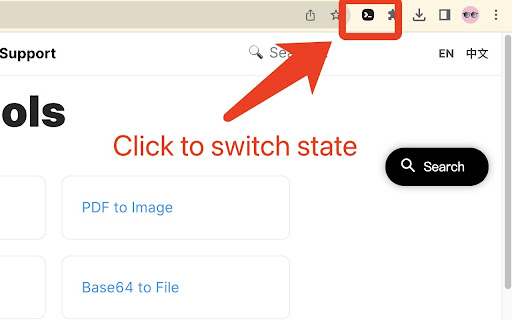
🔘 Enable the Extension: Once installed, you'll see the "KeyPress Live" icon in your browser's toolbar, that is, the activation is successful.

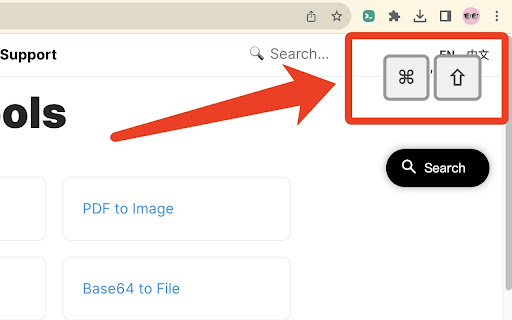
🔘 Real-Time Display: As you press keys on your keyboard while browsing any webpage, the pressed keys will be displayed in real-time as text in a corner or a designated location on the current webpage.

🔘 Customize Settings: [TODO supports me to speed up updates] The extension offers customization options to tailor the display according to your preferences. You can choose the size, color, and font style of the displayed keyboard inputs, as well as adjust the display position to avoid interference with your browsing experience.

🔘 Toggle Visibility: If you want to temporarily hide the displayed keyboard inputs, simply click the extension icon to toggle the display on and off.

🔘 End Usage: When you no longer need to show the keyboard inputs, click the "KeyPress Live" icon in the browser toolbar to disable the extension.

KeyPress Live aims to provide a simple yet effective way for you to share your keyboard actions with others, enhancing clarity and visualization in your demonstrations and tutorials, whether you're working, learning, or enjoying entertainment activities.
Technical
- Version
- 1.0
- Manifest
- V3
- Size
- 20.36KiB
- Min Chrome
- 88
- Languages
- 1
- Featured
- No
Metadata
- ID
- hlpoabpmfhmopgimggiaigipbeliancc
- Developer ID
- u7afdea4a70d79da3daaa9f5d6c6bfb28
- Developer Email
- [email protected]
- Created
- Sep 6, 2023
- Last Updated (Store)
- Sep 6, 2023
- Last Scraped
- May 21, 2026
- Website
- lwebapp.com
- Support URL
- https://lwebapp.com
Similar extensions
Alternatives to KeyPress Live: Instant Keyboard Input Display, ranked by description similarity.

LiveModify
LiveModify lets you draw, write, and highlight on any webpage. Annotate sites instantly without leaving your browser.
11
★ 5.0

Keyboard Link Navigation
Navigate links by typing. Use '/' to search links, Enter to visit, and '/' again to find the next match.
5

Screen Recorder & Screenshot - SnapRec
Screen recorder & full page screenshot tool. Record in 4K, annotate with blur/arrows/text, add webcam overlay, and share instantly.
217
★ 5.0

webkey
Visualizes keys as you press them, for screencast or presentation.
7
★ 5.0

SmartKey - Auto-Popup Keyboard
Touch-friendly virtual keyboard with auto-capitalize, voice input, cursor positioning, draggable UI, and 15 language layouts
130
★ 5.0

RecordPlus - Screen Recorder
Captures tabs, desktop, webcam, microphone, and system sound. Annotate with pencil tool and color picker.
97

Screen Recorder for Chrome
Use this Chrome extension to record your screen, window and download the video for later use.
18

GALTech Screen Recorder
Record your screen with or without voice audio, with annotation tools - by GALTech
12
★ 5.0
Data sourced from the Chrome Web Store · last verified May 21, 2026.