
Miito - TikTok like videos with captions for Google Meet
Embeds TikTok like videos with captions into Google Meet to help you focus.
As of June 2026, Miito - TikTok like videos with captions for Google Meet has 3 users and a 5.00/5 rating from 1 reviews in the Accessibility category.
Usersdown 25.0 percent−25.0%
3
3
Ratingno change0%
5.00
1 reviews
Reviewsno change0%
1
Version
1.2.2
Manifest V3
History
3 snapshotsTracking since Apr 4, 2026.
View as table
| Date | Users | Rating | Reviews | Version |
|---|---|---|---|---|
| Apr 4, 2026 | 4 | 5.00 | 1 | 1.2.2 |
| May 21, 2026 | 3 | 5.00 | 1 | 1.2.2 |
| Jun 8, 2026 | 4 | 5.00 | 1 | 1.2.2 |
| Now | 3 | 5.00 | 1 | 1.2.2 |
Permissions & access
- Permissions
- storage
- Host access
- None declared
Screenshots




About
Miito adds a floating visual overlay to your Google Meet interface.

This extension is designed to help users maintain focus during long meetings by displaying a pre-selected calming visual loop alongside real-time captions. It is helpful for users who benefit from visual stimulation to stay attentive (e.g., for neurodivergent users or visual stimming).

Features:
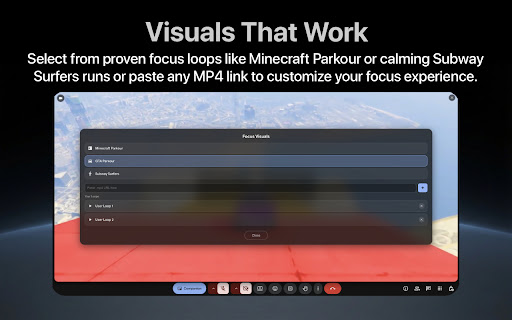
— Visual Focus Aid: Choose from a variety of built-in calming visuals (Minecraft/GTA 5 Parkour, Subway Surfers) or add your own custom MP4 loop to suit your preference.
— Smart Looping: Videos are always keeping the visual stimulation fresh and non-repetitive.
— Captions: Displays Google Meet captions inside the overlay so you don't miss the conversation while watching the visual.
— Fully Customizable: You can drag and resize the overlay to position it anywhere on your screen, and you can change the font size, color, and opacity of the window.

How to use:
1. Install the extension.
2. Join a Google Meet call.
3. The focus overlay will appear automatically.
4. Enable Closed Captions (CC) in Google Meet to activate the features.


To make the experience fully tailored to your needs, click the "Video" icon in the overlay to switch visuals or add your own, or click the "Text" icon in the overlay to customize the captions to your own preference.
Technical
- Version
- 1.2.2
- Manifest
- V3
- Size
- 1.9MiB
- Min Chrome
- 88
- Languages
- 1
- Featured
- No
Metadata
- ID
- hlnfebhmljcldnhepjeiodhmijahlhcc
- Developer ID
- u3fa67e6af689d906c40640c1707cfaea
- Developer Email
- [email protected]
- Created
- Dec 29, 2025
- Last Updated (Store)
- Jan 22, 2026
- Last Scraped
- Jun 8, 2026
- Website
- —
- Support URL
- —
- Privacy Policy
- —
Similar extensions
Alternatives to Miito - TikTok like videos with captions for Google Meet, ranked by description similarity.

Google Meet Zoom In Zoom Out
Google Meet Zoom In Zoom Out allows to zoom in-out the content shared by others in Google Meet
1.0K
★ 4.9

Individual Fullscreen for Google Meet
This is an unofficial extension that allows You to make any video source fullscreen in a google meeting!
1.0K
★ 5.0

Super Zoom + Tab Finder
Super Zoom + Tab Finder allows to zoom in-out the content shared by others in Google Meet and finds your browser tabs
74
★ 5.0

Meet Protect - microphone & camera protection
A Google Meet protector against the accidental microphone and camera opening.
254
★ 5.0

CineFocus
Dims the page around videos for a cinematic viewing experience.
1

Slides Captions
Make Google Slides Captions Multi Line
102
★ 5.0

Fullscreen Google Meet
View Screenshare in full screen on Google Meet
74
★ 1.0

Google Meet: Auto Disable Camera And Mute Audio
Defaults camera to off, and mute audio when joining a Google Meet meeting
172
★ 5.0
Data sourced from the Chrome Web Store · last verified Jun 8, 2026.