
AI Memo Wrap
Capture insights from any website and sync them to Notion with AI-driven curation.
As of June 2026, AI Memo Wrap has 2 users and a 5.00/5 rating from 1 reviews in the Productivity category.
Usersno change0%
2
2
Ratingno change0%
5.00
1 reviews
Reviewsno change0%
1
Version
1.2.7
Manifest V3
90-day change · In the last 90 days this extension 1 version update, changed permissions.
History
4 snapshotsTracking since Apr 16, 2026.
View as table
| Date | Users | Rating | Reviews | Version |
|---|---|---|---|---|
| Apr 16, 2026 | — | — | — | 1.2.6 |
| Apr 22, 2026 | — | — | — | 1.2.6 |
| Apr 26, 2026 | 2 | 5.00 | 1 | 1.2.6 |
| May 21, 2026 | 2 | 5.00 | 1 | 1.2.6 |
| Now | 2 | 5.00 | 1 | 1.2.7 |
Changelog
- May 21, 2026description
AI Memo Wrap helps you capture important text from any webpage and turn it into actionable memos.

Use the floating Wrap bubble after text selection, then manage everything in the side panel.

Core features:

Highlight capture from any website

Local-first memo storage (chrome.storage.local)

Search + tag filters (#tag) + category organization

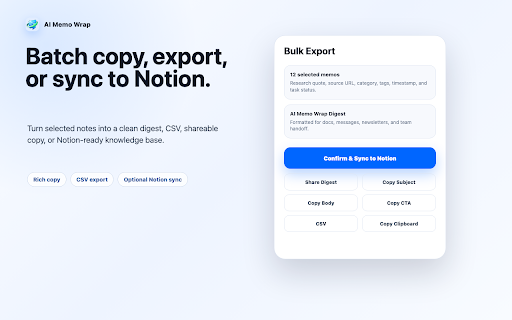
Batch mode: select, export, copy, share digest

Quick Rich Copy for cleaner sharing to messaging and social tools

Session workflow to group related memos

Optional Notion sync (OAuth, user-authorized)

Optional cloud sync via Supabase account login

Privacy model:

Works locally by default

Cloud sync and Notion sync are optional and user-triggered

No forced account for local capture
AI Memo Wrap helps you capture important text from any webpage and turn it into organized, searchable memos.

Highlight text on a webpage, click the floating Wrap bubble, then manage everything in Chrome’s side panel.

Core features:

- Capture selected text from any website
- Organize memos with categories, tags, sessions, stars, and archive
- Search across saved insights and use / commands for faster actions
- Select multiple memos for batch export, copy, delete, or Notion sync
- Create action tasks with deadlines from captured text
- Use Quick Rich Copy for cleaner sharing to chat, email, and social tools
- Optional Notion sync through user-authorized OAuth
- Optional cloud sync for cross-browser and cross-device access

Privacy model:

- Local-first by default
- No account required for local capture
- Cloud sync and Notion sync are optional and user-triggered
- Selected webpage text is saved only when you choose to wrap it
- May 21, 2026host_permissions
https://*/*, http://*/*, https://api.notion.com/*
https://*/*, http://*/*
Permissions & access
- Permissions
- storageidentityactiveTabtabssidePanelscriptingcontextMenus
- Host access
- https://*/*, http://*/*
Screenshots



About
AI Memo Wrap helps you capture important text from any webpage and turn it into organized, searchable memos.

Highlight text on a webpage, click the floating Wrap bubble, then manage everything in Chrome’s side panel.

Core features:

- Capture selected text from any website
- Organize memos with categories, tags, sessions, stars, and archive
- Search across saved insights and use / commands for faster actions
- Select multiple memos for batch export, copy, delete, or Notion sync
- Create action tasks with deadlines from captured text
- Use Quick Rich Copy for cleaner sharing to chat, email, and social tools
- Optional Notion sync through user-authorized OAuth
- Optional cloud sync for cross-browser and cross-device access

Privacy model:

- Local-first by default
- No account required for local capture
- Cloud sync and Notion sync are optional and user-triggered
- Selected webpage text is saved only when you choose to wrap it
Technical
- Version
- 1.2.7
- Manifest
- V3
- Size
- 493KiB
- Min Chrome
- 114
- Languages
- 1
- Featured
- No
Metadata
- ID
- hlmadcmleiholmlengnlodmfobdbmdac
- Developer ID
- u70baec13d658209cb20d9e8fe3af2075
- Developer Email
- [email protected]
- Created
- Apr 13, 2026
- Last Updated (Store)
- May 18, 2026
- Last Scraped
- Jun 9, 2026
- Website
- —
Data sourced from the Chrome Web Store · last verified Jun 9, 2026.