
ConvoSnap: ChatGPT & Gemini to Google Docs | Export AI Chats to PDF
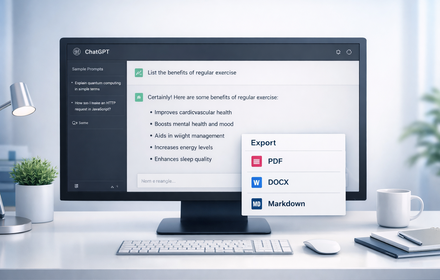
Export ChatGPT, Gemini & Claude chats to Google Docs, PDF, or Markdown. Save and organize AI conversations into folders.
As of June 2026, ConvoSnap: ChatGPT & Gemini to Google Docs | Export AI Chats to PDF has 1,000 users and a 3.75/5 rating from 8 reviews in the Productivity category.
Usersno change0%
1.0K
1,000
Ratingdown 13.4 percent−13.4%
3.75
8 reviews
Reviewsup 33.3 percent+33.3%
8
Version
1.1.1
Manifest V3
90-day change · In the last 90 days this extension 3 version updates, changed permissions.
History
4 snapshotsTracking since Apr 18, 2026.
View as table
| Date | Users | Rating | Reviews | Version |
|---|---|---|---|---|
| Apr 18, 2026 | 1.0K | 4.33 | 6 | 1.0.72 |
| Apr 23, 2026 | 1.0K | 4.33 | 6 | 1.0.73 |
| Apr 30, 2026 | 1.0K | 4.33 | 6 | 1.0.73 |
| May 17, 2026 | 1.0K | 3.75 | 8 | 1.1.0 |
| Now | 1.0K | 3.75 | 8 | 1.1.1 |
Changelog
- May 17, 2026short_description
Export AI chats to PDF, Docs, and Markdown. Organize ChatGPT, Claude, Gemini, and Grok chats into folders.
Export ChatGPT, Gemini & Claude chats to Google Docs, PDF, or Markdown. Save and organize AI conversations into folders.
- May 17, 2026name
ConvoSnap: Export & Organize AI Chats | PDF, Docs, Markdown
ConvoSnap: ChatGPT & Gemini to Google Docs | Export AI Chats to PDF
- Apr 30, 2026description
ConvoSnap Exporter - Turn Your AI Conversations into Exportable, Organized Files
Save to Google Docs, Download as PDF, Markdown, Image and more

Supported AI Chat Platforms 🌐
- Google AI Mode, Gemini, ChatGPT, Claude, Grok and more

Key Features ✨
- Export Your Way: Save and Copy conversations in multiple formats—PDF, Markdown, JSON, CSV, Images, or plain text. Your chats, your format.
- Latex Copy Support: Easily copy formulas and equations in LaTeX format to Word.
- Seamless Google Integration: Export chats to Google Docs or Sheets for analysis, organization, and team collaboration.
- Universal Compatibility: Works with ChatGPT, Grok, Google Gemini, Claude, DeepSeek, and more. One tool for all your AI chats.
- Privacy First: Your conversations stay yours. Data is processed locally with zero server storage for complete privacy. 🔒

FAQs ❓
1. Can I export only part of the conversation?
   Yes! Use the checkbox to select specific responses for export.
2. How do you handle my conversation data?
   Your conversations are private. We process data locally with zero server storage.
3. Do I need to log in to use the extension?
   Yes, to save to Google Docs or Sheets, log into your Google account.

Support & Feedback 📧
Got questions or ideas? Contact us at [email protected]. We’re here to help!

Take Control of Your AI Chats Today! 🚀
Install ConvoSnap Exporter now to organize, export, and share your AI conversations in your preferred format. Try it free and enjoy seamless integration with ChatGPT, Grok, and more!

Have ideas to make ConvoSnap better? Share your feedback at [email protected] and shape the future of AI conversation management! 💡
ConvoSnap — Export & Organize Your AI Conversations | PDF, Google Docs, Markdown, and More

ConvoSnap gives you two superpowers for your AI chats: powerful multi-format export and a personal folder system to organize every conversation.

Whether you're archiving research, collaborating with a team, or just keeping your AI workflow tidy, ConvoSnap puts you in control.

─────────────────────────────────
SUPPORTED AI PLATFORMS
─────────────────────────────────
Works with major AI platforms including ChatGPT, Claude, Google Gemini, Grok and DeepSeek

─────────────────────────────────
KEY FEATURES
─────────────────────────────────

📄 Flexible Export Options
Export AI conversations to PDF, Markdown, and more — clean and ready to use.

☁️ Save to Google Docs or Sheets
Send AI chats to your Google account for editing, analysis, and collaboration in documents or spreadsheets.

🔢 LaTeX Formula Support
Copy mathematical equations from AI responses in LaTeX format — ready to use in your preferred editor or LaTeX tools.

✅ Selective Export
Choose exactly which messages to export using per-message selection. Keep what matters and skip the rest.

📁 Folder Organization
Organize your saved conversations with folders. Only conversation IDs are stored locally — not the message content.

🔒 Privacy First
All processing happens locally in your browser. Your conversation content is not stored on our servers.

─────────────────────────────────
WHO IS THIS FOR?
─────────────────────────────────
• Researchers and students saving and referencing AI-generated content
• Developers documenting AI-assisted workflows
• Writers repurposing AI drafts
• Professionals sharing AI outputs with teams
• Anyone who wants a clean, portable record of their AI conversations

─────────────────────────────────
FREQUENTLY ASKED QUESTIONS
─────────────────────────────────

Q: Can I export only selected messages from a conversation?
A: Yes. Select the messages you want and export only those parts.

Q: Is my conversation data stored on your servers?
A: No. Processing happens locally in your browser, and we do not store your conversation content.

Q: Do I need to sign in?
A: Signing in with your Google account is only required for document or spreadsheet export. Other formats work without login.

Q: Which browsers are supported?
A: Works on Chrome and other Chromium-based browsers like Edge, Brave, and Arc.

─────────────────────────────────
SUPPORT & FEEDBACK
─────────────────────────────────
Have a question or feature request? We read every message.
📧 [email protected]

Your feedback helps shape future updates. If ConvoSnap saves you time, consider leaving a review.
- Apr 30, 2026short_description
ChatGPT to Google Docs, Export as PDF, Markdown, Image and more. Gemini to Google Docs, Grok, DeepSeek Batch Copy
Export AI chats to PDF, Docs, and Markdown. Organize ChatGPT, Claude, Gemini, and Grok chats into folders.
- Apr 30, 2026name
ConvoSnap Exporter: Save AI chat to Google Docs, Export as PDF, Markdown
ConvoSnap: Export & Organize AI Chats | PDF, Docs, Markdown
- Apr 30, 2026permissions
storage, offscreen
storage, scripting, offscreen
- Apr 18, 2026description
ConvoSnap Exporter - Turn Your AI Conversations into Exportable, Organized Files
Save to Google Docs, Download as PDF, Markdown, Image and more

Supported AI Chat Platforms 🌐
- Google AI Mode, Gemini, ChatGPT, Grok, DeepSeek, and more.

Key Features ✨
- Export Your Way: Save and Copy conversations in multiple formats—PDF, Markdown, JSON, CSV, Images, or plain text. Your chats, your format.
- Latex Copy Support: Easily copy formulas and equations in LaTeX format to Word.
- Seamless Google Integration: Export chats to Google Docs or Sheets for analysis, organization, and team collaboration.
- Universal Compatibility: Works with ChatGPT, Grok, Google Gemini, DeepSeek, and more. One tool for all your AI chats.
- Privacy First: Your conversations stay yours. Data is processed locally with zero server storage for complete privacy. 🔒

FAQs ❓
1. Can I export only part of the conversation?
   Yes! Use the checkbox to select specific responses for export.
2. How do you handle my conversation data?
   Your conversations are private. We process data locally with zero server storage.
3. Do I need to log in to use the extension?
   Yes, to save to Google Docs or Sheets, log into your Google account.

Support & Feedback 📧
Got questions or ideas? Contact us at [email protected]. We’re here to help!

Take Control of Your AI Chats Today! 🚀
Install ConvoSnap Exporter now to organize, export, and share your AI conversations in your preferred format. Try it free and enjoy seamless integration with ChatGPT, Grok, and more!

Have ideas to make ConvoSnap better? Share your feedback at [email protected] and shape the future of AI conversation management! 💡
ConvoSnap Exporter - Turn Your AI Conversations into Exportable, Organized Files
Save to Google Docs, Download as PDF, Markdown, Image and more

Supported AI Chat Platforms 🌐
- Google AI Mode, Gemini, ChatGPT, Claude, Grok and more

Key Features ✨
- Export Your Way: Save and Copy conversations in multiple formats—PDF, Markdown, JSON, CSV, Images, or plain text. Your chats, your format.
- Latex Copy Support: Easily copy formulas and equations in LaTeX format to Word.
- Seamless Google Integration: Export chats to Google Docs or Sheets for analysis, organization, and team collaboration.
- Universal Compatibility: Works with ChatGPT, Grok, Google Gemini, Claude, DeepSeek, and more. One tool for all your AI chats.
- Privacy First: Your conversations stay yours. Data is processed locally with zero server storage for complete privacy. 🔒

FAQs ❓
1. Can I export only part of the conversation?
   Yes! Use the checkbox to select specific responses for export.
2. How do you handle my conversation data?
   Your conversations are private. We process data locally with zero server storage.
3. Do I need to log in to use the extension?
   Yes, to save to Google Docs or Sheets, log into your Google account.

Support & Feedback 📧
Got questions or ideas? Contact us at [email protected]. We’re here to help!

Take Control of Your AI Chats Today! 🚀
Install ConvoSnap Exporter now to organize, export, and share your AI conversations in your preferred format. Try it free and enjoy seamless integration with ChatGPT, Grok, and more!

Have ideas to make ConvoSnap better? Share your feedback at [email protected] and shape the future of AI conversation management! 💡
- Apr 18, 2026host_permissions
*://chatgpt.com/*, *://grok.com/*, *://gemini.google.com/*, *://www.google.com/*, *://chat.deepseek.com/*
*://claude.ai/*, *://chatgpt.com/*, *://grok.com/*, *://gemini.google.com/*, *://www.google.com/*, *://chat.deepseek.com/*
Permissions & access
- Permissions
- storagescriptingoffscreen
- Host access
- *://claude.ai/*, *://chatgpt.com/*, *://grok.com/*, *://gemini.google.com/*, *://www.google.com/*, *://chat.deepseek.com/*
Screenshots


About
ConvoSnap — Export & Organize Your AI Conversations | PDF, Google Docs, Markdown, and More

ConvoSnap gives you two superpowers for your AI chats: powerful multi-format export and a personal folder system to organize every conversation.

Whether you're archiving research, collaborating with a team, or just keeping your AI workflow tidy, ConvoSnap puts you in control.

─────────────────────────────────
SUPPORTED AI PLATFORMS
─────────────────────────────────
Works with major AI platforms including ChatGPT, Claude, Google Gemini, Grok and DeepSeek

─────────────────────────────────
KEY FEATURES
─────────────────────────────────

📄 Flexible Export Options
Export AI conversations to PDF, Markdown, and more — clean and ready to use.

☁️ Save to Google Docs or Sheets
Send AI chats to your Google account for editing, analysis, and collaboration in documents or spreadsheets.

🔢 LaTeX Formula Support
Copy mathematical equations from AI responses in LaTeX format — ready to use in your preferred editor or LaTeX tools.

✅ Selective Export
Choose exactly which messages to export using per-message selection. Keep what matters and skip the rest.

📁 Folder Organization
Organize your saved conversations with folders. Only conversation IDs are stored locally — not the message content.

🔒 Privacy First
All processing happens locally in your browser. Your conversation content is not stored on our servers.

─────────────────────────────────
WHO IS THIS FOR?
─────────────────────────────────
• Researchers and students saving and referencing AI-generated content
• Developers documenting AI-assisted workflows
• Writers repurposing AI drafts
• Professionals sharing AI outputs with teams
• Anyone who wants a clean, portable record of their AI conversations

─────────────────────────────────
FREQUENTLY ASKED QUESTIONS
─────────────────────────────────

Q: Can I export only selected messages from a conversation?
A: Yes. Select the messages you want and export only those parts.

Q: Is my conversation data stored on your servers?
A: No. Processing happens locally in your browser, and we do not store your conversation content.

Q: Do I need to sign in?
A: Signing in with your Google account is only required for document or spreadsheet export. Other formats work without login.

Q: Which browsers are supported?
A: Works on Chrome and other Chromium-based browsers like Edge, Brave, and Arc.

─────────────────────────────────
SUPPORT & FEEDBACK
─────────────────────────────────
Have a question or feature request? We read every message.
📧 [email protected]

Your feedback helps shape future updates. If ConvoSnap saves you time, consider leaving a review.
Technical
- Version
- 1.1.1
- Manifest
- V3
- Size
- 1.69MiB
- Min Chrome
- 88
- Languages
- 14
- Featured
- No
Metadata
- ID
- hlhlaappdmhaigmfcjpobpmimoimagkg
- Developer ID
- uafa53eb948b1c92bb16617c9ea93e8fc
- Developer Email
- [email protected]
- Created
- Jun 29, 2025
- Last Updated (Store)
- Jun 12, 2026
- Last Scraped
- Jun 15, 2026
- Website
- convosnap.com
- Support URL
- —
- Privacy Policy
- https://exporter.convosnap.com/policy
Similar extensions
Alternatives to ConvoSnap: ChatGPT & Gemini to Google Docs | Export AI Chats to PDF, ranked by description similarity.

AI Chat Exporter - ChatGPT, Claude, Gemini & DeepSeek to PDF
Export ChatGPT, Claude, Gemini, DeepSeek, Grok to PDF. Batch save chats with code, math & images. Export your AI history.
1.0K
★ 4.5

AI Chat Exporter – PDF, DOCX & Sheets
Save and export ChatGPT conversations instantly
43
★ 5.0

Chat Conversation Exporter
Export chat conversations from various LLM platforms (Markdown, PDF, HTML, JSON)
124
★ 3.5

AI Chat Exporter
Export AI conversations to Markdown or Text with one click. Supports selective export and preserves formatting.
89
★ 4.5

AI Chat Exporter Pro
Export conversations from ChatGPT, Claude, Gemini, and more to PDF, Markdown, TXT, HTML, and JSON with images.
9

GrabChat - Export & Backup AI Chats and save context in JSON, MD, and PDF
Export conversations from all major LLM platforms to JSON, Markdown, and PDF
341
★ 5.0
ChatGPT Exporter
Export ChatGPT conversations to PDF, Word, Markdown, and Text.
194
★ 1.0

Chat2Doc - Export ChatGPT, Claude & Gemini to PDF/Word
One-click export AI chats (ChatGPT, Claude, Gemini, DeepSeek) to professional PDF, Word, and Markdown documents. Save your history.
115
★ 1.0
Data sourced from the Chrome Web Store · last verified Jun 15, 2026.