
Ultimasaurus - Turn Off AI Overviews
Remove annoying clutter, improve search, & bring back features of the web. Works on Twitter, YouTube, & Major Search Engines.
As of May 2026, Ultimasaurus - Turn Off AI Overviews has 788 users and a 5.00/5 rating from 7 reviews in the Workflow & Planning category.
Usersdown 4.0 percent−4.0%
788
788
Ratingno change0%
5.00
7 reviews
Reviewsno change0%
7
Version
1.1.6
Manifest V3
History
2 snapshotsTracking since Apr 25, 2026.
View as table
| Date | Users | Rating | Reviews | Version |
|---|---|---|---|---|
| Apr 25, 2026 | 821 | 5.00 | 7 | 1.1.6 |
| May 21, 2026 | 797 | 5.00 | 7 | 1.1.6 |
| Now | 788 | 5.00 | 7 | 1.1.6 |
Permissions & access
- Permissions
- storagetabsactiveTabscripting
- Host access
- <all_urls>
Screenshots

About
Our mission is to give users granular control over what they see and experience on the desktop web.

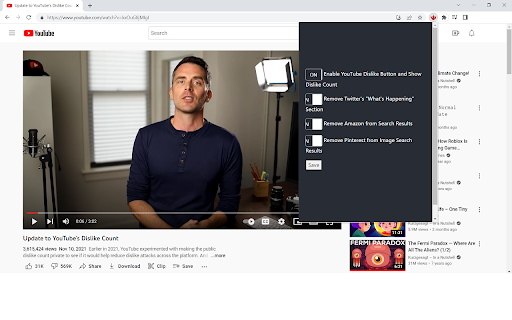
Use simple toggle switches to; reduce advertising footprints/volume, add or remove features on social media websites, remove clutter sites try to shove at you, improve your search experience by removing specific sites or sections from search results, and give yourself built-in tools and utilities without needing more extensions.

Ultimasaurus currently works on Google, X, YouTube, Facebook, Bing, DuckDuckGo, Wikipedia, and numerous Shopify stores.

Google Controls
👉 Turn Off Google's AI Overviews.
👉 Remove People Also Ask, From Sources Across the Web, and Discussion & Forums sections.
👉 Remove Sitelinks from ads on Google to make the ad take up less space.
👉 Cut Out Amazon, Reddit, Quora, Stackoverflow/Stackechange, or IMDB from your search results.
👉 Add Expert Insights on specific keyword searches. See more about this feature here: https://ultimasaurus.com/features/expert-insights/

X / Twitter Controls
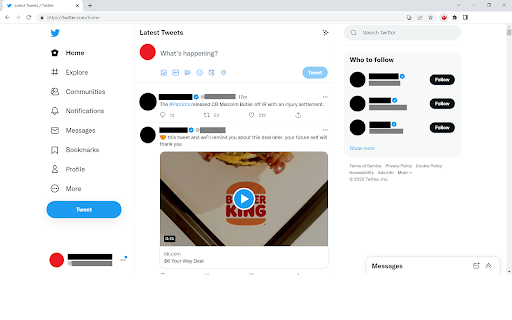
👉 Remove the "Explore"/"What's Happening", "Who to Follow", and "Subscribe to Premium" sections.

Facebook Controls
👉 Remove Facebook's Stories section.

YouTube Controls
👉 Show a dislike count on YouTube videos.
👉 Block YouTube's premium upgrade popup.

Wikipedia Controls
👉 Block donation popups (experimental, may miss some)

Shopify Controls
👉 Automatically Apply Coupons on Shopify Stores.

Bing Controls
👉 Remove Sitelinks from ads on Bing to make the ad take up less space.
👉 Cut Out Amazon, Reddit, Quora, Stackoverflow/Stackechange, or IMDB from your search results.
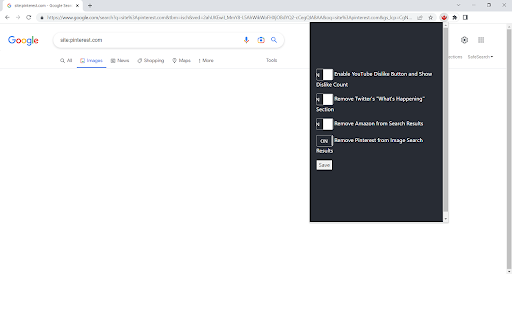
👉 Cut Out Pinterest images from image search.

DuckDuckGo Controls
👉 Remove Sitelinks from ads on DuckDuckGo to make the ad take up less space.
👉 Cut Out Amazon, Reddit, Quora, Stackoverflow/Stackechange, or IMDB from your search results.
👉 Cut Out Pinterest images from image search.

Utilities / Tools Built-in
👉 Take simple screenshots.
👉 Remove logos of big tech websites
👉 Terminate spam websites from across the web

Ultimasaurus is your solution for reducing clutter and distractions while you use the desktop web. It's a perfect solution for freelancers, office workers, people with slower computers or web connections, or even casual web users who want to add features to the web they can use or remove distractions.

The internet belongs to you. Make it your own.

More features coming soon.
Technical
- Version
- 1.1.6
- Manifest
- V3
- Size
- 4.45MiB
- Min Chrome
- 88
- Languages
- 1
- Featured
- No
Metadata
- ID
- hlgfahamcjaplejdcibninehmahkofen
- Developer ID
- u641a2e6174237af5f3ee6065f98db5d6
- Developer Email
- [email protected]
- Created
- Aug 30, 2022
- Last Updated (Store)
- Nov 28, 2024
- Last Scraped
- May 21, 2026
- Website
- —
- Support URL
- —
- Privacy Policy
- https://ultimasaurus.com/privacy-policy/
Similar extensions
Alternatives to Ultimasaurus - Turn Off AI Overviews, ranked by description similarity.

YouTube Detox — Block Shorts, Hide Recommendations & Stay Focused
A complete toolkit to help you use YouTube with purpose. Block Shorts, remove distractions, and stay focused on what truly matters.
5.0K
★ 4.6

Beacon Blocker
AI-powered content blocker that helps you stay focused by blocking distracting websites based on your personal goals.
10
★ 5.0

FocusFilter
Block Sites and their elements
1

Block these URLs, Domains or Keywords
Take control of your browsing. Automatically block, close, or redirect tabs based on URLs, keywords, or regex patterns.
572
★ 3.9

tinyWeb
Experience the best of web without the distractions
8

YETI: Remove Google™ Search AI
Customize your browsing by removing unwanted AI search results on Google™ and applying your own custom CSS to any webpage.
292
★ 3.7

Blinders - Block Distracting Sites
Block distracting sites with smart pattern matching. Beat doomscrolling.
—

Advanced Ad Blocker
Block ads, trackers, and unwanted content with advanced filtering capabilities
1.0K
★ 5.0
Data sourced from the Chrome Web Store · last verified May 21, 2026.