
Planning Poker for Google Meet
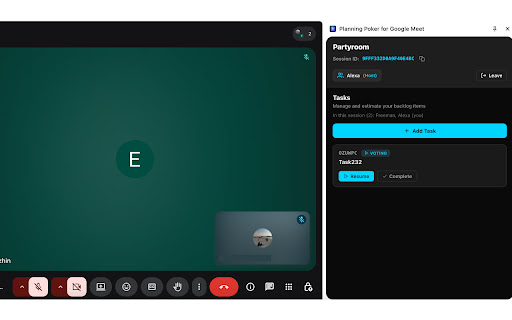
Planning poker in the Meet side panel: create sessions, vote, and sync estimates in real time.
As of June 2026, Planning Poker for Google Meet has 12 users and a 5.00/5 rating from 1 reviews in the Productivity category.
Usersup 200.0 percent+200.0%
12
12
Ratingno change0%
5.00
1 reviews
Reviewsno change0%
1
Version
2.0.2
Manifest V3
History
6 snapshotsTracking since Apr 1, 2026.
View as table
| Date | Users | Rating | Reviews | Version |
|---|---|---|---|---|
| Apr 1, 2026 | 4 | — | — | 2.0.2 |
| Apr 17, 2026 | 4 | — | — | 2.0.2 |
| May 8, 2026 | 4 | 5.00 | 1 | 2.0.2 |
| May 12, 2026 | 5 | 5.00 | 1 | 2.0.2 |
| May 24, 2026 | 6 | 5.00 | 1 | 2.0.2 |
| May 31, 2026 | 11 | 5.00 | 1 | 2.0.2 |
| Now | 12 | 5.00 | 1 | 2.0.2 |
Permissions & access
- Permissions
- storagesidePanel
- Host access
- https://meet.google.com/*, https://firestore.googleapis.com/*
Screenshots


About
Planning Poker for Google Meet adds real-time agile estimation directly inside your Google Meet calls.

Instead of switching between tabs, you can open a planning poker room from the side panel and estimate together with your team in seconds.

Key features
- Launch a PokerPlanning2 room from inside Google Meet
- Share the room link instantly with meeting participants
- Real-time voting and reveal
- Simple, distraction-free interface
- Works directly in the Chrome side panel

How it works
1. Open a Google Meet.
2. Click the extension icon.
3.The side panel opens with Planning Poker.
4.Start a room and share it with your team.

This extension is designed for agile teams who want fast, lightweight estimation during remote meetings.
Technical
- Version
- 2.0.2
- Manifest
- V3
- Size
- 123KiB
- Min Chrome
- 114
- Languages
- 1
- Featured
- No
Metadata
- ID
- hldgjkmjlkdnmhpahpnidmepjkfgnlab
- Developer ID
- ud9e0ee7bf0f595d877de970c58be9a90
- Developer Email
- [email protected]
- Created
- Feb 18, 2026
- Last Updated (Store)
- Apr 7, 2026
- Last Scraped
- Jun 6, 2026
- Website
- —
Data sourced from the Chrome Web Store · last verified Jun 6, 2026.