
AdBlock Shield – Block Ads, Trackers & Pop-ups
Block ads, trackers & pop-ups on every site. Fastest MV3 ad blocker with 48,000+ filter rules. Free & open source.
As of June 2026, AdBlock Shield – Block Ads, Trackers & Pop-ups has — users in the Privacy & Security category.
Usersno change0%
—
—
Ratingno change0%
—
— reviews
Reviewsno change0%
—
Version
1.0.0
Manifest V3
History
1 snapshotsTracking since Jun 7, 2026.
Not enough history yet for this metric — the chart fills in as we collect more snapshots.
View as table
| Date | Users | Rating | Reviews | Version |
|---|---|---|---|---|
| Jun 7, 2026 | — | — | — | 1.0.0 |
| Now | — | — | — | 1.0.0 |
Permissions & access
- Permissions
- scriptingstoragetabswebNavigationdeclarativeNetRequestdeclarativeNetRequestFeedbackdeclarativeNetRequestWithHostAccesscommands
- Host access
- <all_urls>
Screenshots


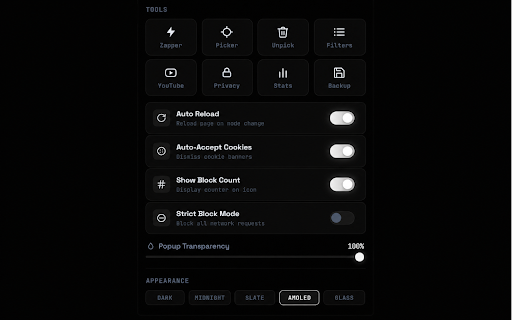
About
AdBlock Shield — Block Ads, Trackers & Pop-ups

Browse faster, cleaner, and with more privacy. AdBlock Shield removes intrusive
ads, blocks pop-ups, and stops common trackers so pages load quicker and look
the way they should — without the clutter.

Built on Chrome's modern Manifest V3 and the Declarative Net Request engine,
AdBlock Shield is lightweight and efficient. It does its filtering work
natively in the browser, so it stays fast and easy on memory.

━━━━━━━━━━━━━━━━━━━━━━━━━━━━━━
WHAT IT DOES
━━━━━━━━━━━━━━━━━━━━━━━━━━━━━━━
• Blocks banner ads, video ads, pop-ups, and pop-unders
• Reduces common third-party trackers and analytics requests
• Hides YouTube video ads for smoother playback
• Automatically dismisses cookie-consent banners (optional)
• Cleaner, faster pages that use less data

━━━━━━━━━━━━━━━━━━━━━━━━━━━━━━
KEY FEATURES
━━━━━━━━━━━━━━━━━━━━━━━━━━━━━━━
• Filtering modes — choose Off, Basic, Optimal, or Strict to match each site
• Element Zapper — click any element on a page to hide it instantly
• Element Picker — create your own precise blocking rules
• Custom filters — add your own rules in standard filter syntax
• Per-site control — turn protection on or off for individual websites
• Block counter — see how many requests have been blocked on each page
• Filter lists — manage the rule lists that power the blocker
• Backup & restore — export and import your settings any time
• Clean, modern interface with multiple dark themes

━━━━━━━━━━━━━━━━━━━━━━━━━━━━━━
HOW TO USE
━━━━━━━━━━━━━━━━━━━━━━━━━━━━━━━
1. Pin AdBlock Shield to your toolbar.
2. Click the icon to open the popup and pick a filtering mode.
3. Use the Zapper or Picker to hide anything that's left.
4. Open the dashboard for filter lists, statistics, and backups.

That's it — protection is active by default on the sites you visit.

━━━━━━━━━━━━━━━━━━━━━━━━━━━━━━
ABOUT ADS IN THIS EXTENSION
━━━━━━━━━━━━━━━━━━━━━━━━━━━━━━━
AdBlock Shield is free and supported by a single small ad banner shown inside
the extension's own interface. This banner helps fund ongoing development and
filter-list updates. It is unobtrusive, never injected into the web pages you
browse, and does not interfere with the ad-blocking features described above.

━━━━━━━━━━━━━━━━━━━━━━━━━━━━━━
PRIVACY
━━━━━━━━━━━━━━━━━━━━━━━━━━━━━━━
Your browsing stays yours. AdBlock Shield does not sell your personal data and
does not require an account to use. Filtering is performed locally in your
browser. See the full Privacy Policy for details on what is and isn't collected.

━━━━━━━━━━━━━━━━━━━━━━━━━━━━━━
PERMISSIONS
━━━━━━━━━━━━━━━━━━━━━━━━━━━━━━━
The extension requests only the permissions needed to block content and apply
your filters across the sites you visit. Each permission is used solely to
deliver the features listed above.

Enjoy a faster, cleaner, more private web with AdBlock Shield.
Technical
- Version
- 1.0.0
- Manifest
- V3
- Size
- 11.61MiB
- Min Chrome
- 88
- Languages
- 31
- Featured
- No
Metadata
- ID
- hkjofidiledehkcpidjbpadcccdladoh
- Developer ID
- u641e53ee9255b281d1ef879c4032b4b4
- Developer Email
- [email protected]
- Created
- Jun 6, 2026
- Last Updated (Store)
- Jun 6, 2026
- Last Scraped
- Jun 7, 2026
- Website
- —
- Support URL
- —
Data sourced from the Chrome Web Store · last verified Jun 7, 2026.