
GPT Google Form Quiz Maker
Generate Google Forms from Docs, Slides, Sheets, PDFs, and prompts. Create quizzes and assessments with AI in Google Workspace.
As of June 2026, GPT Google Form Quiz Maker has 524 users and a 5.00/5 rating from 3 reviews in the Education category.
Usersup 3930.8 percent+3930.8%
524
524
Ratingno change0%
5.00
3 reviews
Reviewsno change0%
3
Version
1.4.0
Manifest V3
90-day change · In the last 90 days this extension 2 version updates, changed permissions.
History
10 snapshotsTracking since Apr 16, 2026.
View as table
| Date | Users | Rating | Reviews | Version |
|---|---|---|---|---|
| Apr 16, 2026 | 13 | 5.00 | 3 | 1.0.19 |
| Apr 23, 2026 | 13 | 5.00 | 3 | 1.0.19 |
| Apr 30, 2026 | 63 | 5.00 | 3 | 1.0.19 |
| May 7, 2026 | 89 | 5.00 | 3 | 1.0.19 |
| May 12, 2026 | 146 | 5.00 | 3 | 1.0.19 |
| May 17, 2026 | 169 | 5.00 | 3 | 1.0.19 |
| May 24, 2026 | 233 | 5.00 | 3 | 1.0.19 |
| May 30, 2026 | 341 | 5.00 | 3 | 1.0.19 |
| Jun 6, 2026 | 444 | 5.00 | 3 | 1.3.5 |
| Jun 15, 2026 | 482 | 5.00 | 3 | 1.3.5 |
| Now | 524 | 5.00 | 3 | 1.4.0 |
Changelog
- Jun 15, 2026short_description
Generate ready made Google Forms from your document, PDF, Notes and prompts. Create Forms you can use for student Quiz assessments.
Generate Google Forms from Docs, Slides, Sheets, PDFs, and prompts. Create quizzes and assessments with AI in Google Workspace.
- Jun 15, 2026host_permissions
https://docs.google.com/*, https://forms.google.com/*, https://myquizgpt.com/*
https://docs.google.com/*, https://slides.google.com/*, https://sheets.google.com/*, https://forms.google.com/*, https://myquizgpt.com/*
- Jun 15, 2026permissions
storage, sidePanel, tabs
storage, sidePanel, tabs, scripting
- Jun 15, 2026description
Create fully formatted Google Forms quizzes in seconds using ChatGPT— directly from your documents, notes, PDFs, or prompts.
As a teacher, this extension saves you hours of manually copying and formatting questions in Google Forms for your assessments.
Skip the copy-paste, setup, and scripts—everything is generated and organized automatically for you.

If you already have existing Google Forms, you can use this extension to add more questions, including MCQs, checkbox, true/false questions, and Cloze prompts, powered by AI.

Ideal for anyone creating multiple choice question, survey, feedback, questionnaire, True/False, Mixed Quiz, and registration form.

🚀 What This Extension Does
GPT Google Form Quiz Maker connects ChatGPT with MyQuizGPT to help you:
Convert PDFs, Google Docs, Word files, and notes into quizzes
Generate multiple-choice questions with answers automatically
Create Google form Survey, Feedback form and Questionnaire
Instantly create a ready-to-use Form
Skip the entire manual form-building process

⚡ The Fastest Workflow (ChatGPT → Google Forms)
The fastest way to create a Google Form is by combining this chrome extension with ChatGPT.
Rather than just helping you write questions, it actually takes your quiz and turns it into a real Google Form automatically.
Upload or paste your content
Ask: “Create a Google Form from this”
Get a quiz link from MyQuizGPT
Open it → Your Google Form is created automatically
That’s it.

🎯 Who It’s For
Teachers → Create quizzes, tests, and assessments instantly
Students → Turn notes into practice quizzes
Anyone using ChatGPT who wants speed in creating Questionnaire, Survey and Feedback Form

🔥 Key Features
Supports PDFs, Docs, Sheets, Word, and raw text
AI-generated questions, options, and answers
Instant quiz links you can open, edit, and manage
Sync directly into real Google Forms
No coding, no Google Apps Script required
Works seamlessly with ChatGPT

💡 Why Use This?
Creating Google Forms manually is slow:
Copying questions
Formatting answers
Setting correct options
This extension removes all of that.
You focus on your content — AI handles the rest.

🔐 Privacy & Security
Your data is only used to generate your quizzes
No unnecessary tracking or data selling
Secure integration with MyQuizGPT

🌐 Get Started
Install the extension → Connect to MyQuizGPT → Open ChatGPT → Start generating forms instantly.
🚀 Create fully formatted Google Forms quizzes in seconds using ChatGPT — directly from your google documents, notes, PDFs, or prompts. As a teacher, this extension saves you hours of manually copying and formatting questions in Google Forms for your assessments. Skip the copy-paste, setup, and scripts—everything is generated and organized automatically for you. If you already have existing Google Forms, you can use this extension to add more questions, including MCQs, checkbox, true/false questions, and Cloze prompts, powered by AI. Ideal for anyone creating multiple choice question, survey, feedback, questionnaire, True/False, Mixed Quiz, and registration form. ━━━━━━━━━━━━━━━━━━━━ 📄 Create Google Forms From Your Files Turn existing content into ready-to-use Google Forms without copy-pasting. 📘 Google Docs → Google Forms Open any Google Doc, click the extension, and generate a Google Form directly from the document content. Perfect for: • Lesson notes • Study guides • Training materials • Meeting notes • Research documents 📊 Google Slides (PowerPoint) → Google Forms Convert presentations into quizzes, assessments, surveys, and questionnaires. Ideal for: • Classroom presentations • Lecture slides • Training decks • Workshop materials • Educational PowerPoints 📈 Google Sheets → Google Forms Generate forms from spreadsheets, tables, datasets, and structured information. Great for: • Assessments • Data collection forms • Surveys • Registration forms • Knowledge checks 📕PDF → Google Forms Upload a PDF and instantly convert it into a quiz, test, questionnaire, or survey. Supports: • Textbooks • Worksheets • Study materials • Training manuals • Reports ━━━━━━━━━━━━━━━━━━━━ ⭐ Generate Forms Directly From the Sidebar Simply open a Google Doc, Sheet, or Slide and click the extension icon. The extension automatically imports the content from the current file and lets you generate: • Multiple Choice Questions (MCQ) • Checkbox Questions • True/False Questions • Short Answer Questions • Cloze Questions • Mixed Question Types • Surveys • Feedback Forms • Registration Forms Everything is organized and formatted automatically. ━━━━━━━━━━━━━━━━━━━━ ⚡ The Fastest ChatGPT → Google Forms Workflow GPT Google Form Quiz Maker works seamlessly with ChatGPT and MyQuizGPT. 1. Upload or paste your content 2. Ask ChatGPT to create a quiz or form 3. Generate questions instantly 4. Open the generated form 5. Start collecting responses Instead of spending time formatting questions and answers, you get a ready-to-use Google Form in seconds. ━━━━━━━━━━━━━━━━━━━━ 🔥 Key Features • Create Google Forms from Google Docs • Convert Google Slides and PowerPoint presentations into quizzes • Generate forms from Google Sheets • Turn PDFs into assessments and surveys • AI-generated questions and answer options • Support for MCQ, True/False, Checkbox, Short Answer, and Cloze questions • Create surveys, questionnaires, and feedback forms • Direct Google Forms integration • Works inside Google Workspace • No coding or Google Apps Script required • Seamless ChatGPT integration ━━━━━━━━━━━━━━━━━━━━ 🎯 **Who It's For** 👩🏫 **Teachers** Create quizzes, tests, worksheets, assessments, and classroom activities in seconds. 🎓 **Students** Turn notes, PDFs, presentations, and study materials into practice quizzes. 📚 **Trainers & Educators** Build assessments and knowledge checks from training materials and presentations. 🏢 **Businesses & Teams** Create surveys, feedback forms, questionnaires, onboarding forms, and registration forms quickly. ━━━━━━━━━━━━━━━━━━━━ 💡 **Why Use GPT Google Form Quiz Maker?** Creating forms manually is time-consuming: • Copying content from documents • Writing questions • Formatting answer choices • Setting correct answers • Organizing sections GPT Google Form Quiz Maker automates the entire process. You focus on the content. AI handles the form creation. ━━━━━━━━━━━━━━━━━━━━ 🔒 Privacy & Security Your content is only used to generate forms and quizzes. We do not sell your data or use it for advertising. All processing is designed to help you create Google Forms quickly and securely. ━━━━━━━━━━━━━━━━━━━━ 🚀 Get Started Install the extension, open any Google Doc, Google Sheet, Google Slide, PDF, or note, and generate a fully formatted Google Form directly from the sidebar in seconds. ✨ From content to Google Form with a single click.
- May 30, 2026description
Create fully formatted Google Forms quizzes in seconds using ChatGPT— directly from your documents, notes, PDFs, or prompts.
As a teacher, this extension saves you hours of manually copying and formatting questions in Google Forms for your assessments.
Skip the copy-paste, setup, and scripts—everything is generated and organized automatically for you.

🚀 What This Extension Does
GPT Google Form Quiz Maker connects ChatGPT with MyQuizGPT to help you:
Convert PDFs, Google Docs, Word files, and notes into quizzes
Generate multiple-choice questions with answers automatically
Instantly create a ready-to-use Google Form
Skip the entire manual form-building process

⚡ The Fastest Workflow (ChatGPT → Google Forms)
The fastest way to create a Google Form is by combining this chrome extension with ChatGPT.
Rather than just helping you write questions, it actually takes your quiz and turns it into a real Google Form automatically.
Upload or paste your content
Ask: “Create a Google Form from this”
Get a quiz link from MyQuizGPT
Open it → Your Google Form is created automatically
That’s it.

🎯 Who It’s For
Teachers → Create quizzes, tests, and assessments instantly
Students → Turn notes into practice quizzes
Anyone using ChatGPT who wants speed

🔥 Key Features
Supports PDFs, Docs, Sheets, Word, and raw text
AI-generated questions, options, and answers
Instant quiz links you can open, edit, and manage
Sync directly into real Google Forms
No coding, no Google Apps Script required
Works seamlessly with ChatGPT

💡 Why Use This?
Creating Google Forms manually is slow:
Copying questions
Formatting answers
Setting correct options
This extension removes all of that.
You focus on your content — AI handles the rest.

🔐 Privacy & Security
Your data is only used to generate your quizzes
No unnecessary tracking or data selling
Secure integration with MyQuizGPT

🌐 Get Started
Install the extension → Connect to MyQuizGPT → Open ChatGPT → Start generating forms instantly.
Create fully formatted Google Forms quizzes in seconds using ChatGPT— directly from your documents, notes, PDFs, or prompts.
As a teacher, this extension saves you hours of manually copying and formatting questions in Google Forms for your assessments.
Skip the copy-paste, setup, and scripts—everything is generated and organized automatically for you.

If you already have existing Google Forms, you can use this extension to add more questions, including MCQs, checkbox, true/false questions, and Cloze prompts, powered by AI.

Ideal for anyone creating multiple choice question, survey, feedback, questionnaire, True/False, Mixed Quiz, and registration form.

🚀 What This Extension Does
GPT Google Form Quiz Maker connects ChatGPT with MyQuizGPT to help you:
Convert PDFs, Google Docs, Word files, and notes into quizzes
Generate multiple-choice questions with answers automatically
Create Google form Survey, Feedback form and Questionnaire
Instantly create a ready-to-use Form
Skip the entire manual form-building process

⚡ The Fastest Workflow (ChatGPT → Google Forms)
The fastest way to create a Google Form is by combining this chrome extension with ChatGPT.
Rather than just helping you write questions, it actually takes your quiz and turns it into a real Google Form automatically.
Upload or paste your content
Ask: “Create a Google Form from this”
Get a quiz link from MyQuizGPT
Open it → Your Google Form is created automatically
That’s it.

🎯 Who It’s For
Teachers → Create quizzes, tests, and assessments instantly
Students → Turn notes into practice quizzes
Anyone using ChatGPT who wants speed in creating Questionnaire, Survey and Feedback Form

🔥 Key Features
Supports PDFs, Docs, Sheets, Word, and raw text
AI-generated questions, options, and answers
Instant quiz links you can open, edit, and manage
Sync directly into real Google Forms
No coding, no Google Apps Script required
Works seamlessly with ChatGPT

💡 Why Use This?
Creating Google Forms manually is slow:
Copying questions
Formatting answers
Setting correct options
This extension removes all of that.
You focus on your content — AI handles the rest.

🔐 Privacy & Security
Your data is only used to generate your quizzes
No unnecessary tracking or data selling
Secure integration with MyQuizGPT

🌐 Get Started
Install the extension → Connect to MyQuizGPT → Open ChatGPT → Start generating forms instantly.
- May 30, 2026host_permissions
(empty)
https://docs.google.com/*, https://forms.google.com/*, https://myquizgpt.com/*
- May 30, 2026permissions
(empty)
storage, sidePanel, tabs
Permissions & access
- Permissions
- storagesidePaneltabsscripting
- Host access
- https://docs.google.com/*, https://slides.google.com/*, https://sheets.google.com/*, https://forms.google.com/*, https://myquizgpt.com/*
Screenshots


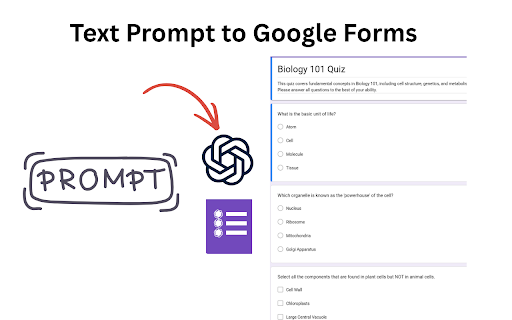
About
🚀 Create fully formatted Google Forms quizzes in seconds using ChatGPT — directly from your google documents, notes, PDFs, or prompts. As a teacher, this extension saves you hours of manually copying and formatting questions in Google Forms for your assessments. Skip the copy-paste, setup, and scripts—everything is generated and organized automatically for you. If you already have existing Google Forms, you can use this extension to add more questions, including MCQs, checkbox, true/false questions, and Cloze prompts, powered by AI. Ideal for anyone creating multiple choice question, survey, feedback, questionnaire, True/False, Mixed Quiz, and registration form. ━━━━━━━━━━━━━━━━━━━━ 📄 Create Google Forms From Your Files Turn existing content into ready-to-use Google Forms without copy-pasting. 📘 Google Docs → Google Forms Open any Google Doc, click the extension, and generate a Google Form directly from the document content. Perfect for: • Lesson notes • Study guides • Training materials • Meeting notes • Research documents 📊 Google Slides (PowerPoint) → Google Forms Convert presentations into quizzes, assessments, surveys, and questionnaires. Ideal for: • Classroom presentations • Lecture slides • Training decks • Workshop materials • Educational PowerPoints 📈 Google Sheets → Google Forms Generate forms from spreadsheets, tables, datasets, and structured information. Great for: • Assessments • Data collection forms • Surveys • Registration forms • Knowledge checks 📕PDF → Google Forms Upload a PDF and instantly convert it into a quiz, test, questionnaire, or survey. Supports: • Textbooks • Worksheets • Study materials • Training manuals • Reports ━━━━━━━━━━━━━━━━━━━━ ⭐ Generate Forms Directly From the Sidebar Simply open a Google Doc, Sheet, or Slide and click the extension icon. The extension automatically imports the content from the current file and lets you generate: • Multiple Choice Questions (MCQ) • Checkbox Questions • True/False Questions • Short Answer Questions • Cloze Questions • Mixed Question Types • Surveys • Feedback Forms • Registration Forms Everything is organized and formatted automatically. ━━━━━━━━━━━━━━━━━━━━ ⚡ The Fastest ChatGPT → Google Forms Workflow GPT Google Form Quiz Maker works seamlessly with ChatGPT and MyQuizGPT. 1. Upload or paste your content 2. Ask ChatGPT to create a quiz or form 3. Generate questions instantly 4. Open the generated form 5. Start collecting responses Instead of spending time formatting questions and answers, you get a ready-to-use Google Form in seconds. ━━━━━━━━━━━━━━━━━━━━ 🔥 Key Features • Create Google Forms from Google Docs • Convert Google Slides and PowerPoint presentations into quizzes • Generate forms from Google Sheets • Turn PDFs into assessments and surveys • AI-generated questions and answer options • Support for MCQ, True/False, Checkbox, Short Answer, and Cloze questions • Create surveys, questionnaires, and feedback forms • Direct Google Forms integration • Works inside Google Workspace • No coding or Google Apps Script required • Seamless ChatGPT integration ━━━━━━━━━━━━━━━━━━━━ 🎯 **Who It's For** 👩🏫 **Teachers** Create quizzes, tests, worksheets, assessments, and classroom activities in seconds. 🎓 **Students** Turn notes, PDFs, presentations, and study materials into practice quizzes. 📚 **Trainers & Educators** Build assessments and knowledge checks from training materials and presentations. 🏢 **Businesses & Teams** Create surveys, feedback forms, questionnaires, onboarding forms, and registration forms quickly. ━━━━━━━━━━━━━━━━━━━━ 💡 **Why Use GPT Google Form Quiz Maker?** Creating forms manually is time-consuming: • Copying content from documents • Writing questions • Formatting answer choices • Setting correct answers • Organizing sections GPT Google Form Quiz Maker automates the entire process. You focus on the content. AI handles the form creation. ━━━━━━━━━━━━━━━━━━━━ 🔒 Privacy & Security Your content is only used to generate forms and quizzes. We do not sell your data or use it for advertising. All processing is designed to help you create Google Forms quickly and securely. ━━━━━━━━━━━━━━━━━━━━ 🚀 Get Started Install the extension, open any Google Doc, Google Sheet, Google Slide, PDF, or note, and generate a fully formatted Google Form directly from the sidebar in seconds. ✨ From content to Google Form with a single click.
Technical
- Version
- 1.4.0
- Manifest
- V3
- Size
- 179KiB
- Min Chrome
- 88
- Languages
- 1
- Featured
- No
Metadata
- ID
- hkjmpemlflldioaflbehlblbjonlaapd
- Developer ID
- ueb826b2de980ed1f6adc7e055df8aea3
- Developer Email
- [email protected]
- Created
- Apr 13, 2026
- Last Updated (Store)
- Jun 10, 2026
- Last Scraped
- Jun 15, 2026
- Website
- —
- Support URL
- https://myquizgpt.com/contact
- Privacy Policy
- https://myquizgpt.com/privacy
Data sourced from the Chrome Web Store · last verified Jun 15, 2026.