
Speeder - YouTube Speed Controller
Control the playback speed of YouTube videos for a comfortable viewing experience.
As of June 2026, Speeder - YouTube Speed Controller has 66 users and a 4.00/5 rating from 2 reviews in the Functionality & UI category.
Usersdown 13.2 percent−13.2%
66
66
Ratingno change0%
4.00
2 reviews
Reviewsno change0%
2
Version
0.1.9
Manifest V3
History
5 snapshotsTracking since Apr 18, 2026.
View as table
| Date | Users | Rating | Reviews | Version |
|---|---|---|---|---|
| Apr 18, 2026 | 76 | 4.00 | 2 | 0.1.9 |
| Apr 28, 2026 | 72 | 4.00 | 2 | 0.1.9 |
| May 9, 2026 | 67 | 4.00 | 2 | 0.1.9 |
| May 22, 2026 | 64 | 4.00 | 2 | 0.1.9 |
| Jun 4, 2026 | 65 | 4.00 | 2 | 0.1.9 |
| Now | 66 | 4.00 | 2 | 0.1.9 |
Permissions & access
- Permissions
- storage
- Host access
- None declared
Screenshots



About
Speed Controller for YouTube™

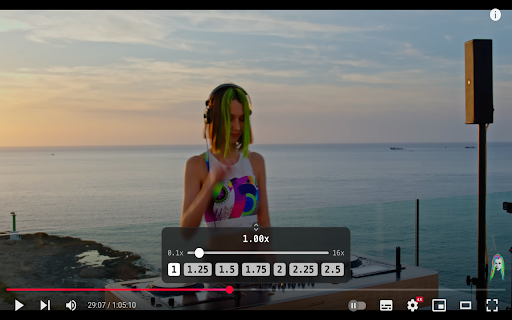
Accelerate or slow down videos on YouTube with our convenient speed controller! Our extension allows you to adjust playback speed from 0.1x to 16x directly within the YouTube player. Double-clicking the slider will instantly reset the speed to the standard.

Features:
- Wide Range of Speeds: Adjust speed from 0.1x to 16x.
- Ease of Use: Reset speed with a double-click for quick return to normal playback.
- Convenient Viewing: The controller hides when hovering over the scroll bar for time code viewing, ensuring nothing obstructs your view.
- Personalization: Speed settings for each channel are saved in the extension's storage and automatically applied when launching a video. (Available in the next version)

Keyboard Shortcuts
- Toggle Controller:
  Press V to show or hide the controller.

- Decrease Speed:
  Press S to decrease the speed by 0.1.

- Increase Speed:
  Press D to increase the speed by 0.1.

- Reset Speed:
  Press R to reset the speed to 1.

- Preferred Speed:
  Press G to set the speed to your preferred value of 2.0.

At the moment, keyboard shortcuts cannot be customized.

Control video speed with ease and comfort, making your YouTube viewing experience even more convenient and personalized!
Technical
- Version
- 0.1.9
- Manifest
- V3
- Size
- 24.45KiB
- Min Chrome
- 88
- Languages
- 1
- Featured
- No
Metadata
- ID
- hkhfaempiaejenaddpbeckghomphjjcp
- Developer ID
- ua25d63286f92d771107974e22f6758bf
- Developer Email
- [email protected]
- Created
- Jun 18, 2025
- Last Updated (Store)
- Oct 27, 2025
- Last Scraped
- Jun 4, 2026
- Website
- —
- Support URL
- —
- Privacy Policy
- https://github.com/doroved/speeder/blob/main/PRIVACY.md
Similar extensions
Alternatives to Speeder - YouTube Speed Controller, ranked by description similarity.

Youtube Video Speed Controller with Hotkeys
Speed up, slow down, advance and rewind HTML5 audio/video with shortcuts
16
★ 1.0

Video Speed Controller
Control video playback speed with configurable increments.
4
★ 5.0

YouTube Speed Controller
Adjust YouTube video playback speed with custom controls
42

Universal Video Speed Controller
Controls playback speed for HTML5 videos on any website.
25
★ 5.0

YouTube Speed Controller
Enhance your YouTube viewing experience with the YouTube Speed Controller extension! This lightweight and easy-to-use extension…
35

Video Speed Controller
Enhanced video playback speed control with keyboard shortcuts, visual feedback, and persistent settings
14
★ 5.0

Video Speed Controller
Enhanced video playback speed control with keyboard shortcuts, visual feedback, and persistent settings
6

Custom speed extension
Control video speed with a floating UI and keyboard shortcuts.
5
★ 5.0
Data sourced from the Chrome Web Store · last verified Jun 4, 2026.