
Volume Master — Increase Volume
The extension boosts browser audio up to 600%.
As of May 2026, Volume Master — Increase Volume has 8,000 users and a 4.15/5 rating from 13 reviews in the Accessibility category.
Usersup 33.3 percent+33.3%
8.0K
8,000
Ratingno change0%
4.15
13 reviews
Reviewsno change0%
13
Version
1.0.0
Manifest V3
90-day change · In the last 90 days this extension gained 2.0K users.
History
2 snapshotsTracking since Apr 25, 2026.
View as table
| Date | Users | Rating | Reviews | Version |
|---|---|---|---|---|
| Apr 25, 2026 | 6.0K | 4.15 | 13 | 1.0.0 |
| May 21, 2026 | 7.0K | 4.15 | 13 | 1.0.0 |
| Now | 8.0K | 4.15 | 13 | 1.0.0 |
Permissions & access
- Permissions
- tabstabCapturestorageoffscreenscripting
- Host access
- <all_urls>
Screenshots


About
Your ultimate tool for boosting volume in your browser!

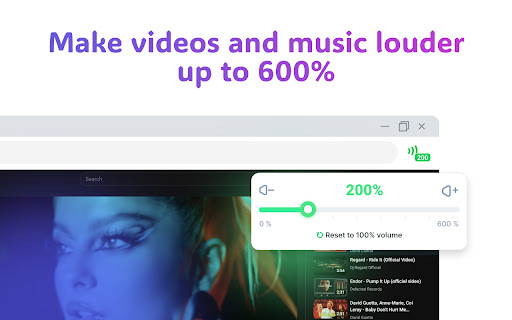
Volume Master is a simple yet powerful extension that allows you to increase sound volume up to 600% on any tab. Watch videos, listen to music, and enjoy content on YT, Vimeo, Dailymotion, and other platforms with maximum comfort.

Why Choose Volume Master?

	•	Powerful Sound Amplification – Break through standard volume limits.
	•	Precise Control – Smooth volume adjustment from 0% to 600%.
	•	Simplicity and Convenience – Intuitive interface with no unnecessary elements.

How It Works:

— In full-screen mode, browsers may restrict the functionality of sound-enhancing extensions. For your convenience, a blue indicator will appear on the tab bar, signaling active sound amplification.
— Tip: To activate full-screen mode, press F11 (Windows) or Ctrl + Cmd + F (Mac).

Shortcuts:

When the popup is open and active, you can control the volume using these hotkeys:
	•	Left Arrow / Down Arrow – decrease volume by 10%
	•	Right Arrow / Up Arrow – increase volume by 10%
	•	Space – instantly boost volume by 100%
	•	M – mute/unmute

These shortcuts make volume adjustments fast and effortless, allowing you to fine-tune audio directly from the popup with a single keystroke.

Why Are Permissions Needed?
The extension requests access to website data to work with audio streams via AudioContext and display active tabs with sound. This is necessary for the proper functioning of the sound amplification features.

Install Volume Master and enjoy sound like never before!

Your Privacy Is Our Priority:

We do not collect, store, or share your personal data. Volume Master operates locally on your device, ensuring complete security and confidentiality. The extension fully complies with the privacy policies of extension stores.

Try Volume Master today and discover a new level of sound in your browser!
Technical
- Version
- 1.0.0
- Manifest
- V3
- Size
- 263KiB
- Min Chrome
- 88
- Languages
- 54
- Featured
- Yes
Metadata
- ID
- hkcbnlcphleacgfgkgfcocfbpnkjpkfo
- Developer ID
- ua253d28052d6b493698cbba811285aa6
- Developer Email
- [email protected]
- Created
- Mar 18, 2025
- Last Updated (Store)
- Mar 18, 2025
- Last Scraped
- May 21, 2026
- Website
- —
- Support URL
- —
Similar extensions
Alternatives to Volume Master — Increase Volume, ranked by description similarity.

Volume Up Plus
The extension allows you to control volume and amplify sound in the browser up to 600%.
2.0K
★ 4.7

Volume Master
Boost volume of any tab Up to 600% and control it with a simple slider
2.0K
★ 4.5

Volume Master 4 You
Volume booster up to 600% with fine-grained control for any tab
13

VolumeBooster
Boost or reduce audio/video volume (0-1000%) on any website. Works with YouTube, Netflix, Twitch and all other sites.
598
★ 5.0

Volume Booster
Boost your volume up to 500 %
40.0K
★ 3.5

Volume Booster - Increase sound
Volume booster increase volume on any tab! Bass booster and EQ control in your browser.
10.0K
★ 4.7

Volume Boost & Sound Boost (PRO) - Increase Volume & Sound
Increase the sound by 1000%! Easy to use Sound Controller for any browser tab.
97
★ 3.7

Simple Volume Booster
Boost volume and adjust EQ per tab for HTML5 audio/video.
2.0K
★ 5.0
Data sourced from the Chrome Web Store · last verified May 21, 2026.