
KDP Autofill
KDP Auto-Fill helps you upload your books much faster with auto fill system to save you time and the hustle.
As of June 2026, KDP Autofill has 3,000 users and a 3.91/5 rating from 35 reviews in the Workflow & Planning category.
Usersdown 25.0 percent−25.0%
3.0K
3,000
Ratingno change0%
3.91
35 reviews
Reviewsno change0%
35
Version
2.1.0
Manifest V3
90-day change · In the last 90 days this extension lost 1.0K users, 1 version update, changed permissions.
History
2 snapshotsTracking since Apr 25, 2026.
View as table
| Date | Users | Rating | Reviews | Version |
|---|---|---|---|---|
| Apr 25, 2026 | 4.0K | 3.91 | 35 | 2.0.0.4 |
| May 5, 2026 | 4.0K | 3.91 | 35 | 2.1.0 |
| Now | 3.0K | 3.91 | 35 | 2.1.0 |
Changelog
- Apr 25, 2026description
KDP Auto Fill Help you save the book information and details so you don't have to fill it out every time you want to upload a book. it saves you a lot of time and hustle and also there are no errors or typos once you do the first filling correctly. Amazon KDP Automation Gets Easier!
DP Autofill helps authors and publishers save time when creating paperback listings on Amazon KDP.

What it does

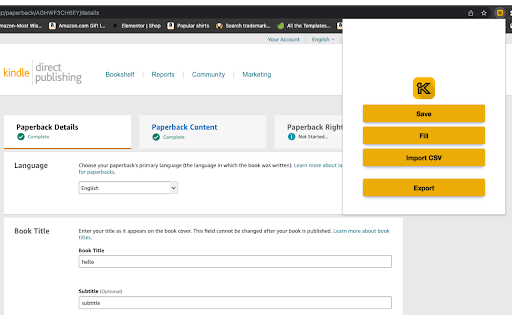
Save your current KDP form data (Details, Pricing, Content fields)
Fill saved data back into KDP forms instantly
Import metadata from CSV
Export your saved metadata to CSV
Generate KDP detail suggestions with AI (using your own OpenAI API key)

AI feature (your own key)

The extension includes an AI Autofill helper:

Paste your OpenAI API key in the extension popup
Click AI autofill details
Describe your book (genre, audience, topic, style)
The extension generates suggested KDP detail fields
Click Fill to apply them on KDP
Your OpenAI key is stored locally in your browser profile for extension use.

License required
This extension requires a valid Gumroad license key for activation.

Get your license here: https://mohaa4.gumroad.com/l/kdpautofill

After purchase:

Open the extension popup
Paste your Gumroad license key
Click Submit to activate

Who this is for

KDP self-publishers
Low/medium content publishers
Teams managing multiple book listings
Anyone who wants faster, repeatable KDP entry workflows
How To Use (for Store “Overview” or support page)

Install the extension

Open Amazon KDP book setup page
Click extension icon
Enter Gumroad license key and submit

Use:

Save: capture current form values
Fill: populate saved values
Import CSV: load data from CSV
Export: download current saved data
(Optional) Add OpenAI API key in popup for AI suggestions, then click AI autofill details
License validation is performed with Gumroad API.
AI generation uses OpenAI API only when the user provides their own key.
User-entered API key is stored locally in browser storage.
No account creation required.
- Apr 25, 2026host_permissions
https://kdp.amazon.com/*, https://autofill.mercherworld.com/*
https://kdp.amazon.com/*, https://api.gumroad.com/*, https://api.openai.com/*
- Apr 25, 2026permissions
storage, activeTab
storage, activeTab, contextMenus, downloads
Permissions & access
- Permissions
- storageactiveTabcontextMenusdownloads
- Host access
- https://kdp.amazon.com/*, https://api.gumroad.com/*, https://api.openai.com/*
Screenshots
About
DP Autofill helps authors and publishers save time when creating paperback listings on Amazon KDP.

What it does

Save your current KDP form data (Details, Pricing, Content fields)
Fill saved data back into KDP forms instantly
Import metadata from CSV
Export your saved metadata to CSV
Generate KDP detail suggestions with AI (using your own OpenAI API key)

AI feature (your own key)

The extension includes an AI Autofill helper:

Paste your OpenAI API key in the extension popup
Click AI autofill details
Describe your book (genre, audience, topic, style)
The extension generates suggested KDP detail fields
Click Fill to apply them on KDP
Your OpenAI key is stored locally in your browser profile for extension use.

License required
This extension requires a valid Gumroad license key for activation.

Get your license here: https://mohaa4.gumroad.com/l/kdpautofill

After purchase:

Open the extension popup
Paste your Gumroad license key
Click Submit to activate

Who this is for

KDP self-publishers
Low/medium content publishers
Teams managing multiple book listings
Anyone who wants faster, repeatable KDP entry workflows
How To Use (for Store “Overview” or support page)

Install the extension

Open Amazon KDP book setup page
Click extension icon
Enter Gumroad license key and submit

Use:

Save: capture current form values
Fill: populate saved values
Import CSV: load data from CSV
Export: download current saved data
(Optional) Add OpenAI API key in popup for AI suggestions, then click AI autofill details
License validation is performed with Gumroad API.
AI generation uses OpenAI API only when the user provides their own key.
User-entered API key is stored locally in browser storage.
No account creation required.
Technical
- Version
- 2.1.0
- Manifest
- V3
- Size
- 104KiB
- Min Chrome
- 88
- Languages
- 1
- Featured
- No
Metadata
- ID
- hkaaadbdciidjlkjdlhagcomlinjeffp
- Developer ID
- u8a107a6bebe6bb5b60b2ffe09f8b3da7
- Developer Email
- [email protected]
- Created
- Dec 25, 2019
- Last Updated (Store)
- Apr 15, 2026
- Last Scraped
- Jun 14, 2026
- Website
- merchaai.com
- Support URL
- https://merchaai.com/contact
- Privacy Policy
- https://merchaai.com/privacy
Similar extensions
Alternatives to KDP Autofill, ranked by description similarity.

phantm.io
Extra automation tools for phantm.io
—

KDP Spy by Book Bolt
KDP Spy is brought to you by BookBolt.io.
Please follow these steps to install KDP Spy and begin using it.
Step 1: Install the…
50.0K
★ 2.4

KDP Template Overlay
Generates 300-DPI PNG overlays for KDP: Cover and Interior
16

AutoJobFill: AI Job Application Helper
Auto-fill job applications with your saved answers.
3
★ 5.0

Resume Autopilot
Your Resume Autopilot
2

Copy Tags KDP Title Generator Search Amazon
Get tags from Amazon KDP searches and generates titles so you can list your books faster.
631

Book Bolt Lister
Book Bolt Lister - Bulk Upload Multiple Book Design Variations Easily
Book Bolt Lister is available under any of the Book Bolt…
20.0K
★ 3.3

Book Connect Kdp Integrator
Transfer your Book Connect data directly to KDP with this simple to use BCI KDP Integrator.
17
Data sourced from the Chrome Web Store · last verified Jun 14, 2026.