Torq AI: ChatGPT Powered AI Assistant
Harnessing the prowess of ChatGPT to revolutionize your productivity through advanced AI assistance.
As of May 2026, Torq AI: ChatGPT Powered AI Assistant has 162 users and a 5.00/5 rating from 3 reviews in the Workflow & Planning category.
Usersdown 6.4 percent−6.4%
162
162
Ratingno change0%
5.00
3 reviews
Reviewsno change0%
3
Version
1.0.2
Manifest V3
History
2 snapshotsTracking since Apr 25, 2026.
View as table
| Date | Users | Rating | Reviews | Version |
|---|---|---|---|---|
| Apr 25, 2026 | 173 | 5.00 | 3 | 1.0.2 |
| May 21, 2026 | 151 | 5.00 | 3 | 1.0.2 |
| Now | 162 | 5.00 | 3 | 1.0.2 |
Permissions & access
- Permissions
- storagebookmarkstopSitesfaviconactiveTab
- Host access
- None declared
Screenshots
About
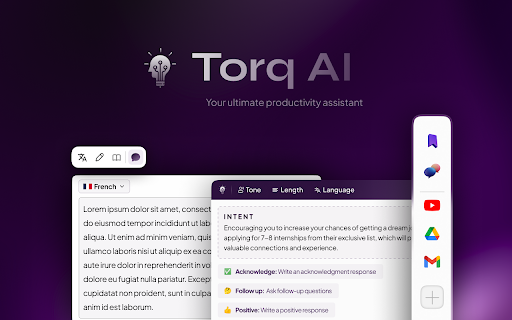
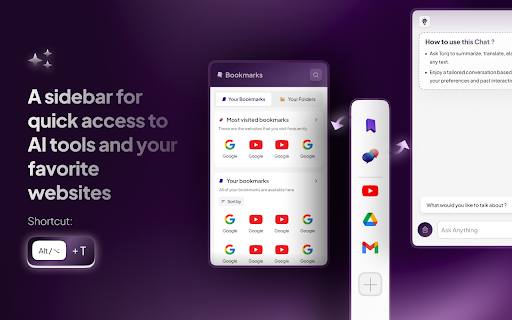
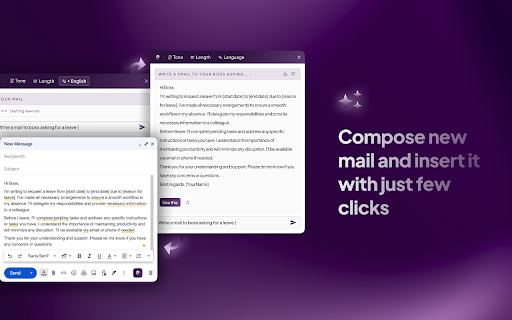
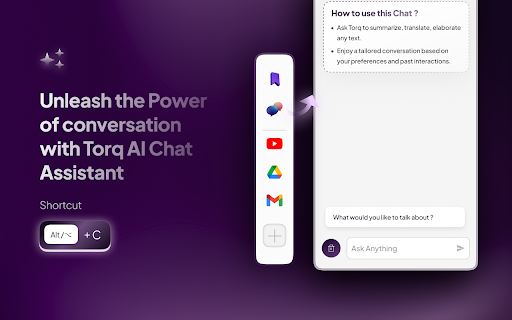
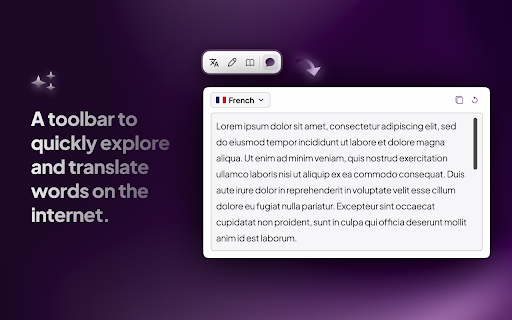
Introducing Torq AI, your advanced browsing assistant powered by state-of-the-art AI capabilities. This innovative Chrome Extension is built to elevate your browsing experience, bolster productivity, and offer a suite of new features including our brand new "Sidebar". No matter the browsing context, be it engaging with your Gmail or needing smarter, AI-integrated responses, Torq AI is your solution to streamline workflow. With Torq AI, you don't just have instant access to the data you need; you have an intelligent assistant enhancing your browsing experience at every step. From generating smart responses to assisting with real-time Gmail suggestions, Torq AI is your go-to for effective and engaging web navigation. ⭐️ Key Features ⭐️ 1️⃣ AI Smart Reply and Response Generation - Engage in dynamic conversations about any topic on the web with your personal AI assistant, Torq AI. - Benefit from smart response generation, quick answer provision, and simplification of complex texts you're reading. - How to use it? ⬇️ - Interact with Torq AI by selecting text and clicking on the Torq AI icon for inquiries about your selected reading. 2️⃣ Gmail Smart Reply Feature - Smoothly navigate your Gmail communications with the aid of Torq AI's Smart Reply feature, offering real-time suggestions for responses. 3️⃣ Efficient Data Access - Leverage Torq AI for quick access to essential information, thus streamlining your workflow and saving precious time. 4️⃣ Seamless Browsing Experience - Experience a highly responsive and stable user interface, guaranteeing smoother transitions and superior usability. 5️⃣ Newly Introduced Sidebar - Engage in an interactive AI chat, manage bookmarks and folders, access quick links, and customise the sidebar according to your needs. Torq AI is FREE and does not require any CREDIT CARD. 🧑🏫 Introduction to Torq AI: Torq AI is here to transform your browsing experience. With our cutting-edge AI technology, you can generate smart responses, receive real-time Gmail suggestions, and have immediate access to required data. Torq AI offers you a seamless, efficient browsing journey, saving time and making web navigation intuitive and easy. Experience the power of an AI assistant that enhances your browsing experience wherever you go. Simply install the Torq AI Chrome Extension and click on the Torq AI icon on the right side of the browser to start a smart and efficient interaction with the AI. ➕ What is Torq AI? Torq AI is an intelligent browsing assistant empowered with advanced AI technology. It's designed to facilitate smart responses to inquiries, improve Gmail communications, and offer an efficient web navigation experience. Torq AI is here to boost your productivity by offering an enhanced browsing experience. ➕ How to utilise Sidebar in Torq AI? Access Torq AI's Side Bar by using the Alt + T shortcut, and utilise the AI chat with the Alt + C shortcut or the trigger on the right of the page for a seamlessly interactive and customisable browsing experience. ➕ How do I utilise AI and Torq AI in Chrome? To use Torq AI on Chrome, install the Torq AI Chrome extension from the Chrome Web Store. After installation, you can start interacting with Torq AI on any website, enjoying smart AI responses and improved Gmail communication. ➕ Subscribe to us for more! https://www.torq.live Stay updated with Torq AI, your advanced Chrome Extension for an engaging browsing experience. Enjoy the power of AI in your browsing journey with Torq AI! Release Notes: v1.0.1 🐛 Bug Fixes: Chat Issue Resolved: 🛠 We've addressed an issue where some chats created by Torq were not opening on ChatGPT. Users should now experience a seamless chat experience without any hiccups. ✨ New Features & Enhancements: Event Tracking for Torq Interactions: 📊 To better understand user interactions and improve the overall experience, we've introduced event tracking for interactions with Torq components. 🛡 We prioritise your privacy, and we want to assure you that events are sent only when you interact with Torq components. Importantly, no personally identifiable information (PII) is being used or collected. Your data remains confidential, and we're committed to maintaining the highest privacy standards. v1.0.2 🐛 Bug Fixes: Minor bug fixes done
Technical
- Version
- 1.0.2
- Manifest
- V3
- Size
- 1.9MiB
- Min Chrome
- 88
- Languages
- 1
- Featured
- Yes
Metadata
- ID
- hjpbafkbdcdlojmhaklhfbdighpdpghn
- Developer ID
- u30d32d5f6ddbc6f14251fd2719308272
- Developer Email
- [email protected]
- Created
- Aug 8, 2023
- Last Updated (Store)
- Aug 25, 2023
- Last Scraped
- May 21, 2026
- Website
- https://www.torq.live/
- Support URL
- https://www.torq.live/support
- Privacy Policy
- https://www.torq.live/privacy.html
Similar extensions
Alternatives to Torq AI: ChatGPT Powered AI Assistant, ranked by description similarity.
AI ON THE GO
Get instant, personalized AI assistance on any website with AI ON THE GO, powered by ChatGPT. Streamline your workflow today!
104

Your AI Companion - Chatbot.to
Boost productivity with Chatbot.to AI Companion. Image Generation - 150 custom prompts - Save time & enhance your workflow.
17
★ 5.0

101GPT - StandAlone Chat
Boost productivity with 101GPT stand-alone chat. 150 custom prompts included to save you time & enhance your browsing experience.
16
★ 5.0

QuickGPT AI assistant
QuickGPT AI Assistant for in-browser ChatGPT access and features
8

Geta.Team
Connect your browser to GetA.Team AI agents for automation
65
★ 5.0

Browse Buddy: AI Assistant with Page Reading and Search
AI assistant that reads web pages and provides contextual help. Features smart models with web search capabilities.
7

CoTaskAI
LLM on your browser. CoTaskAI helps you to talk to your browsing contents, summarize, and generate ideas.
5

QAssist by QNavix: AI Workspace
QAssist by QNavix is your AI workspace for notes, knowledge, files, reminders, trackers, and helpful browser assistance.
33
★ 5.0
Data sourced from the Chrome Web Store · last verified May 21, 2026.