
Pomodoro Ninja — Focus Timer & Game
Pomodoro timer + break game: a ninja slices falling tomatoes and throws shurikens. Combos, rewards, stats to keep you focused.
As of June 2026, Pomodoro Ninja — Focus Timer & Game has — users in the Workflow & Planning category.
Usersno change0%
—
—
Ratingno change0%
—
— reviews
Reviewsno change0%
—
Version
1.0.0
Manifest V3
History
1 snapshotsTracking since Jun 21, 2026.
Not enough history yet for this metric — the chart fills in as we collect more snapshots.
View as table
| Date | Users | Rating | Reviews | Version |
|---|---|---|---|---|
| Jun 21, 2026 | — | — | — | 1.0.0 |
| Now | — | — | — | 1.0.0 |
Permissions & access
- Permissions
- storagealarmsoffscreensidePanel
- Host access
- None declared
Screenshots



About
Pomodoro Ninja turns the classic focus-and-break technique into a habit you actually want to keep.

Work in focused sessions, and when the break starts, a side-panel mini-game opens: a ninja slices falling tomatoes for points. Build combos, earn coins, and spend them on katana skins, backgrounds, and throwing shurikens. When the break ends, you get a clear cue to get back to work.

Key features:
- Customizable Pomodoro timer — set work length, short break, long break, and how many cycles before a long break.
- A fun break game instead of doom-scrolling — slice tomatoes, dodge bombs, chase combos and milestones.
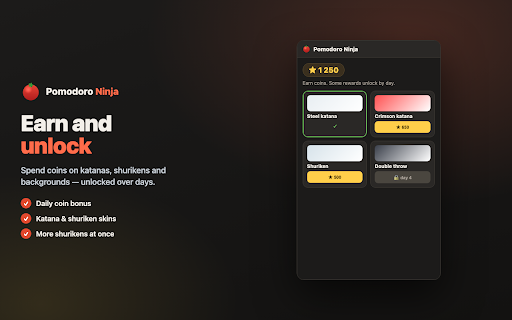
- Rewards shop — earn coins from play and unlock katanas, backgrounds, shurikens, and abilities (dash, double jump, multi-throw).
- Daily streak bonuses to keep you coming back.
- Stats — track tomatoes sliced, focus minutes, and total score, broken down by day.
- Audible cues and a toolbar badge tell you when it's time to play and when it's time to work.
- English and Russian interface.

How to use it:
1. Click the tomato icon in your toolbar to open the side panel.
2. Press Start and focus on your work until the timer ends.
3. When the break begins, play the game — move the ninja and slice tomatoes.
4. When the break ends, head back to work. Every few cycles you get a longer break.

Privacy:
Everything runs locally on your device. No account, no sign-in, and no internet connection required. Your settings, progress, and stats are stored only in your browser and are never sent anywhere.

Feedback and support:
Suggestions and bug reports are welcome — use the in-app feedback link or the support email on this listing.
Technical
- Version
- 1.0.0
- Manifest
- V3
- Size
- 66.46KiB
- Min Chrome
- 88
- Languages
- 2
- Featured
- No
Metadata
- ID
- hjojdelapdfbndnppcdmodjaihkoenbf
- Developer ID
- u8a7351b78d2743b3d9e635a2dbcdd2ed
- Developer Email
- [email protected]
- Created
- Jun 20, 2026
- Last Updated (Store)
- Jun 20, 2026
- Last Scraped
- Jun 21, 2026
- Website
- —
- Support URL
- —
- Privacy Policy
- —
Data sourced from the Chrome Web Store · last verified Jun 21, 2026.