
Open in Profile
Send any tab or link to another Chrome profile instantly. Right-click or click the toolbar icon.
As of June 2026, Open in Profile has 12 users and a 1.00/5 rating from 1 reviews in the Workflow & Planning category.
Usersno change0%
12
12
Ratingno change0%
1.00
1 reviews
Reviewsno change0%
1
Version
2.9
Manifest V3
90-day change · In the last 90 days this extension 2 version updates, changed permissions.
History
9 snapshotsTracking since Apr 1, 2026.
View as table
| Date | Users | Rating | Reviews | Version |
|---|---|---|---|---|
| Apr 1, 2026 | — | — | — | 2.1 |
| Apr 17, 2026 | — | — | — | 2.1 |
| Apr 24, 2026 | 4 | — | — | 2.1 |
| May 1, 2026 | 6 | — | — | 2.1 |
| May 8, 2026 | 7 | — | — | 2.1 |
| May 12, 2026 | 12 | 1.00 | 1 | 2.5 |
| May 18, 2026 | 14 | 1.00 | 1 | 2.5 |
| May 31, 2026 | 11 | 1.00 | 1 | 2.5 |
| Jun 6, 2026 | 10 | 1.00 | 1 | 2.5 |
| Now | 12 | 1.00 | 1 | 2.9 |
Changelog
- May 8, 2026permissions
contextMenus, tabs, nativeMessaging
contextMenus, tabs, nativeMessaging, storage
Permissions & access
- Permissions
- contextMenustabsnativeMessagingstorage
- Host access
- <all_urls>
Screenshots



About
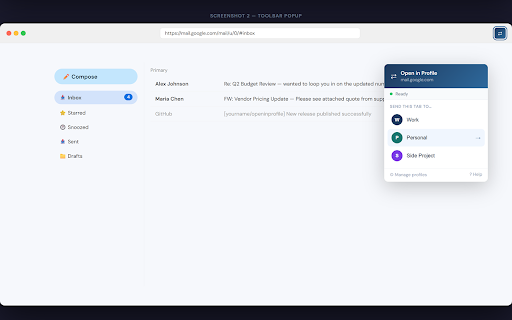
Send any tab or link to another Chrome profile. Right-click or click the toolbar icon — done.
Keep your logins and tabs separated between work, school and personal, and fix the "logged into the wrong account" annoyance.

How it works
→ Right-click any page or link and choose "Open in Work", "Open in Personal", etc.
→ Or click the ⇄ toolbar button to send the current tab with one click.
→ The page opens immediately in the correct profile.
Key features
• Works on any page or link — right-click context menu and toolbar popup
• Configure your profiles once — all your Chrome windows share the same settings automatically
• Auto-detects your Chrome profiles — no need to look up profile folder names manually
• Rename profiles in one place — the change applies everywhere instantly
• Clean, modern setup guide walks you through installation step by step
What's the companion app?
Chrome extensions can't directly control other Chrome profiles, so Open in Profile uses a small companion helper (a PowerShell script) that runs silently on your PC when needed. The included installer sets everything up in about 2 minutes — no technical knowledge required.
The companion app is open source and available on GitHub. It stores your profile names in a single file on your computer and sends no data anywhere.
Download the companion app: https://github.com/shedaya/openinprofile/releases/latest
Requirements
• Windows 10 or 11
• Google Chrome
• One-time companion app installation (link above)
Support & source code
https://github.com/shedaya/openinprofile
Technical
- Version
- 2.9
- Manifest
- V3
- Size
- 14.57KiB
- Min Chrome
- 88
- Languages
- 1
- Featured
- No
Metadata
- ID
- hjmlmoaenjllnbcfhggihdplahoboann
- Developer ID
- u4263ba8c37a18ba9a723dfb684a6254b
- Developer Email
- [email protected]
- Created
- Mar 31, 2026
- Last Updated (Store)
- Jun 5, 2026
- Last Scraped
- Jun 6, 2026
- Website
- —
- Support URL
- https://github.com/shedaya/openinprofile
- Privacy Policy
- https://shedaya.github.io/openinprofile/
Data sourced from the Chrome Web Store · last verified Jun 6, 2026.