
Super Save Image As
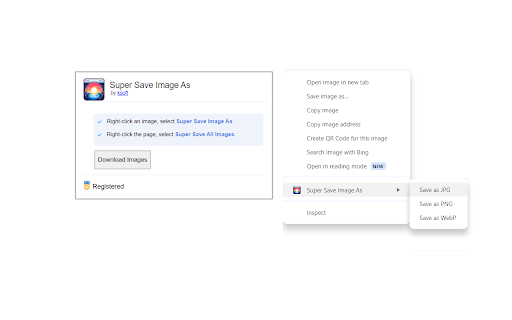
Save images as png, jpg, or webp by right-clicking on an image. Adds a new context menu to save images in a variety of formats.
As of May 2026, Super Save Image As has 201 users in the Functionality & UI category.
Usersup 6.9 percent+6.9%
201
201
Ratingno change0%
—
— reviews
Reviewsno change0%
—
Version
1.0
Manifest V3
History
2 snapshotsTracking since Apr 24, 2026.
View as table
| Date | Users | Rating | Reviews | Version |
|---|---|---|---|---|
| Apr 24, 2026 | 188 | — | — | 1.0 |
| May 21, 2026 | 199 | — | — | 1.0 |
| Now | 201 | — | — | 1.0 |
Permissions & access
- Permissions
- downloadscontextMenusoffscreenactiveTabscriptingstorage
- Host access
- http://*/, https://*/
Screenshots


About
Save images as PNG, JPG, or WEBP by right-clicking on an image. Adds a new context menu to the web browser to save images in a variety of formats. Also allows one-click to save all images on the page.

* Save images as PNG, JPG, or WEBP.
* Adds a new option in the right-click menu to save images in a variety of formats.
* Click a button to save all images on the page.

The free version allows saving unlimited images (with a limit of 30 images per single batch download). The registered version unlocks unlimited images in a single download.

Super Save Image As is the quickest and easiest way to save images in a web page.
Technical
- Version
- 1.0
- Manifest
- V3
- Size
- 94.82KiB
- Min Chrome
- 88
- Languages
- 1
- Featured
- No
Metadata
- ID
- hjjimaalejeikngnbbhipnekaecifaao
- Developer ID
- u8085cf0869150d1368ce504fd499a9eb
- Developer Email
- [email protected]
- Created
- Jan 22, 2024
- Last Updated (Store)
- Jan 22, 2024
- Last Scraped
- May 21, 2026
- Privacy Policy
- http://dummysoftware.com/chrome-privacy.html
Similar extensions
Alternatives to Super Save Image As, ranked by description similarity.

Save Image As
Right-click any image and save it as JPG, PNG, WebP, or AVIF.
569
★ 3.0

Save Image As PNG
Adds a "Save Image as PNG" option to the right-click menu, allowing you to easily save images in PNG format. Save image as type.
100.0K
★ 4.2

Save WEBP as JPG/PNG
Gives the option to save WEBP images to JPG/PNG
2.0K
★ 1.9

RapidPNG
Adds the right-click menu option to directly save images as PNG.
2

Image Download Manager Extension
Download All Images from a WebPage in Just ONE Click with Image Download Manager Extension.
3.0K
★ 3.9

Save Image As...
Right-click any image to save it in your preferred format — lossless, compressed, modern, or as a PDF.
112
★ 5.0

Alt-Click Image Downloader: One-Click Save, Convert & Batch Download
Save images instantly with Alt+Left-Click. Supports direct/data/blob URLs; extracts original links from CDNs. Lightweight, private.
76
★ 1.0

Pix Grabber
Pix Grabber: Download all images
1
Data sourced from the Chrome Web Store · last verified May 21, 2026.