
Link Saver
A browser extension that lets you easily save and organize your favorite links in one place.
As of May 2026, Link Saver has 20 users and a 5.00/5 rating from 3 reviews in the Productivity category.
Usersup 33.3 percent+33.3%
20
20
Ratingno change0%
5.00
3 reviews
Reviewsno change0%
3
Version
1
Manifest V3
History
2 snapshotsTracking since Apr 24, 2026.
View as table
| Date | Users | Rating | Reviews | Version |
|---|---|---|---|---|
| Apr 24, 2026 | 15 | 5.00 | 3 | 1 |
| May 21, 2026 | 18 | 5.00 | 3 | 1 |
| Now | 20 | 5.00 | 3 | 1 |
Permissions & access
- Permissions
- tabsstorageunlimitedStoragecontextMenus
- Host access
- None declared
Screenshots


About
Do you need help managing your favorite links?

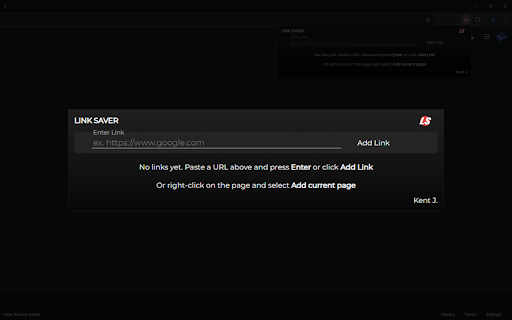
Well, Link Saver has your back. Go to the page you want to save, open the context menus (right-click), and press 'Add current page to Link Saver.'

That's very easy, right? That's not all. You can also add a link manually. Copy and paste the link you want to save, open the Link Saver extension, paste it into the input box, and click 'Add Link.'

So simple!

What's great about this extension?
• Organize your links with the group function. This allows you to group multiple links at the same time. Select the links you want to group, then click 🗂️ GROUP SELECTED to group them.
• Sort the links according to your preference. Hold your left mouse button at the six (6) dots on each link to grab it. Do not let go; simply drag it to the position you want it to be. You can also do this with a group!
• Rename groups according to your preference or leave them as they are. I provided random group names for you!
• Rename the title of links according to your preference.
• Open multiple links at once. Select the links you want to include, then click 🔗 OPEN SELECTED. You can also do this by group by clicking the 'Open All' button at the top of the group layout.

That's it!

Note: Some functions are not working on ARM64 devices, I am still looking into it.
Technical
- Version
- 1
- Manifest
- V3
- Size
- 6.88MiB
- Min Chrome
- 88
- Languages
- 1
- Featured
- No
Metadata
- ID
- hjhomnlneohefohpmkeflgiidnnacoil
- Developer ID
- u3cf36ea340bf9e091a4dd02eecb68559
- Developer Email
- [email protected]
- Created
- Sep 24, 2024
- Last Updated (Store)
- Sep 24, 2024
- Last Scraped
- May 21, 2026
- Website
- —
- Support URL
- https://kentj.vercel.app/
- Privacy Policy
- —
Similar extensions
Alternatives to Link Saver, ranked by description similarity.

Link Saver
Save up to 20 links for quick access.
14

Save Links
An extension to save and manage links easily.
83
★ 5.0

Link Saver
Right-click on links to save their URLs and manage the list via a popup.
3
★ 5.0

Link Saver
Save and organize links for later reading
4

Saved Links Manager
This extension saves your fav links to download them as a '.txt' file
17
★ 5.0

Save to LinkySave
Save the current page to your LinkySave account with one click.
4

Link App
Link App Extension
79
★ 5.0

LinkLasso
Easily open, copy, or bookmark multiple links.
53
★ 5.0
Data sourced from the Chrome Web Store · last verified May 21, 2026.