
AudioBrief – AI Article Summarizer & Text to Speech
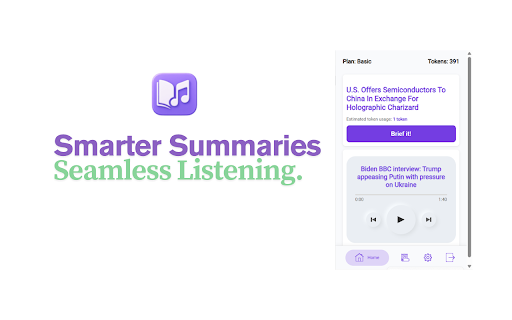
Turn any article into an AI audio summary. 11 styles, 6 voices, 10+ languages. Listen hands-free in 1 click.
As of June 2026, AudioBrief – AI Article Summarizer & Text to Speech has 12 users and a 5.00/5 rating from 4 reviews in the Productivity category.
Usersno change0%
12
12
Ratingno change0%
5.00
4 reviews
Reviewsno change0%
4
Version
1.6
Manifest V3
90-day change · In the last 90 days this extension 2 version updates, changed permissions.
History
7 snapshotsTracking since Apr 19, 2026.
View as table
| Date | Users | Rating | Reviews | Version |
|---|---|---|---|---|
| Apr 19, 2026 | 12 | 5.00 | 4 | 1.4 |
| Apr 26, 2026 | 12 | 5.00 | 4 | 1.5 |
| May 9, 2026 | 13 | 5.00 | 4 | 1.6 |
| May 14, 2026 | 12 | 5.00 | 4 | 1.6 |
| May 20, 2026 | 11 | 5.00 | 4 | 1.6 |
| May 26, 2026 | 14 | 5.00 | 4 | 1.6 |
| Jun 3, 2026 | 13 | 5.00 | 4 | 1.6 |
| Now | 12 | 5.00 | 4 | 1.6 |
Changelog
- Apr 19, 2026description
AudioBrief – Smarter Summaries, Seamless Listening
Turn long reads into crisp, clear audio tailored to your language, style, and voice preferences.

AudioBrief is your AI-powered tool for transforming articles and summaries into natural-sounding audio—perfect for learning, catching up, or staying informed on the go.

Key Features:
Instant Audio Summaries: Quickly convert articles and long-form content into concise, engaging narrations.

Voice Selection: Pick from a variety of high-quality AI voices—male, female, or expressive tones—to suit your taste.

Summary Style Selection: Choose the type of summary you want—factual, conversational, or analytical.

Language & Translation Options: Summarize and translate content into your preferred language with support for multiple languages and regional accents.

User-Friendly Interface: Clean, simple design for a smooth and intuitive experience.

Maximize Productivity: Great for commuting, exercising, or multitasking—listen and learn anytime, anywhere.

AudioBrief makes information accessible, personal, and effortlessly listenable—your smarter way to stay informed.
AudioBrief turns any web article into a concise AI-generated audio summary so you can listen instead of read — while commuting, working out, cooking, or doing anything else with your hands.

Just open an article, click the extension, and press "Brief it!" AudioBrief extracts the content, summarizes it with AI, and starts playing audio in seconds.

──────────────────────────────
⚡ WHY AUDIOBRIEF?
──────────────────────────────

Most "text to speech" extensions just read every word on the page — ads, menus, cookie banners included — in a robotic voice. AudioBrief is different:

✅ AI extracts only the real article content
✅ AI condenses it into the key points
✅ Neural voices read it back naturally
✅ Playback starts immediately (audio streams — no waiting)

──────────────────────────────
🎙️ 11 SUMMARY STYLES
──────────────────────────────

Choose how the AI frames your content:

• Default – Clear, balanced narrative
• TL;DR – Ultra-short, 3-sentence max
• Bullet Points – Scannable key facts
• Explainer – Teaches you the topic from scratch
• Optimistic – The silver-lining angle
• Key Quotes – Verbatim highlights from the article
• Contextual – Background, implications, bigger picture
• Action Items – What you should do next
• Creative – Storytelling tone, engaging prose
• Atrioc – Energetic, streamer-style commentary
• Sarcastic – Dry wit and sharp takes

──────────────────────────────
🔊 VOICES & TTS OPTIONS
──────────────────────────────

• 6 OpenAI neural voices: Echo, Alloy, Fable, Nova, Onyx, Shimmer
• Streaming audio — starts playing immediately, no buffering wait
• Piper local TTS — 100% free, runs offline in your browser with no data sent to any server.

──────────────────────────────
🌍 10+ LANGUAGES & CROSS-LANGUAGE SUMMARIES
──────────────────────────────

Read an article in French. Listen to it summarized in English. Or vice versa. AudioBrief supports:
English · French · German · Spanish · Italian · Portuguese · Arabic · Dutch · Japanese · and more.

Set your Language Level too: Beginner, Intermediate, Advanced, or Native — great for language learners who want controlled-difficulty audio practice.

──────────────────────────────
📋 AUDIO QUEUE & CONTEXT MENU
──────────────────────────────

• Right-click any article link → "Add to AudioBrief Queue" — line up reads without leaving your current page
• Built-in audio queue — listen to multiple articles back-to-back automatically
• Dashboard history — every brief is saved; replay from any device including mobile

──────────────────────────────
💡 WHAT HAPPENS WHEN TOKENS RUN OUT?
──────────────────────────────

AudioBrief automatically switches to Piper local TTS and reads the full article aloud — no error, no dead end. You never get locked out of content.

──────────────────────────────
🔒 PRIVACY
──────────────────────────────

AudioBrief only reads pages when you explicitly click "Brief it!" or right-click a link. We never track your browsing history. Using Piper local TTS? Zero data ever leaves your device. Full privacy policy at audiobrief.cc/privacy-policy.html

──────────────────────────────
📖 PERFECT FOR
──────────────────────────────

• Busy professionals — stay on top of industry news during your commute
• Students & researchers — quickly absorb papers and long reads
• Language learners — hear content at your level in your target language
• Anyone with screen fatigue — give your eyes a break without falling behind
• Commuters & gym-goers — convert your reading list into a personal podcast
• Productivity hackers — consume 3× more content in the same amount of time

──────────────────────────────
🚀 HOW IT WORKS
──────────────────────────────

1. Install AudioBrief and sign in (free)
2. Open any article in Chrome
3. Click the AudioBrief icon in your toolbar
4. Choose your language, voice, and summary style
5. Press "Brief it!" — audio starts in seconds

Or right-click any link on any page → "Add to AudioBrief Queue" to batch up your reading list.
- Apr 19, 2026short_description
AudioBrief is a Chrome extension that summarizes web pages and converts them into audio podcasts.
Turn any article into an AI audio summary. 11 styles, 6 voices, 10+ languages. Listen hands-free in 1 click.
- Apr 19, 2026name
AudioBrief
AudioBrief – AI Article Summarizer & Text to Speech
- Apr 19, 2026permissions
storage, activeTab, scripting, offscreen, tabs, contextMenus
storage, activeTab, scripting, offscreen, tabs, contextMenus, notifications
Permissions & access
- Permissions
- storageactiveTabscriptingoffscreentabscontextMenusnotifications
- Host access
- <all_urls>
Screenshots


About
AudioBrief turns any web article into a concise AI-generated audio summary so you can listen instead of read — while commuting, working out, cooking, or doing anything else with your hands.

Just open an article, click the extension, and press "Brief it!" AudioBrief extracts the content, summarizes it with AI, and starts playing audio in seconds.

──────────────────────────────
⚡ WHY AUDIOBRIEF?
──────────────────────────────

Most "text to speech" extensions just read every word on the page — ads, menus, cookie banners included — in a robotic voice. AudioBrief is different:

✅ AI extracts only the real article content
✅ AI condenses it into the key points
✅ Neural voices read it back naturally
✅ Playback starts immediately (audio streams — no waiting)

──────────────────────────────
🎙️ 11 SUMMARY STYLES
──────────────────────────────

Choose how the AI frames your content:

• Default – Clear, balanced narrative
• TL;DR – Ultra-short, 3-sentence max
• Bullet Points – Scannable key facts
• Explainer – Teaches you the topic from scratch
• Optimistic – The silver-lining angle
• Key Quotes – Verbatim highlights from the article
• Contextual – Background, implications, bigger picture
• Action Items – What you should do next
• Creative – Storytelling tone, engaging prose
• Atrioc – Energetic, streamer-style commentary
• Sarcastic – Dry wit and sharp takes

──────────────────────────────
🔊 VOICES & TTS OPTIONS
──────────────────────────────

• 6 OpenAI neural voices: Echo, Alloy, Fable, Nova, Onyx, Shimmer
• Streaming audio — starts playing immediately, no buffering wait
• Piper local TTS — 100% free, runs offline in your browser with no data sent to any server.

──────────────────────────────
🌍 10+ LANGUAGES & CROSS-LANGUAGE SUMMARIES
──────────────────────────────

Read an article in French. Listen to it summarized in English. Or vice versa. AudioBrief supports:
English · French · German · Spanish · Italian · Portuguese · Arabic · Dutch · Japanese · and more.

Set your Language Level too: Beginner, Intermediate, Advanced, or Native — great for language learners who want controlled-difficulty audio practice.

──────────────────────────────
📋 AUDIO QUEUE & CONTEXT MENU
──────────────────────────────

• Right-click any article link → "Add to AudioBrief Queue" — line up reads without leaving your current page
• Built-in audio queue — listen to multiple articles back-to-back automatically
• Dashboard history — every brief is saved; replay from any device including mobile

──────────────────────────────
💡 WHAT HAPPENS WHEN TOKENS RUN OUT?
──────────────────────────────

AudioBrief automatically switches to Piper local TTS and reads the full article aloud — no error, no dead end. You never get locked out of content.

──────────────────────────────
🔒 PRIVACY
──────────────────────────────

AudioBrief only reads pages when you explicitly click "Brief it!" or right-click a link. We never track your browsing history. Using Piper local TTS? Zero data ever leaves your device. Full privacy policy at audiobrief.cc/privacy-policy.html

──────────────────────────────
📖 PERFECT FOR
──────────────────────────────

• Busy professionals — stay on top of industry news during your commute
• Students & researchers — quickly absorb papers and long reads
• Language learners — hear content at your level in your target language
• Anyone with screen fatigue — give your eyes a break without falling behind
• Commuters & gym-goers — convert your reading list into a personal podcast
• Productivity hackers — consume 3× more content in the same amount of time

──────────────────────────────
🚀 HOW IT WORKS
──────────────────────────────

1. Install AudioBrief and sign in (free)
2. Open any article in Chrome
3. Click the AudioBrief icon in your toolbar
4. Choose your language, voice, and summary style
5. Press "Brief it!" — audio starts in seconds

Or right-click any link on any page → "Add to AudioBrief Queue" to batch up your reading list.
Technical
- Version
- 1.6
- Manifest
- V3
- Size
- 15.88MiB
- Min Chrome
- 88
- Languages
- 1
- Featured
- No
Metadata
- ID
- hjaabplfbnmgkkpgeibjdmbofalopoai
- Developer ID
- u6ce17399175bebb1cf4514d354ff6404
- Developer Email
- [email protected]
- Created
- Apr 1, 2025
- Last Updated (Store)
- Apr 19, 2026
- Last Scraped
- Jun 8, 2026
- Website
- —
- Support URL
- https://audiobrief.cc
- Privacy Policy
- https://audiobrief.cc/privacy-policy.html
Similar extensions
Alternatives to AudioBrief – AI Article Summarizer & Text to Speech, ranked by description similarity.

Email Summarizer
Summarize your emails and articles and listen to them.
2

Audiotext AI
Turn your Thoughts into Useable Notes
65
★ 5.0

Blurbi
Transform your reading into intelligent audio digests. Save articles, get AI summaries delivered to your inbox with audio versions.
—

IListen AI
IListen AI
134
★ 4.3

Article - Text Reader
Modern text-to-speech reader for articles. Plays in background.
22
★ 5.0

AI Article Summarizer - Quick & Smart Reading
Instantly summarize articles with AI. Save time reading news, blogs, and papers. Multi-language support for all websites.
4
★ 4.0

CleeqAI: Read, Write, Research, Tweet Smarter with AI
Summarize pages, get voice summaries, chat with screenshots, understand data and research faster with ChatGPT, Claude & Gemini.
43
★ 5.0

Audioread: Ultra-Realistic Text-to-Speech
Convert articles, PDFs, emails, or any text into audio
5.0K
★ 4.0
Data sourced from the Chrome Web Store · last verified Jun 8, 2026.