
Scroller
Scrolls the page for you!
As of June 2026, Scroller has 2,000 users and a 3.86/5 rating from 21 reviews in the Productivity category.
Usersup 100.0 percent+100.0%
2.0K
2,000
Ratingno change0%
3.86
21 reviews
Reviewsno change0%
21
Version
1.1.8
Manifest V3
90-day change · In the last 90 days this extension gained 1.0K users.
History
2 snapshotsTracking since May 3, 2026.
View as table
| Date | Users | Rating | Reviews | Version |
|---|---|---|---|---|
| May 3, 2026 | 1.0K | 3.86 | 21 | 1.1.8 |
| Jun 1, 2026 | 1.0K | 3.86 | 21 | 1.1.8 |
| Now | 2.0K | 3.86 | 21 | 1.1.8 |
Permissions & access
- Permissions
- storagetabscontextMenusscripting
- Host access
- <all_urls>
Screenshots



About
Scroller - Your Personalized Auto Scroll Chrome Extension

Are you a manga enthusiast, a news junkie, or a blog reader who finds it tedious to manually scroll through lengthy pages? Say hello to Scroller, a Google Chrome extension designed to enhance your reading experience by automating the scrolling process.

Getting Started:
1. Install the Scroller extension and pin it to your browser.
2. Click on the Scroller icon (next to the address bar) to access and save your preferred scrolling configuration.
3. To activate Scroller, right-click on the webpage, select "Scroller" from the dropdown menu, and choose either "Start Scroll" or "Stop Scroll."
4. If enabled, a double-click anywhere on the webpage will initiate the auto-scroll feature.
5. An option to select if the webpage should automatically scroll on the page load.
6. A single click on the webpage will temporarily pause the auto-scroll. To resume, simply scroll manually. To permanently stop, use the right-click menu.

Features:

Scroller offers two modes for a tailored scrolling experience:

1. Simple Mode: Adjust the scroll speed to your liking, choosing from slow, medium, or fast. The speed is customizable, with 1 being the fastest and higher values slowing the scroll speed.

2. Advanced Mode: This mode provides additional options:
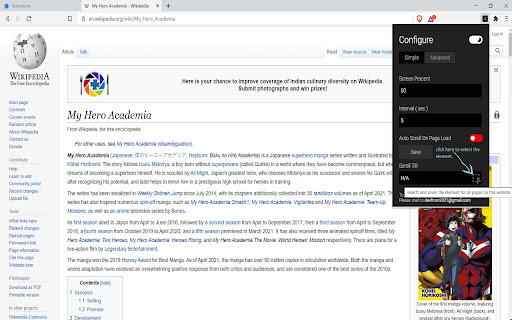
- Scroll Percent: Define the percentage of the visible screen to scroll in each interval.
- Interval: Set the time gap (in seconds) between each scroll.
- Scroll Till: Specify an element on the page where scrolling should stop. Use the element picker button next to the input field to select the element on the current webpage. The element you're selecting will be highlighted in light blue. (Refer to the 3rd and 4th screenshots for more details).

Both modes allow you to enable or disable the "double click to scroll" feature per domain and support the "auto scroll to top" feature. If enabled, Scroller will automatically scroll the page to the top once the scrolling is completed.


Note:
Remember to save your configuration before using the "Scroll Till" option.
The configuration is stored per domain (e.g., www.example.com), not per individual webpage.
Technical
- Version
- 1.1.8
- Manifest
- V3
- Size
- 2.91MiB
- Min Chrome
- 88
- Languages
- 1
- Featured
- Yes
Metadata
- ID
- hidphoggmejjfibikofhkcolcfpkjkmm
- Developer ID
- u31b0ce58a10a6fc3fefc302ebb657d61
- Developer Email
- [email protected]
- Created
- Apr 17, 2021
- Last Updated (Store)
- Oct 15, 2024
- Last Scraped
- Jun 1, 2026
- Website
- —
- Support URL
- —
- Privacy Policy
- —
Similar extensions
Alternatives to Scroller, ranked by description similarity.

Smart Scroller
Auto scroll websites with adjustable speed and custom settings
235
★ 4.3

Auto Scroll Extension
Automatically scrolls the webpage every 10 seconds.
1.0K
★ 3.9

Auto Scroll Extension
Automatically scroll webpages with customizable speed.
48
★ 5.0

Auto Scroller
Help users achieve hands-free page reading with adjustable auto-scroll speed
5

Auto Scroll Controller
Smooth auto-scroll with speed, direction, hover pause, and page-end stop.
67
★ 5.0

AutoScroll
AutoScroll offers two modes — Classic AutoScroll for hands-free reading and Smart Navigation with arrows or quick-scroll zones.
325
★ 3.0

Auto Scroll
Smart and Customizable Web Page Scrolling Extension
9

Auto Scroll Extension
Automatically scrolls webpage with adjustable speed
10
Data sourced from the Chrome Web Store · last verified Jun 1, 2026.