
JPT - ChatGPT Code Interpreter
ChatGPT's code interpreter plugin as a chrome extension
As of June 2026, JPT - ChatGPT Code Interpreter has 1,000 users and a 4.13/5 rating from 8 reviews in the Developer Tools category.
Usersno change0%
1.0K
1,000
Ratingno change0%
4.13
8 reviews
Reviewsno change0%
8
Version
1.4
Manifest V3
History
2 snapshotsTracking since Apr 1, 2026.
View as table
| Date | Users | Rating | Reviews | Version |
|---|---|---|---|---|
| Apr 1, 2026 | 1.0K | 4.13 | 8 | 1.4 |
| Jun 1, 2026 | 2.0K | 4.13 | 8 | 1.4 |
| Now | 1.0K | 4.13 | 8 | 1.4 |
Permissions & access
- Permissions
- None declared
- Host access
- None declared
Screenshots

About
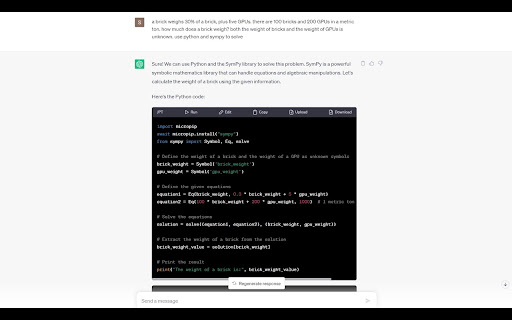
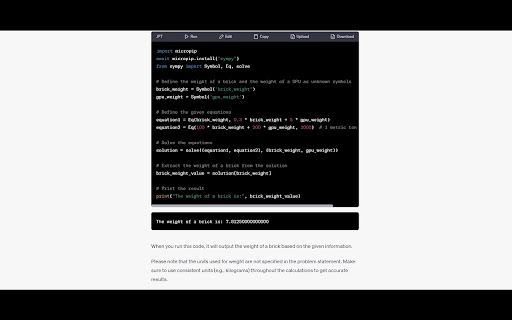
JPT let's you run your Python code right within ChatGPT. No need for ChatGPT Plus or any ChatGPT plugins!

JPT uses Pyodide, a WASM-based Python interpreter. This means that your code executes completely within your browser. The only people who get to see your code is you and OpenAI!

Features
- Run Python code
- Edit Python code, but does not persist
- Upload files for Python to access, including Python modules
- Download files created in Python
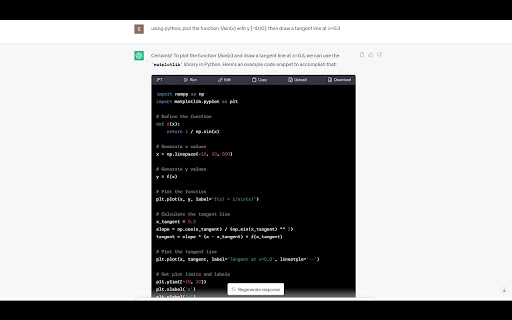
- Standard library, numpy, matplotlib, and some other packages supported
- See output from stdout
- See plots from matplotlib

How to use
1. To run Python code, ask ChatGPT to write a hello world program in Python. Then press the "Run" button. It may take a while for the first run, but subsequent runs should be faster.
2. To edit Python code, press the "Edit" button. Once you are done editing, press "Edit" again to save.
3. To upload a file, press the "Upload" button and select the file you want to upload. You can then access the file in the current directory in Python.
4. To download a file, first save the file within Python and remember the name you saved the file as. Press the "Download" button, you will be prompted to save a file. Type in the name of the file you saved earlier, including the file extension. It must match exactly or it will not download. I'm aware this is not very user-friendly and I will make a proper UI in future versions.
5. To load your own module, upload your Python file. Then load the module dynamically. You can ask ChatGPT to give you an example of how to do this.
6. To load Python packages, use micropip. For example, to import scipy, use `micropip.install("scipy")`. You may also need to import micropip. More details here: https://pyodide.org/en/stable/usage/loading-packages.html

Known Issues
- Infinite loops will freeze JPT. Requires restarting the extension
- Input is not supported

Roadmap
- Interrupt execution
- Add indicator for initialization and execution
- Support input
- Export chat as Jupyter Notebook
- Reduce extension size
Technical
- Version
- 1.4
- Manifest
- V3
- Size
- 54.8MiB
- Min Chrome
- 88
- Languages
- 1
- Featured
- No
Metadata
- ID
- hhpkcgbmfdclebniepgkgnfmpbgijoaf
- Developer ID
- uebabba1759ba2e7efd81281a1fc8c86a
- Developer Email
- [email protected]
- Created
- Jun 21, 2023
- Last Updated (Store)
- Dec 4, 2023
- Last Scraped
- Jun 1, 2026
- Website
- —
- Support URL
- —
- Privacy Policy
- —
Similar extensions
Alternatives to JPT - ChatGPT Code Interpreter, ranked by description similarity.

Python Code Runner
Python playground and script runner. Run Python code snippets from any website using our free online Python compiler and IDE.
10.0K
★ 4.9

ChatGPT for Google Colab
Embed ChatGPT inside Google Colab.
7.0K
★ 4.8

PlayCode for ChatGPT
Connect ChatGPT with PlayCode for live AI-powered coding. Generate code in ChatGPT and instantly preview it in PlayCode!
20

ExportGPTCode
Download code from ChatGPT in one click.
4
★ 5.0

CloudBoard - Online Code Editor and Compiler
Cloudboard v6
358
★ 5.0
GPT Code Assistant
GPT Code Assistant - ChatGPT powered extension for developers
157

JupyPilot
Jupyter Notebook Copilot that can write, run, and debug code right inside your notebook
158
★ 3.5

ChatGPT UI Preview
Introducing ChatGPT UI Preview! Now, seamlessly view your HTML, CSS, or JS code results right in the ChatGPT sidebar
53
★ 4.7
Data sourced from the Chrome Web Store · last verified Jun 1, 2026.