
Time Zone Meeting Planner
Schedule global events with Time Zone Meeting Planner, your world clock meeting planner, and an international time zone converter.
As of June 2026, Time Zone Meeting Planner has 2,000 users and a 4.80/5 rating from 44 reviews in the Productivity category.
Usersno change0%
2.0K
2,000
Ratingup 0.2 percent+0.2%
4.80
44 reviews
Reviewsup 2.3 percent+2.3%
44
Version
1.1.0
Manifest V3
History
1 snapshotsTracking since May 3, 2026.
View as table
| Date | Users | Rating | Reviews | Version |
|---|---|---|---|---|
| May 3, 2026 | 2.0K | 4.79 | 43 | 1.1.0 |
| Now | 2.0K | 4.80 | 44 | 1.1.0 |
Permissions & access
- Permissions
- None declared
- Host access
- None declared
Screenshots
About
Introducing the Time Zone Meeting Planner chrome extension, the ultimate solution for anyone needing to schedule and manage international events seamlessly. This powerful tool integrates a comprehensive world clock meeting planner and a versatile time zone converter, making it an essential asset for professionals who coordinate with teams worldwide.
Features Overview:
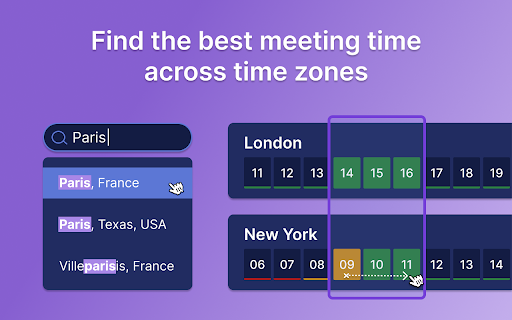
1. Time Zone Meeting Planner: view intervals in multiple cities worldwide to easily schedule events.
2. Time Zone Converter: convert between different time zones instantly to find the perfect event interval (for example: 9am pst to singapore time)
3. Global scheduler: organize international events without the hassle of calculating hour differences.
Why Choose Time Zone Meeting Planner?
– Simplicity and Efficiency: Streamlined interface that’s easy to navigate.
– Accuracy: Provides up-to-date data for reliable scheduling.
– Customization: Set your preferred world clock for quick access.

Comprehensive Planning Tools:
𑇐 Plan events with the international planner feature, which covers all clock bands from UTC to Pacific.
𑇐 Use the eastern and central time zone converter to manage events across the U.S.
𑇐 Convert intervals using specific tools like the CET and pacific standard time zone converter.

How does the time zone meeting planner? work:
🏙 Add the cities where participants are based to the list.
⏩ Adjust the event period to accommodate all attendees' working hours.
📤 Schedule the event in the calendar and send invitations to all participants with time zone overlap.

Additional Features:
▸ World time and date  zone planner integration for scheduling on a global scale.
▸ International event planner capabilities, ideal for large conferences.
▸ Time zone calculator to help you manage international calls.

Who Can Benefit?
1️⃣ Executives: Utilize the time zone meeting planner to arrange high-level calls.
2️⃣ Project Managers: Effortlessly coordinate teams across different continents.
3️⃣ Freelancers: Connect with clients around the world at convenient timeframes.

Use Cases:
1. Web conferences across 10+ different time zones: simplifies scheduling common times, ensuring global participation.
2. Virtual family reunions: Coordinates across time zones for shared celebrations.
3. Global sales pitches: Helps sales teams schedule intl client meetings, avoiding clock zone errors.
4. International educational events: Allows institutions to plan lectures for maximum global attendance.
5. Virtual team building: Schedules events within remote teams' working hours to boost engagement.
6. Multi-national medical consultations: Facilitates expert healthcare discussions across different timezones.
7. Global product launches and press releases: PR teams schedule announcements for optimal media coverage.
8. International legal consultations: Manages client sessions and negotiations, respecting legal timelines.

Key Benefits:
⏳ Efficiency Boost: Quick setup and easy-to-understand interface.
↘️ Minimize Errors: Avoid confusion with global clock comparison.
📈 Enhance Productivity: Streamline planning to maximize operational efficiency.

❓ Frequently Asked Questions:
📌 How does it work?
💡 Time Zone Meeting Planner is a Chrome extension designed to simplify the scheduling of global events. By integrating a world clock converter, it allows you to view and compare clock across different clock regions, making it easier to find suitable worldmeeting intervals for participants worldwide.

📌 How do I install?
💡 To install the extension, navigate to the Chrome Web Store and select "Add to Chrome". It will automatically be added to your browser, and you can begin planning your intl events right away.

📌 Can this extension manage events across the world?
💡 Yes, world clock meeting planner can manage and schedule events globally.

📌 Is my privacy protected when using this extension?
💡 Absolutely! Timezone meeting planner operates entirely within your browser. It respects your privacy by not collecting or storing any personal data.

📌 Are there any limitations on the number of events I can schedule?
💡 There are no limits on the number of events you can schedule with world clock meeting planner. It's designed to support both frequent and occasional international meeting planning, accommodating your specific needs without restrictions.
Streamline scheduling with the Time Zone Meeting Planner Chrome extension. Perfect for global teams, it synchronizes events worldwide, offering a world clock planner right at your fingertips. Elevate your planning effortlessly. 🌍
Technical
- Version
- 1.1.0
- Manifest
- V3
- Size
- 275KiB
- Min Chrome
- 88
- Languages
- 52
- Featured
- No
Metadata
- ID
- hhofnjbnimclnejljkgajhdleeafaajo
- Developer ID
- u2007a271fb5762f350ff8a8d4a5804f8
- Developer Email
- [email protected]
- Created
- May 29, 2024
- Last Updated (Store)
- Mar 29, 2025
- Last Scraped
- Jun 1, 2026
- Website
- —
- Support URL
- —
Similar extensions
Alternatives to Time Zone Meeting Planner, ranked by description similarity.

UTC Time Converter
Use our UTC Time Converter tool to check London time, world clock and as your time zone converter.
588
★ 5.0

World Clock & Calendar
Beautiful clock widget displaying Hijri and Gregorian calendars with world time zones
4

Free Timezone Converter
Instantly convert times between any two time zones, even offline.
33

Timezone Master - World Clock & Time Converter
Add multiple clocks for different timezones, convert time instantly across the globe, and stay in sync with international schedules.
24
★ 5.0

MeetMomentum
Time zone comparison utility and world clock. Easily identify common working times for you and your global colleagues!
62
★ 5.0

Zutime - Meeting Scheduler Helper
Instantly see all attendee timezones when scheduling Google Calendar meetings. Never book 2 AM calls again.
—
Time Difference Calculator
Time Difference Calculator helps you convert time zone easily
1.0K
★ 4.6

Timezone Converter
Simple and practical timezone converter
1
Data sourced from the Chrome Web Store · last verified Jun 1, 2026.