
Biometric Device Serial Number Finder Tool
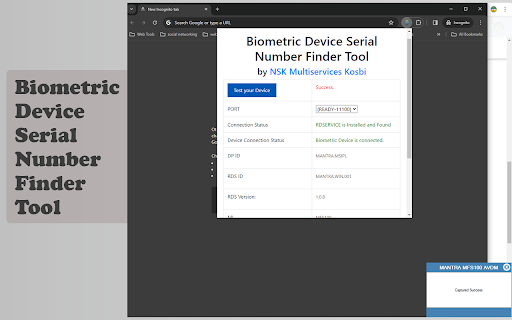
This Chrome extension helps users locate serial numbers for biometric devices, It also helps to diagnose the Installation Issues.
As of June 2026, Biometric Device Serial Number Finder Tool has 635 users and a 4.50/5 rating from 2 reviews in the Productivity category.
Usersup 7.4 percent+7.4%
635
635
Ratingno change0%
4.50
2 reviews
Reviewsno change0%
2
Version
1.0
Manifest V3
History
3 snapshotsTracking since Apr 1, 2026.
View as table
| Date | Users | Rating | Reviews | Version |
|---|---|---|---|---|
| Apr 1, 2026 | 591 | 4.50 | 2 | 1.0 |
| May 3, 2026 | 616 | 4.50 | 2 | 1.0 |
| Jun 1, 2026 | 628 | 4.50 | 2 | 1.0 |
| Now | 635 | 4.50 | 2 | 1.0 |
Permissions & access
- Permissions
- None declared
- Host access
- None declared
Screenshots
About
Extension Name: Biometric Device Serial Number Finder Tool for Mantra MFS 100

Publisher: Nandeshwar Katenga (NSK Multiservices)

Description:
The Biometric Device Serial Number Finder Tool is a handy extension developed by NSK Multiservices to simplify the process of locating serial numbers for biometric devices. Whether you're a technician, IT professional, or system administrator, this tool streamlines the task of identifying serial numbers, saving you time and effort.

Features:

Efficient Search: Quickly search for the serial number of your biometric device with just a few clicks.
User-Friendly Interface: The extension offers a simple and intuitive interface, making it easy for users of all levels to navigate and use effectively.
Comprehensive Support: Currently, it support only Mantra MFS 100 Device, In furute we will add multiple devices.
Time-Saving: Eliminates the need for manual searching or troubleshooting, allowing you to retrieve serial numbers swiftly and efficiently.
Reliable Results: Provides accurate and reliable results, ensuring that you have the correct serial number for your biometric device.

How to Use:

Install the Biometric Device Serial Number Finder Tool from the Chrome Web Store.
Click on the extension icon in the browser toolbar to open the tool.
Device information will be shown on extension page.
Click on the "Test your Device" button to test your Mantra MFS100 Device.
Copy or note down the serial number for your reference or further use.
Technical
- Version
- 1.0
- Manifest
- V3
- Size
- 169KiB
- Min Chrome
- 88
- Languages
- 1
- Featured
- No
Metadata
- ID
- hhocjpebocpfhahgbphdohhoamkbcijl
- Developer ID
- u1a62447d5deef1afad00aa6bb72d1de0
- Developer Email
- [email protected]
- Created
- Mar 13, 2024
- Last Updated (Store)
- Mar 13, 2024
- Last Scraped
- Jun 1, 2026
- Website
- https://nskmultiservices.in/
- Support URL
- https://nskmultiservices.in/contact-us/
Similar extensions
Alternatives to Biometric Device Serial Number Finder Tool, ranked by description similarity.

Screener Smart Analyzer
Enhance stock analysis in Screener. Real-time data, insights, no spreadsheets.
20.0K
★ 4.7

Managed Chrome Device Information Messenger
Listens for messages and echos back the corresponding information about the given device
44

Advance font finder from any website
Have you ever visited a website and wondered what the font is? Advanced Font Finder assists in identifying fonts in a snap.
224
★ 3.0

Enterprise Device ID Tool
Displays the ChromeOS Directory Device ID.
5

Mobile Numerology Scanner
Scan webpages for mobile numbers and get numerology insights instantly.
9

HID Credential Management Extension
Browser extension for HID credential management solution.
1.0M
★ 1.3

Barcode Injector
A small tool that allows for a barcode scanner to inject a barcode into a website in the background without affecting cursor focus.…
5

Kurmi Webex Token Generator
Quickly fill and configure Cisco Webex integrations with Kurmi: auto-fill forms, manage scopes, and extract integration details.
30
Data sourced from the Chrome Web Store · last verified Jun 1, 2026.