Tandem Editor
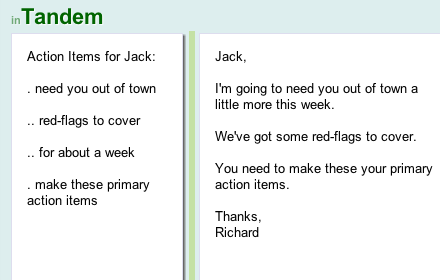
In Tandem you can do simple editing tasks using two resizable, independently scrollable editing areas
As of June 2026, Tandem Editor has 38 users and a 4.75/5 rating from 4 reviews.
Usersdown 2.6 percent−2.6%
38
38
Ratingno change0%
4.75
4 reviews
Reviewsno change0%
4
Version
0.6.5
Manifest V2
History
2 snapshotsTracking since Apr 1, 2026.
View as table
| Date | Users | Rating | Reviews | Version |
|---|---|---|---|---|
| Apr 1, 2026 | 39 | 4.75 | 4 | 0.6.5 |
| May 3, 2026 | 36 | 4.75 | 4 | 0.6.5 |
| Now | 38 | 4.75 | 4 | 0.6.5 |
Permissions & access
- Permissions
- clipboardReadclipboardWrite
- Host access
- None declared
Screenshots


About
Tandem also remembers where you left it last, so you can come back to it later - But doesn't currently save what you're doing anywhere other than on your device.

Examples uses:

- Translating documents - paste the text you want to translate into one area, and start your translation in the other.

- Responding to email - paste the email(s) you're responding to in one area, and compose your email in the other.

- Composing email - use one area for holding notes or points you want to make, which you can refer to whilst composing in the other.

Why two editing areas?

Email example: Usually an email is sent in response to something, even multiple things, and often you have to go back and forth between writing the email and referring to previous email(s), which is a time consuming task and difficult to balance. So, by simply pasting your reference emails in one area, and composing in the other, you can now simply scroll up and and edit down these areas (independently), making sure you've answered all of the relevant items.

Why Tandem?

Originally, the idea came about because email clients - both web (GMail, Hotmail, etc) and desktop (Apple Mail, Outlook, etc) - either provide less space to compose your email or make it difficult for you to refer to the email(s) you may be responding to whilst composing.

Tandem is simple intentionally; it aims to provide a large space for you to just compose an email, and another space for you to put everything you need to refer to whilst composing that email - two activities that are not as easily done in today's email clients.
Technical
- Version
- 0.6.5
- Manifest
- V2
- Size
- 184KiB
- Min Chrome
- —
- Languages
- 1
- Featured
- No
Metadata
- ID
- hhndgbekkchcpalkaomfdhigajkbpoim
- Developer ID
- uec23d4de85059c9bd21d652fad1a01eb
- Developer Email
- —
- Created
- Aug 26, 2012
- Last Updated (Store)
- Feb 15, 2013
- Last Scraped
- Jun 1, 2026
- Website
- http://tandem.dfjs.co.uk/
- Support URL
- —
- Privacy Policy
- —
Similar extensions
Alternatives to Tandem Editor, ranked by description similarity.

MailMemo
Add sticky notes and annotations to Gmail messages. Highlight text and create personal notes by AIO.com.ai
—

To do List for Gmail
Capture Gmail messages as local to do tasks with due dates, priority and optional canvas sketch notes—100% offline.
10

Gmail Notes - Quick Notes for Email
Add notes to Gmail. Manage notes in one place. Preview, search, re-edit, set colors, delete notes, navigate to related conversation.
166
★ 3.4

QuickReply
Simplify your copy/paste experience
1.0K
★ 4.5
Unknown
—

Templates for Gmail
Save reusable email snippets and insert them into any Gmail compose window with a click or shortcut.
23
★ 1.0

typedesk Canned Responses
Boost your productivity effortlessly! Automate typing tasks, streamline with canned responses, text snippets, and automation.
4.0K
★ 4.6

Gmail Snippets by cloudHQ
Save your time: Compose an entire email while only using 3 words!
10.0K
★ 4.0
Data sourced from the Chrome Web Store · last verified Jun 1, 2026.