
OpenBrain
AI Assistant powered by OpenRouter
As of June 2026, OpenBrain has 44 users and a 5.00/5 rating from 1 reviews in the Productivity category.
Usersup 22.2 percent+22.2%
44
44
Ratingno change0%
5.00
1 reviews
Reviewsno change0%
1
Version
1.0.0
Manifest V3
History
4 snapshotsTracking since Apr 1, 2026.
View as table
| Date | Users | Rating | Reviews | Version |
|---|---|---|---|---|
| Apr 1, 2026 | 36 | 5.00 | 1 | 1.0.0 |
| Apr 21, 2026 | 38 | 5.00 | 1 | 1.0.0 |
| May 11, 2026 | 41 | 5.00 | 1 | 1.0.0 |
| Jun 7, 2026 | 36 | 5.00 | 1 | 1.0.0 |
| Now | 44 | 5.00 | 1 | 1.0.0 |
Permissions & access
- Permissions
- sidePanelstorage
- Host access
- https://openrouter.ai/*
Screenshots
About
OpenBrain: AI Sidepanel for Chrome

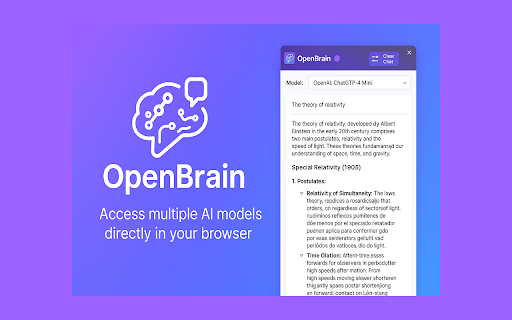
OpenBrain brings the power of multiple AI language models directly to your browser's side panel. Using OpenRouter as a gateway, you can access a variety of top AI models from different providers like OpenAI, Anthropic, Meta, Google, and more - all without leaving your current tab.

Key Features:
• Multiple AI Models: Choose from various AI language models including GPT-4o, Claude, Llama, Gemini, and more through OpenRouter integration
• Seamless Side Panel Integration: Chat with AI while browsing without switching contexts or tabs
• Custom Configuration: Configure your own preferred models and API settings
• Conversation History: Review your chat history within the panel
• Dark Mode Support: Toggle between light and dark themes for comfortable viewing
• Markdown Support: View AI responses with proper formatting, code blocks, and more

How to Get Started:
1.	Create an OpenRouter account (openrouter.ai)
2.	Obtain your API key
3.	Create a simple config file as described in the extension
4.	Start chatting with your chosen AI models
OpenBrain is perfect for researchers, writers, developers, students, and anyone who wants AI assistance while browsing the web.

Note: This extension requires an OpenRouter API key. All conversations remain private between you and your chosen AI service - no data is stored on our servers.
Technical
- Version
- 1.0.0
- Manifest
- V3
- Size
- 3.02MiB
- Min Chrome
- 88
- Languages
- 1
- Featured
- No
Metadata
- ID
- hhmingjkecbkigbgipdnhhcobhjlaffc
- Developer ID
- uc93b4132b37ec37b37267361f927af98
- Developer Email
- [email protected]
- Created
- Apr 5, 2025
- Last Updated (Store)
- Apr 5, 2025
- Last Scraped
- Jun 7, 2026
- Website
- —
- Support URL
- —
- Privacy Policy
- —
Similar extensions
Alternatives to OpenBrain, ranked by description similarity.

Chat with Ai (gpt ,grok ,claude,gemini)
Open ChatGPT, DeepSeek, Gemini, Claude, Grok in sidebar, for explain, summarize, & Fix Grammer.
106
★ 5.0

TurboPanel AI
AI Assistant Extension - ChatGPT, Claude, Gemini & More. Side Panel, Floating Windows, Custom Prompts for Productivity
4

Free AI Sidebar: ChatGPT, Claude, Gemini, DeepSeek, Perplexity & more
Access AI services directly from the browser sidebar
716
★ 4.8

Multimodal AI Browser Agent
A multimodal AI assistant for your browser powered by Gemini and OpenAI.
15

AI Assistant Sidebar
AI chat in a sidebar. Use your own API keys.
3

Browser Brain AI Agent
A true autonomous AI browser agent—bring your own API key (no subscription) or run local Ollama/LM Studio models for private AI.
12

AI Sidebar Pro
Chat with ChatGPT, Claude, DeepSeek, Gemini & Grok in a side panel on any webpage. Summarize pages, explain selections.
29

AI Sidebar Pro
Multi-AI sidebar with ChatGPT, Claude, Gemini - No backend required. Your API keys, your data.
21
Data sourced from the Chrome Web Store · last verified Jun 7, 2026.