
FlowNotes
Your notes, at the speed of your browsing.
As of June 2026, FlowNotes has 3 users in the Productivity category.
Usersno change0%
3
3
Ratingno change0%
—
— reviews
Reviewsno change0%
—
Version
1.1.1
Manifest V3
History
2 snapshotsTracking since Apr 19, 2026.
View as table
| Date | Users | Rating | Reviews | Version |
|---|---|---|---|---|
| Apr 19, 2026 | 3 | — | — | 1.1.1 |
| Apr 29, 2026 | 4 | — | — | 1.1.1 |
| Now | 3 | — | — | 1.1.1 |
Permissions & access
- Permissions
- storageidentityidentity.email
- Host access
- None declared
Screenshots

About
FlowNotes - Your notes, at the speed of your browsing

Capture thoughts, save snippets, and organize your ideas without ever leaving your current tab. FlowNotes is a lightweight, beautiful, and powerful note-taking extension designed for efficiency and focus.

Whether you are a student saving research, a developer storing code snippets, or just need a place to jot down a quick reminder, FlowNotes keeps your data synchronized and accessible instantly.

Key Features:
Instant Access: Open the extension immediately with a click or the custom keyboard shortcut (Alt+S).

Rich Text Editor: Format your notes clearly with Bold, Italic, Underline, and clear formatting tools.

Smart Copy Chips: A unique productivity feature. Highlight any text and turn it into a "Smart Chip."

Clicking the chip copies the text to your clipboard instantly—perfect for API keys, color codes, emails, or frequent copy-paste tasks.

Drag & Drop Organization: Keep your workspace tidy. Drag notes to reorder them or drop them into specific folders. Reorder your folders to suit your workflow.

Custom Folders: Create, rename, and manage folders to categorize your notes effectively.

Flexible Layouts: Switch between a visual Grid View (2 columns) or a compact List View depending on your preference.

Seamless Sync: Built on Chrome Storage Sync, your notes are automatically backed up and available across all your devices where you are signed into Chrome.

Search Instantly: Find what you need in milliseconds with the built-in search bar.

Data Privacy: Your data belongs to you. Easily Import and Export your notes to JSON format at any time.

Why FlowNotes?
Most note apps are too heavy or require opening a new tab. FlowNotes lives right in your browser toolbar, offering a clean, modern interface that feels native to your workflow.

Get organized today with FlowNotes.
Technical
- Version
- 1.1.1
- Manifest
- V3
- Size
- 48.37KiB
- Min Chrome
- 88
- Languages
- 2
- Featured
- No
Metadata
- ID
- hhlpbienghhcbahbefdkmckjlfmobopd
- Developer ID
- u551075fd13a5665b4547769a2c3a01eb
- Developer Email
- [email protected]
- Created
- Sep 12, 2025
- Last Updated (Store)
- Dec 6, 2025
- Last Scraped
- Jun 4, 2026
- Website
- —
- Support URL
- —
- Privacy Policy
- —
Similar extensions
Alternatives to FlowNotes, ranked by description similarity.

SwiftFlow
A simple fast, minimal bookmark manager for quick saving and access with searchable notes. Offline first, no accounts needed
2
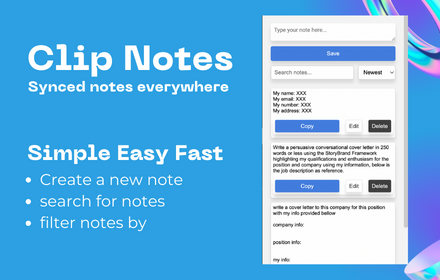
Clip Note
a quick simple in browser productivity notepad, for saving time with repetitive tasks.
129

Notes Lite
Quick notes with tags, search, format, auto-save and export/import.
2
★ 5.0

Sticky Notes
Quick, draggable sticky notes on any site—stay organized without leaving your tab.
14
★ 5.0
NotesLite
NotesLite: Your Digital Sticky Notes Companion
Transform your browser into a powerful note-taking workspace with NotesLite, the…
6
★ 5.0

DeftNotes
Replace forgotten bookmarks with memorable insights. Discover, note, and revisit your web finds with clarity, not clutter.
9
★ 5.0

Quick Note 📝
Quickly jot down your important things!!
7

Quick Chrome Notes
Use Quick Chrome Notes, an instant web scratchpad for Chrome. Capture thoughts fast. Everything auto saves locally automatically.
113
★ 5.0
Data sourced from the Chrome Web Store · last verified Jun 4, 2026.