
Tab Control
Tab Control stresses over your tabs so you don't have to.
As of June 2026, Tab Control has 37 users in the Workflow & Planning category.
Usersup 42.3 percent+42.3%
37
37
Ratingno change0%
—
— reviews
Reviewsno change0%
—
Version
2.0.0
Manifest V3
History
9 snapshotsTracking since Apr 1, 2026.
View as table
| Date | Users | Rating | Reviews | Version |
|---|---|---|---|---|
| Apr 1, 2026 | 26 | — | — | 2.0.0 |
| Apr 16, 2026 | 28 | — | — | 2.0.0 |
| Apr 22, 2026 | 33 | — | — | 2.0.0 |
| Apr 27, 2026 | 32 | — | — | 2.0.0 |
| May 10, 2026 | 36 | — | — | 2.0.0 |
| May 15, 2026 | 32 | — | — | 2.0.0 |
| May 21, 2026 | 35 | — | — | 2.0.0 |
| May 31, 2026 | 38 | — | — | 2.0.0 |
| Jun 8, 2026 | 34 | — | — | 2.0.0 |
| Now | 37 | — | — | 2.0.0 |
Permissions & access
- Permissions
- tabsstorage
- Host access
- None declared
Screenshots

About
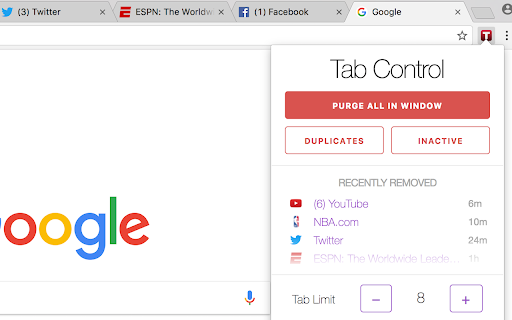
Tab Control allows you to keep a limit on the number of tabs you have per window. Once you attempt to surpass the limit, Tab Control will remove your least active tab and save it internally just incase you need it in the future.

You can also choose to purge your window's tabs if you ever feel like your tabs are getting messy. Purge all tabs, duplicate tabs, or inactive tabs.

For the best experience, restart Chrome after first-time installation!

Note: Tab Control requires access to your browser history in order to save recently removed tabs and assign a timestamp to each tab. Your recently removed history is never saved other than on your own account.
Technical
- Version
- 2.0.0
- Manifest
- V3
- Size
- 122KiB
- Min Chrome
- 88
- Languages
- 1
- Featured
- No
Metadata
- ID
- hheohnanbmmjfpnpgcejpnabbnjhbhip
- Developer ID
- ub7ef58427c2948af131f6c6ac90e3266
- Developer Email
- [email protected]
- Created
- Jul 30, 2017
- Last Updated (Store)
- Feb 16, 2026
- Last Scraped
- Jun 8, 2026
- Website
- sankethhegde.com
- Support URL
- https://chrome.google.com/webstore/detail/tab-control/hheohnanbmmjfpnpgcejpnabbnjhbhip/support
- Privacy Policy
- —
Similar extensions
Alternatives to Tab Control, ranked by description similarity.

Tab Control Center
Regain back the control of your browser tabs. Focus on the important things.
19

Tabinator: Tab Cleaner
Close old, inactive & duplicate chrome tabs with a single click.
12

Chrome Tabs Manager
Helps to manage chrome tabs
4
★ 5.0

Tabion - tab manager
Tabion - the supercharged tab manager
42
★ 5.0

TabCoral
A Chrome extension that declutters your tab bar, save tabs and groups and get back to them later.
—

Tablisto
A Chrome extension to assist with navigating many tabs
6

Tab limit
Limit the number of tabs you can have open at a time
10.0K
★ 4.9

Awesome Window & Tab Manager BETA
Displays a list of all windows and tabs open. Has filtering, sorting, refreshing, bookmarking, and saving. FOR BETA TESTING
6
Data sourced from the Chrome Web Store · last verified Jun 8, 2026.