
Korean Word Lookup - Hover & Select Translate
Korean translator & dictionary: hover words for definitions, or select sentences to translate instantly.
As of June 2026, Korean Word Lookup - Hover & Select Translate has 485 users and a 5.00/5 rating from 1 reviews in the Education category.
Usersup 23.7 percent+23.7%
485
485
Ratingno change0%
5.00
1 reviews
Reviewsno change0%
1
Version
2.4.5
Manifest V3
90-day change · In the last 90 days this extension 1 version update.
History
10 snapshotsTracking since Apr 1, 2026.
View as table
| Date | Users | Rating | Reviews | Version |
|---|---|---|---|---|
| Apr 1, 2026 | 392 | 5.00 | 1 | 2.4.4 |
| Apr 16, 2026 | 403 | 5.00 | 1 | 2.4.4 |
| Apr 24, 2026 | 425 | 5.00 | 1 | 2.4.4 |
| May 1, 2026 | 426 | 5.00 | 1 | 2.4.4 |
| May 7, 2026 | 424 | 5.00 | 1 | 2.4.4 |
| May 12, 2026 | 438 | 5.00 | 1 | 2.4.4 |
| May 18, 2026 | 436 | 5.00 | 1 | 2.4.4 |
| May 24, 2026 | 461 | 5.00 | 1 | 2.4.4 |
| May 31, 2026 | 452 | 5.00 | 1 | 2.4.5 |
| Jun 6, 2026 | 457 | 5.00 | 1 | 2.4.5 |
| Now | 485 | 5.00 | 1 | 2.4.5 |
Changelog
- May 24, 2026description
🇰🇷 Korean Word Lookup - Korean Translator (Hover + Selection)

Korean Word Lookup is a Korean translator + Korean dictionary extension for Chrome.
Hover Hangul (Korean) words for instant English meaning, or select a sentence to translate it in one shot.

🌟 Key Features and Benefits:

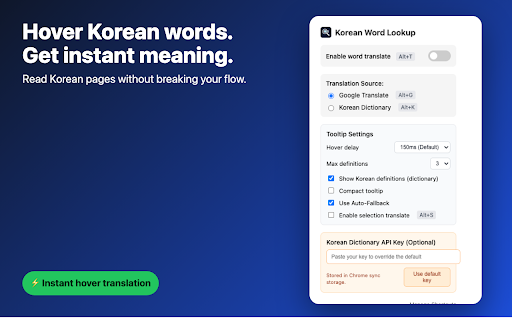
👆 Hover translate (Korean word lookup)
- 🖱️ Hover over Korean words to see English translations.
- ⚡ Choose Google Translate for speed or 📚 Korean Dictionary for detailed definitions.
- 🔄 Smart Auto-Fallback: Automatically tries the other service if the selected one fails (e.g., if Dictionary has no result, it falls back to Google Translate).
- 📝 Display English and (optional) Korean definitions in a clean tooltip.

✨ Selection translate (sentence translation)
- 🟦 Select multiple words or Korean sentences to translate them at once.
- ⌨️ Toggle selection translation in the popup or with `Alt+S`.
- 🧠 Selection translation uses Google Translate for fluent sentence output.

🎛️ User-friendly controls
- 🔛 One-click toggle for enabling or disabling translation.
- ⌨️ Keyboard shortcuts: `Alt+T` (toggle), `Alt+G` (Google Translate), `Alt+K` (Korean Dictionary), `Alt+S` (selection translate).
- 🛠️ Manage Shortcuts: Easily customize keyboard shortcuts directly from the popup.
- ⚙️ Customize hover delay, compact tooltip, and max definitions.

👤 Personalization
- 💾 Saves your preferred settings across sessions via Chrome sync storage.
- 🔑 Optional KRDICT API key override in the popup.
- 🔄 Auto-Fallback Toggle: Option to enable/disable automatic service switching.

🛠️ Technical Features:
- 🌐 Uses Google Translate and the National Institute of Korean Language (KRDICT) dictionary API.
- 🛡️ Manifest V3 Compliant: Built with the latest Chrome Extension standards for enhanced security and performance.
- ⚡ Lightweight content script with caching for faster responses.
- 🌍 Works on any page you visit.

❓ FAQ:
Q: How do I enable selection translation?
A: Turn it on in the popup or press `Alt+S`.

Q: Which services receive the text I look up?
A: Hovered or selected text is sent to Google Translate or the Korean Dictionary API only to fetch translations/definitions.

Q: Can I use my own Korean Dictionary API key?
A: Yes. Paste your key in the popup to override the default.

Q: Are settings saved between sessions?
A: Yes, settings are stored with Chrome sync and automatically restored.

🚀 Planned Future Updates:
- 🏳️ Additional target languages.
- 🤖 Better sentence context handling.
- 🎨 UI refinements and theme options.

📧 Contact:
For suggestions, feedback, or issues, please contact: [email protected]
Korean Word Lookup - Korean Translator for Learners

Read Korean web pages without breaking your flow.

Korean Word Lookup is a lightweight Chrome extension for Korean learners. Hover over Korean words to see quick English meanings, or select a full sentence to translate it in one shot.

Best for:
- Korean learners reading articles, posts, docs, and study pages
- People who want quick English meaning without opening another tab
- Daily reading practice on Chrome, Windows, Mac, and Chromebook

Main features

Hover word lookup
- Hover over Korean words to see English translations
- Choose Google Translate for speed or KRDICT Korean Dictionary for detailed definitions
- Auto-Fallback can try the other source when one source has no result
- Clean tooltip with optional Korean definitions

Selection translation
- Select Korean sentences or paragraphs to translate them instantly
- Turn selection translation on in the popup or with a shortcut
- Useful when word-by-word meaning is not enough

Controls and shortcuts
- One-click ON/OFF toggle
- Windows/Linux/ChromeOS: Alt+T, Alt+G, Alt+K, Alt+S
- Mac: Option+Shift+T, Option+Shift+G, Option+Shift+K, Option+Shift+S
- Customize hover delay, compact tooltip, and definition count

Privacy
- Only the text you hover or select is sent to Google Translate or KRDICT to fetch translations or definitions
- Settings are saved in Chrome storage
- No raw hovered or selected text is sent to product analytics

Feedback
Questions, bugs, and suggestions: [email protected]
Permissions & access
- Permissions
- storage
- Host access
- https://translate.googleapis.com/*, https://krdict.korean.go.kr/*, https://www.google-analytics.com/*
Screenshots


About
Korean Word Lookup - Korean Translator for Learners

Read Korean web pages without breaking your flow.

Korean Word Lookup is a lightweight Chrome extension for Korean learners. Hover over Korean words to see quick English meanings, or select a full sentence to translate it in one shot.

Best for:
- Korean learners reading articles, posts, docs, and study pages
- People who want quick English meaning without opening another tab
- Daily reading practice on Chrome, Windows, Mac, and Chromebook

Main features

Hover word lookup
- Hover over Korean words to see English translations
- Choose Google Translate for speed or KRDICT Korean Dictionary for detailed definitions
- Auto-Fallback can try the other source when one source has no result
- Clean tooltip with optional Korean definitions

Selection translation
- Select Korean sentences or paragraphs to translate them instantly
- Turn selection translation on in the popup or with a shortcut
- Useful when word-by-word meaning is not enough

Controls and shortcuts
- One-click ON/OFF toggle
- Windows/Linux/ChromeOS: Alt+T, Alt+G, Alt+K, Alt+S
- Mac: Option+Shift+T, Option+Shift+G, Option+Shift+K, Option+Shift+S
- Customize hover delay, compact tooltip, and definition count

Privacy
- Only the text you hover or select is sent to Google Translate or KRDICT to fetch translations or definitions
- Settings are saved in Chrome storage
- No raw hovered or selected text is sent to product analytics

Feedback
Questions, bugs, and suggestions: [email protected]
Technical
- Version
- 2.4.5
- Manifest
- V3
- Size
- 1.49MiB
- Min Chrome
- 88
- Languages
- 3
- Featured
- No
Metadata
- ID
- hhcaojjokbganindbecnhonkfjhnibji
- Developer ID
- u27725264e5a072ba180632d9409a98d3
- Developer Email
- [email protected]
- Created
- Dec 2, 2024
- Last Updated (Store)
- May 20, 2026
- Last Scraped
- Jun 6, 2026
- Website
- —
- Support URL
- —
- Privacy Policy
- https://eddy961206.github.io/extension-privacy-policy/
Similar extensions
Alternatives to Korean Word Lookup - Hover & Select Translate, ranked by description similarity.

Vocadoca Word Translate
아주 손쉽게 웹페이지의 한글/영문 단어의 뜻을 찾아서 보여줍니다.
—

Kimchi Reader
Korean popup dictionary for YouTube, Netflix & any website
3.0K
★ 4.8

Word Dictionary
A dictionary extension with search count tracking
2

Clicktionary
Translate selected text, get it's synonyms and example sentences. Save words for future reference. Great for language learners
3

HoverLingo
Hover translation and dictionary popup (FastAPI backend).
32
★ 5.0

Quick Translate – AI Translator
AI-powered translation with text-to-speech & vocabulary learning. Select text → instant AI translation in 15 languages.
57

Quick Dictionary
A quick dictionary extension with full definitions.
41
★ 5.0

Uberlang
Master languages while browsing the web. Hover over text to see definitions, pronunciation, and more.
2
★ 5.0
Data sourced from the Chrome Web Store · last verified Jun 6, 2026.