
AliExpress Order Exporter
Export your AliExpress orders with direct invoice links.
As of June 2026, AliExpress Order Exporter has 36 users in the Shopping category.
Usersno change0%
36
36
Ratingno change0%
—
— reviews
Reviewsno change0%
—
Version
1.0
Manifest V3
History
10 snapshotsTracking since Apr 8, 2026.
View as table
| Date | Users | Rating | Reviews | Version |
|---|---|---|---|---|
| Apr 8, 2026 | — | — | — | 1.0 |
| Apr 19, 2026 | — | — | — | 1.0 |
| Apr 25, 2026 | 4 | — | — | 1.0 |
| May 2, 2026 | 4 | — | — | 1.0 |
| May 9, 2026 | 9 | — | — | 1.0 |
| May 13, 2026 | 18 | — | — | 1.0 |
| May 19, 2026 | 20 | — | — | 1.0 |
| May 25, 2026 | 29 | — | — | 1.0 |
| Jun 1, 2026 | 30 | — | — | 1.0 |
| Jun 7, 2026 | 33 | — | — | 1.0 |
| Now | 36 | — | — | 1.0 |
Permissions & access
- Permissions
- activeTabscripting
- Host access
- https://*.aliexpress.com/*
Screenshots


About
Take control of your personal shopping data with AliExpress Order Master!

This extension is a specialized productivity tool designed for users who need to organize their purchase history for personal bookkeeping, tax purposes, or business expense tracking.

Key Features:
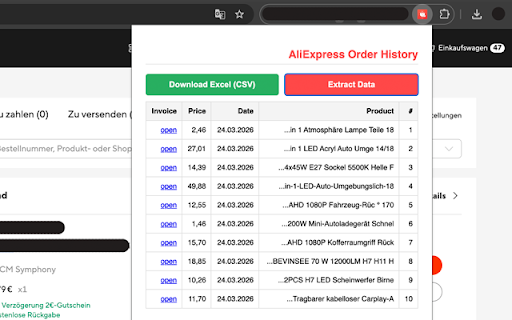
- Instant Export: Extract your entire order list from the AliExpress "My Orders" page into a clean CSV file compatible with Excel and Google Sheets.
- English Title Fetching: Automatically retrieves original English product titles from item pages, ensuring your records are clear and professional.
- Smart Formatting: Converts localized dates into a clean numerical format (DD.MM.YYYY).
- Direct Receipt Access: Generates direct links to official AliExpress payment receipts (Beleg), saving you from digging through multiple menus.
- Privacy-First: All data processing happens locally on your browser. Your order details are never sent to external servers or shared with third parties.

How it works:
Simply navigate to your AliExpress orders page, open the extension, and click "Scrape Data". Within seconds, you'll have a structured table and a downloadable file.

Note: This is an independent productivity tool and is not officially affiliated with AliExpress.
Technical
- Version
- 1.0
- Manifest
- V3
- Size
- 48.75KiB
- Min Chrome
- 88
- Languages
- 1
- Featured
- No
Metadata
- ID
- hglnolnicpgcfpodbkgjagjichohoinn
- Developer ID
- udc48d16a3e7770e378329336d1572ff5
- Developer Email
- [email protected]
- Created
- Apr 8, 2026
- Last Updated (Store)
- Apr 8, 2026
- Last Scraped
- Jun 7, 2026
- Website
- ssulaiman.com
Data sourced from the Chrome Web Store · last verified Jun 7, 2026.