
HEIC to PNG Converter - Image Format Converter
Convert HEIC/HEIF photos to PNG, JPEG, WebP. Fast HEIC converter and universal image format converter for all your images
As of June 2026, HEIC to PNG Converter - Image Format Converter has 14 users and a 5.00/5 rating from 4 reviews in the Productivity category.
Usersno change0%
14
14
Ratingno change0%
5.00
4 reviews
Reviewsno change0%
4
Version
1.1.9
Manifest V3
History
5 snapshotsTracking since Apr 1, 2026.
View as table
| Date | Users | Rating | Reviews | Version |
|---|---|---|---|---|
| Apr 1, 2026 | — | 5.00 | 4 | 1.1.9 |
| Apr 21, 2026 | 13 | 5.00 | 4 | 1.1.9 |
| May 6, 2026 | 14 | 5.00 | 4 | 1.1.9 |
| May 18, 2026 | 15 | 5.00 | 4 | 1.1.9 |
| Jun 1, 2026 | 18 | 5.00 | 4 | 1.1.9 |
| Now | 14 | 5.00 | 4 | 1.1.9 |
Permissions & access
- Permissions
- storagecontextMenusdownloads
- Host access
- <all_urls>
Screenshots



About
HEIC to PNG Converter - Your Ultimate Image Conversion Tool 🚀

Transform your HEIC images with ease! ✨

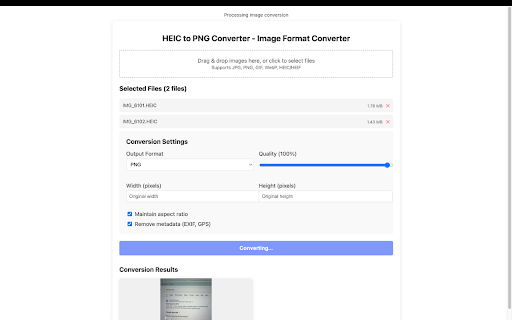
Are you tired of struggling with HEIC images that aren't compatible with your favorite applications? Look no further! Our HEIC to PNG Converter is here to make your life easier. This powerful Chrome extension brings professional-grade image conversion right to your browser. 🎯

Key Features:

Simple and intuitive interface: 🎨
- Drag and drop functionality for instant file uploads
- Modern, clean design that's easy to use
- One-click conversion process
- Batch processing support for multiple files

Powerful conversion capabilities: ⚡
- Convert HEIC images to PNG format with perfect quality
- Maintain original image resolution and details
- Support for multiple image formats: HEIC, JPEG, PNG, WebP, BMP, SVG
- Fast and efficient conversion process

Seamless workflow: 🔄
- Direct download of converted images
- Batch download option for multiple files
- No need to leave your browser
- Instant preview of converted images

Privacy and security: 🔒
- All conversions happen locally in your browser
- No data is sent to external servers
- Your images remain private and secure
- No registration required

Perfect for: 👥
- Photographers working with HEIC images 📸
- Professionals needing quick format conversions 💼
- Social media enthusiasts 📱
- Designers and artists 🎭
- Anyone using modern devices with HEIC support

Why choose our extension? 💫
- Lightning-fast conversion speed ⚡
- Preserves image quality 🎯
- 100% secure and private 🔒
- Completely free to use 🆓
- Regular updates and improvements 🔄

How to use: 📝
1. Click the extension icon in your browser
2. Drag and drop your HEIC images or click to select files
3. Wait for the conversion to complete
4. Download your PNG images instantly

Pro tips: 💡
- Use batch processing for multiple files to save time
- Keep the extension updated for the best performance
- Use drag and drop for the fastest workflow

Bonus features: 🎁
- Dark mode support 🌙
- Responsive design 📱
- Keyboard shortcuts ⌨️
- Progress indicators 📊
- Error handling and recovery 🔄

Regular updates: 🔄
We are constantly improving our extension with new features, bug fixes, performance improvements, and UI/UX enhancements.

Support: 🤝
Need help? We are here for you! Contact us through email support, in-app feedback, or documentation.

Join our community: 👥
Share your experience, suggest new features, report issues, and help others.

Transform your HEIC images into PNG format with just a few clicks. Download now and experience the easiest way to convert your images! 🚀
Technical
- Version
- 1.1.9
- Manifest
- V3
- Size
- 481KiB
- Min Chrome
- 88
- Languages
- 19
- Featured
- No
Metadata
- ID
- hgffiepehhdpepgdheahdadghoidldmj
- Developer ID
- ua5103513f672d889c3da1025b8747854
- Developer Email
- [email protected]
- Created
- Aug 4, 2025
- Last Updated (Store)
- Aug 4, 2025
- Last Scraped
- Jun 1, 2026
- Website
- —
- Support URL
- [email protected]
- Privacy Policy
- https://pomoq-dev.github.io/heic-convert/privacy
Similar extensions
Alternatives to HEIC to PNG Converter - Image Format Converter, ranked by description similarity.

HEIC to PNG
Easily convert HEIC to PNG in one click. HEIC to PNG converter keeps quality, supports batches, no extra software required.
2.0K
★ 4.7

Convert HEIC to PNG
Use Convert HEIC to PNG to easily change HEIC to PNG files online and turn HEIC into PNG format with just one click in your browser.
149
★ 5.0

HEIC to PDF
HEIC to PDF Converter: Effortlessly convert HEIC files and other formats to PDF.
2.0K
★ 5.0

HEIC to JPG Converter
Easily change the format of photos with HEIC to JPG Converter. Transform heic files images to jpeg in seconds, directly in browser.
10.0K
★ 4.5

HEIC to JPG/PNG Converter – Free Offline Image Tool
Convert HEIC images to PNG or JPG in one click. Fast, simple, secure.
340
★ 5.0

HEIC to PDF JPG PNG
Free HEIC converter converts HEIC to PDF, JPG, PNG, WEBP instantly. Works offline. Batch conversion. Private. No sign-up.
57
★ 5.0

HEIC to JPG Converter
Convert HEIC and HEIF images to JPG format instantly. Free, fast, and private - all processing happens in your browser.
97

HEIC to JPG Converter
This extension converts HEIC files to JPG.
110
Data sourced from the Chrome Web Store · last verified Jun 1, 2026.