
DX Toolkit
A floating developer toolkit with productivity modules for every day web development tasks.
As of June 2026, DX Toolkit has — users in the Developer Tools category.
Usersno change0%
—
—
Ratingno change0%
—
— reviews
Reviewsno change0%
—
Version
5.0.0
Manifest V3
90-day change · In the last 90 days this extension 1 version update.
History
9 snapshotsTracking since Apr 21, 2026.
View as table
| Date | Users | Rating | Reviews | Version |
|---|---|---|---|---|
| Apr 21, 2026 | — | — | — | 3.0.0 |
| Apr 26, 2026 | — | — | — | 3.0.0 |
| May 3, 2026 | 3 | — | — | 3.0.0 |
| May 9, 2026 | 4 | — | — | 3.0.0 |
| May 14, 2026 | 5 | — | — | 5.0.0 |
| May 20, 2026 | 9 | — | — | 5.0.0 |
| May 26, 2026 | 32 | — | — | 5.0.0 |
| Jun 3, 2026 | — | — | — | 5.0.0 |
| Jun 8, 2026 | 28 | — | — | 5.0.0 |
| Now | — | — | — | 5.0.0 |
Changelog
- May 9, 2026description
DX Toolkit is a lightweight developer productivity tool that injects a floating panel into any webpage — no setup, no configuration required.

🔍 Super Search
Highlight and navigate multiple keywords simultaneously on any page. Supports comma-separated terms, each highlighted in a distinct color.

⚡ Swagger Seeker
Instantly filter and navigate Swagger/OpenAPI endpoints by keyword. Auto-expands groups and cycles through matches with the Enter key. Opens automatically with Ctrl+F on Swagger pages.

📦 Storage Scout
Inspect, edit, add, and delete LocalStorage, SessionStorage, and Cookies in real time. Supports JSON formatting, value copying, and bulk clear.

⏰ PERT Planner
Calculate task estimates using the PERT formula (optimistic, realistic, pessimistic). Shows expected time, standard deviation, and project total. Exports to a Jira-compatible JSON format.

💻 Viewport Viewer
Simulate Mobile (375px) and Tablet (768px) viewports inside a real device frame — camera, speaker, home bar included — with orientation toggle and refresh, all without leaving the current page.

🚧 Outline Hunter
Toggle visual outlines on every element of the page. Switch between a default mode and a Monokai-themed mode for quick layout and spacing inspection.

🎨 Palette Probe
Extract and inspect all CSS custom properties (variables) declared on the page — names, values, and color swatches at a glance.

Designed for frontend developers and QA engineers. Works on any URL, activates instantly on page load.
DX Toolkit — a floating developer experience panel that works on any page, instantly. No setup. Just install, refresh, and go! Built by a frontend developer, for developers, testers and designers.

🔍 Super Search — Highlight and navigate multiple keywords simultaneously on any page. Supports comma-separated terms, each highlighted in a distinct color.

⚡ Swagger Seeker — Instantly filter and navigate Swagger/OpenAPI endpoints by keyword. Toggle dark theme usage just by pressing a button. Opens automatically with Ctrl+F on Swagger pages.

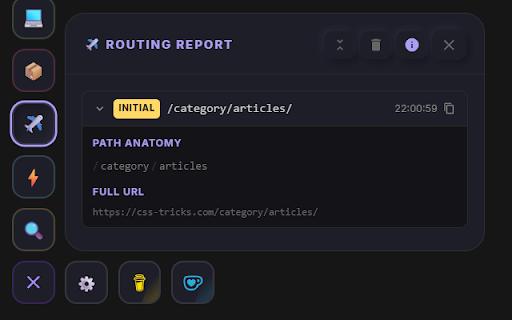
✈️ Routing Report — Track every navigation event with full URL breakdown: params, query strings, history state and time spent per route. No console needed.

Other modules: 📦 Storage Scout  |  💻 Viewport Viewer  |  🚧 Outline Hunter  |  🎨 Palette Probe  |  👁️ Vision Validator  |  ⌛ PERT Planner

 🚀 And Many Moooore! One tool. Every page. Zero friction!
- May 9, 2026short_description
Developer floating panel: Super Search, Swagger Seeker, PERT Planner, Storage Scout, Viewport Viewer, Outline Hunter & Palette Probe
A floating developer toolkit with productivity modules for every day web development tasks.
Permissions & access
- Permissions
- storage
- Host access
- None declared
Screenshots



About
DX Toolkit — a floating developer experience panel that works on any page, instantly. No setup. Just install, refresh, and go! Built by a frontend developer, for developers, testers and designers.

🔍 Super Search — Highlight and navigate multiple keywords simultaneously on any page. Supports comma-separated terms, each highlighted in a distinct color.

⚡ Swagger Seeker — Instantly filter and navigate Swagger/OpenAPI endpoints by keyword. Toggle dark theme usage just by pressing a button. Opens automatically with Ctrl+F on Swagger pages.

✈️ Routing Report — Track every navigation event with full URL breakdown: params, query strings, history state and time spent per route. No console needed.

Other modules: 📦 Storage Scout  |  💻 Viewport Viewer  |  🚧 Outline Hunter  |  🎨 Palette Probe  |  👁️ Vision Validator  |  ⌛ PERT Planner

 🚀 And Many Moooore! One tool. Every page. Zero friction!
Technical
- Version
- 5.0.0
- Manifest
- V3
- Size
- 97.35KiB
- Min Chrome
- 88
- Languages
- 1
- Featured
- No
Metadata
- ID
- hgdfibppaikpnclmacagchapjfbipind
- Developer ID
- uf04025eceb75350e5eeaa8c03510d41f
- Developer Email
- [email protected]
- Created
- Apr 20, 2026
- Last Updated (Store)
- May 6, 2026
- Last Scraped
- Jun 8, 2026
- Website
- —
- Support URL
- —
- Privacy Policy
- —
Data sourced from the Chrome Web Store · last verified Jun 8, 2026.