
File Guard (Encryptor | Decryptor)
Encrypt or decrypt any file with just one click inside your browser!
As of June 2026, File Guard (Encryptor | Decryptor) has 945 users and a 5.00/5 rating from 2 reviews in the Productivity category.
Usersdown 5.5 percent−5.5%
945
945
Ratingno change0%
5.00
2 reviews
Reviewsno change0%
2
Version
0.2.0
Manifest V3
History
6 snapshotsTracking since Apr 1, 2026.
View as table
| Date | Users | Rating | Reviews | Version |
|---|---|---|---|---|
| Apr 1, 2026 | 1.0K | 5.00 | 2 | 0.2.0 |
| Apr 16, 2026 | 987 | 5.00 | 2 | 0.2.0 |
| May 14, 2026 | 1.0K | 5.00 | 2 | 0.2.0 |
| May 23, 2026 | 995 | 5.00 | 2 | 0.2.0 |
| Jun 2, 2026 | 964 | 5.00 | 2 | 0.2.0 |
| Jun 10, 2026 | 960 | 5.00 | 2 | 0.2.0 |
| Now | 945 | 5.00 | 2 | 0.2.0 |
Permissions & access
- Permissions
- storagecontextMenus
- Host access
- None declared
Screenshots


About
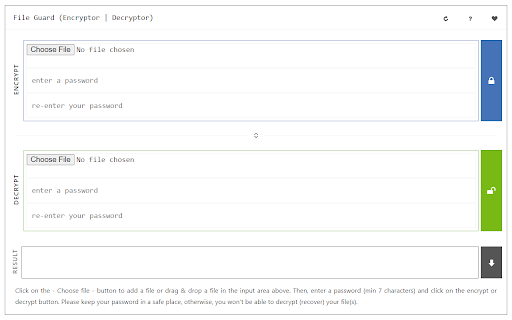
File Guard (Encryptor | Decryptor) is an extension that helps you easily secure your file(s) with the browser's built-in crypto API.

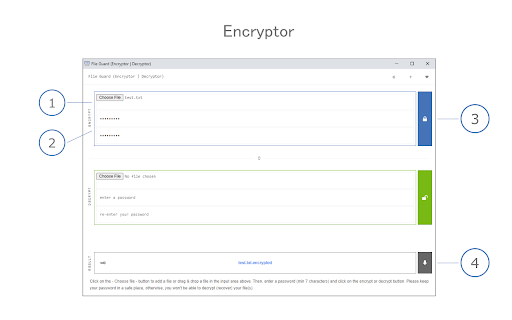
This add-on has a simple and easy-to-use UI. Simply add it to your browser and start using it without any additional plugins. (1) load your file, (2) set a password, and (3) press on the encrypt/decrypt button. File Guard uses the new encryption API (WebCryptoAPI) which is built-in to your browser by default. If you want to encrypt a file, please first browser your file (drag & drop or use the file selector), then enter a password (2 times) and finally click on the - Encrypt - button. The add-on starts the encryption process and downloads the encrypted file to your machine automatically. Please do the same procedure for decryption purposes.

Note: this addon is only designed for encrypting a "single" file. If you have a folder with multiple files or folders in it, please first "compress" your files to a single ".zip" file and then encrypt the compressed file with this add-on. Please note that File Guard can encrypt any file format with any size.

Note: if you forget the encryption password, you will not be able to recover (decrypt) your file with this add-on. Therefore, it is very important to keep your password in a safe place.

If you see any bug or have a feature request, please fill the bug report form on the addon's homepage (https://mybrowseraddon.com/file-encryptor.html).
Technical
- Version
- 0.2.0
- Manifest
- V3
- Size
- 30.73KiB
- Min Chrome
- 88
- Languages
- 1
- Featured
- Yes
Metadata
- ID
- hffpkobhcahdmmafhahfoljjaiccpjek
- Developer ID
- u71792319a8099b50ea26847bc7c06a55
- Developer Email
- [email protected]
- Created
- Aug 11, 2018
- Last Updated (Store)
- Feb 3, 2026
- Last Scraped
- Jun 10, 2026
- Website
- —
- Privacy Policy
- —
Similar extensions
Alternatives to File Guard (Encryptor | Decryptor), ranked by description similarity.

File Safe
Secure document storage with encryption and folder management
181
★ 5.0

Secure Hash Generator
Generate a secure hash code (i.e. SHA-256) from any file or string!
512

GigaZip - File Compression & Decompression Tool
File compression and decompression tool, supports ZIP, 7Z, TAR, GZIP, 100% local processing, privacy protected.
46

File Shredder - Secure File Manager
Split and manage your files securely with intelligent sharding
25

Message Encryptor
Securely encrypt and decrypt messages and files using AES-GCM — fast, offline, and private.
9
★ 5.0

WebLocker
Professional web locking extension - Lock, block, and protect your browsing with password security
30
★ 4.5

PageGuard
Adds a lock overlay to pages, allowing users to password-protect specific sites for privacy and security.
5
★ 5.0

FileHash
Use files as passwords! Drag and drop a file to autofill password fields securely, without storing any data.
2
Data sourced from the Chrome Web Store · last verified Jun 10, 2026.