
Power bar
Some description id
As of June 2026, Power bar has 6 users and a 5.00/5 rating from 1 reviews in the Productivity category.
Usersno change0%
6
6
Ratingno change0%
5.00
1 reviews
Reviewsno change0%
1
Version
0.5
Manifest V3
History
2 snapshotsTracking since Apr 1, 2026.
View as table
| Date | Users | Rating | Reviews | Version |
|---|---|---|---|---|
| Apr 1, 2026 | 6 | 5.00 | 1 | 0.5 |
| Jun 1, 2026 | 5 | 5.00 | 1 | 0.5 |
| Now | 6 | 5.00 | 1 | 0.5 |
Permissions & access
- Permissions
- None declared
- Host access
- *://*/*
Screenshots
About
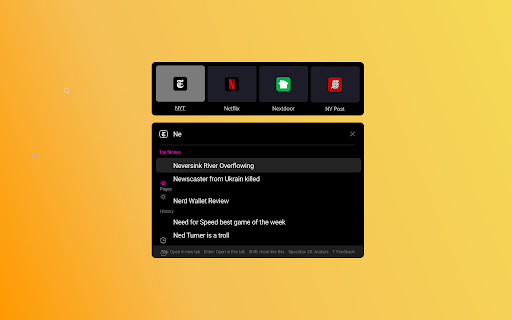
Magic Bar provides users with a new way to search the web. Please keep in mind that this extension is KEYBOARD operated. Once you activate Magic Bar, you can type queries and then hit the right arrow key to select icon suggestions.

Here's some of what Magic Bar can do for you:

1.  If you start to type a search query, such as "HO", Magic Bar will show you a large logo for Home Depot above the search bar, and some pages within Home Depot under the search bar. For example, Tools, Rentals, and Garden might show up under the search bar.
2. If you're doing a longer query, once you type the SPACEBAR, you get results as logos above the search bar. These results come from a combination of sources including the Microsoft Bing API. This can be particularly helpful for queries where: a) the only thing you really care about is the source/domain b) you think the first result will probably solve your query c) you want to open a bunch of tabs - you can hit COMAND + ENTER, and each of the results pops open in a new tab.
3. If you'd like to save some pages for quick access, you can do that in our next version.
4.  If you want traditional Google results, you may type a query and simply press the ENTER key to go to the Google SERP for that query.
5. If you type a query and then hit the TAB key, you'll get the result in a new tab focused. If you hit the SHIFT key, it'll open in the background.
Technical
- Version
- 0.5
- Manifest
- V3
- Size
- 589KiB
- Min Chrome
- 88
- Languages
- 1
- Featured
- No
Metadata
- ID
- hfaklghnimohcmbaioijaeafhhbocnam
- Developer ID
- u30b17cae016a255eebdc81f6e6b0f4fc
- Developer Email
- [email protected]
- Created
- May 25, 2022
- Last Updated (Store)
- May 25, 2022
- Last Scraped
- Jun 1, 2026
- Website
- —
- Support URL
- —
- Privacy Policy
- https://sirch.org/privacy/
Similar extensions
Alternatives to Power bar, ranked by description similarity.

Arc Search
Replaces the generic new tab page with a search engine similar to Arc.
—
★ 4.4

Chrome Command Bar
Navigate your browser like a pro with just a few clicks.
58
★ 5.0

SearchBar
The most efficient way to use your favourite search engines. Search selected text, use customizable hotkeys and much more.
60.0K
★ 4.5

CommandBar+
A keyboard-triggered command interface for browser control and AI-powered actions
14
★ 5.0

SearchBar.pro - search like a pro
Use smart shortcuts for quick access to images, websites, and ChatGPT queries. Find what you need faster!
14

Shortcut Search
Shortcut Search lets you search on Google, Yahoo, Perplexity and more using shortcuts in your address bar.
6

Search Commands
Default search extension that provides various search options directly from the search bar.
20.0K
★ 4.9

Search Picker
Create and use omnibox shortcuts to quickly navigate to your favorite links.
—
Data sourced from the Chrome Web Store · last verified Jun 1, 2026.