
Overlay
Overlay
As of June 2026, Overlay has 227 users and a 5.00/5 rating from 5 reviews in the Productivity category.
Usersup 15.8 percent+15.8%
227
227
Ratingno change0%
5.00
5 reviews
Reviewsno change0%
5
Version
0.9.12
Manifest V3
History
6 snapshotsTracking since Apr 1, 2026.
View as table
| Date | Users | Rating | Reviews | Version |
|---|---|---|---|---|
| Apr 1, 2026 | 196 | 5.00 | 5 | 0.9.12 |
| Apr 19, 2026 | 205 | 5.00 | 5 | 0.9.12 |
| Apr 29, 2026 | 211 | 5.00 | 5 | 0.9.12 |
| May 8, 2026 | 214 | 5.00 | 5 | 0.9.12 |
| May 16, 2026 | 222 | 5.00 | 5 | 0.9.12 |
| May 25, 2026 | 232 | 5.00 | 5 | 0.9.12 |
| Now | 227 | 5.00 | 5 | 0.9.12 |
Permissions & access
- Permissions
- storagescriptingtabsnotificationscontextMenusclipboardWriteidentitysidePanelidlealarmssidePanel
- Host access
- <all_urls>, http://localhost:11434/*, https://overlay.one/*, https://*.supabase.co/*
Screenshots
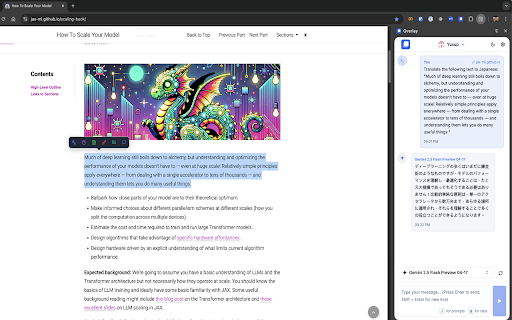

About
Overlay - Browser-Based Knowledge Management System for Professionals & Students

Turn your browser into a powerful knowledge management hub with Overlay. Designed for professionals and students, Overlay transforms how you process, organize, and utilize web information. Seamlessly integrated into Chrome's sidepanel, it combines cutting-edge AI models with intuitive knowledge capture tools to help you extract insights, manage tasks, take structured notes, and build your personal knowledge base—all without leaving your browser.

✨ CORE CAPABILITIES:

Knowledge Management:
• Smart Note-Taking - Capture and organize information from any webpage with automatic context preservation
• Knowledge Base Building - Create interconnected notes and insights that grow with your research
• Content Processing - Extract, summarize, and synthesize information from websites, PDFs, and documents
• Task Management - Convert insights into actionable tasks with integrated Google Tasks support
• Research Organization - Tag, categorize, and cross-reference your findings for easy retrieval

AI-Powered Intelligence:
• Multi-Model Support - Choose from OpenAI GPT-4, Anthropic Claude, Google Gemini, or local Ollama models
• Contextual Analysis - Get AI insights based on the current webpage you're viewing
• Smart Explanations - Understand complex topics with AI-generated explanations tailored to your level
• Instant Translation - Translate and understand content in multiple languages while maintaining context
• Document Processing - Analyze PDFs, images, and text with advanced AI comprehension

Productivity Features:
• Chrome Sidepanel - Work without switching tabs or disrupting your browsing flow
• Structured Data Extraction - Transform unstructured web content into organized, actionable data
• Custom Workflows - Create templates and prompts for repetitive research tasks
• Cross-Device Sync - Access your knowledge base from any device via the web dashboard
• Service Integrations - Connect with Notion, Google Tasks, and other productivity tools

🎯 WHO USES OVERLAY:

Professionals:
• Research Analysts - Compile market insights and competitive intelligence efficiently
• Project Managers - Track tasks, document decisions, and maintain project knowledge
• Content Creators - Research topics, organize references, and generate ideas
• Consultants - Process client information and build knowledge repositories
• Legal Professionals - Review documents, extract key points, and manage case notes

Students & Academics:
• Graduate Students - Manage literature reviews and organize dissertation research
• Undergraduates - Take notes from online resources and create study guides
• Researchers - Track citations, summarize papers, and build research databases
• Online Learners - Process course materials and create personalized study notes
• Language Learners - Translate content and get contextual explanations

💡 HOW IT WORKS:
1. Install Overlay and open it in Chrome's sidepanel
2. Browse any website and highlight text or images to process
3. Use AI to explain, translate, summarize, or extract information
4. Save insights as notes or convert them into actionable tasks
5. Build your searchable knowledge base over time

🚀 KEY USE CASES:
• Academic Research - Organize sources, take notes, and build bibliographies
• Market Analysis - Extract competitor data and industry trends
• Content Curation - Collect and organize information for projects
• Language Learning - Translate and understand foreign content
• Technical Documentation - Process complex documentation with AI assistance
• Meeting Preparation - Research participants and compile briefing notes
• Study Sessions - Create summaries and flashcards from online materials

Start building your knowledge management system today with our Free plan, or unlock advanced features with our Pro tiers.

Transform your browser into an intelligent knowledge workspace—Download Overlay now!
Technical
- Version
- 0.9.12
- Manifest
- V3
- Size
- 1.92MiB
- Min Chrome
- 88
- Languages
- 8
- Featured
- No
Metadata
- ID
- henphnmkkgfpffkgiiknpglbiigfnefa
- Developer ID
- u25eda14ff6a4f258a3ff93ef71abad6f
- Developer Email
- [email protected]
- Created
- Apr 9, 2025
- Last Updated (Store)
- Nov 22, 2025
- Last Scraped
- Jun 6, 2026
- Website
- overlay.one
- Support URL
- https://overlay.one
- Privacy Policy
- https://overlay.one/en/privacy
Similar extensions
Alternatives to Overlay, ranked by description similarity.

AI Learning Agent
Your personal AI browsing companion that learns from your web activity and proactively helps you find insights and connections.
5

AIMode: AI Text Analysis, YouTube Subtitles & Amazon Price Tracker
AI text analysis, live YouTube subtitles, and an Amazon price tracker. Your all-in-one assistant with Google Gemini
26

CleverTabs
AI-powered tab manager. Capture tabs, get smart summaries, sync to Google Sheets.
6

Noted: AI Sidebar — ChatGPT, Claude, Gemini, DeepSeek + Notes
AI sidebar that remembers your browsing. Summarize tabs, chat with Claude/GPT/Gemini, export notes or slides in one click.
31
★ 5.0

Anchored – Notes & Highlights for Websites
Take notes and highlights. Organize by site or page with rich text editing.
17
★ 5.0

AI Knowledge Base
Use AI Knowledge Base for small teams to run an auto-updating LLM knowledge graph, online kb article repository, and a FAQ generator
9

Pronoto: AI Notes, Teleprompter, AI Copilot & Screenshots
All-in-one AI learning assistant: smart notes, browser teleprompter, screenshots & AI copilot in one floating sidebar.
5.0K
★ 4.8

SnapAsk AI
AI-powered learning assistant - Summarize, Q&A, Flashcards, Quizzes. Supports Google Gemini & OpenRouter
6
★ 5.0
Data sourced from the Chrome Web Store · last verified Jun 6, 2026.