
快速翻譯選取文字
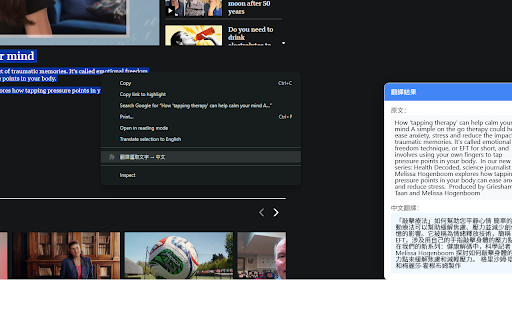
Highlight 文字後右鍵彈窗翻譯
As of June 2026, 快速翻譯選取文字 has — users in the Productivity category.
Usersno change0%
—
—
Ratingno change0%
—
— reviews
Reviewsno change0%
—
Version
1.1
Manifest V3
History
1 snapshotsTracking since Jun 9, 2026.
Not enough history yet for this metric — the chart fills in as we collect more snapshots.
View as table
| Date | Users | Rating | Reviews | Version |
|---|---|---|---|---|
| Jun 9, 2026 | — | — | — | 1.1 |
| Now | — | — | — | 1.1 |
Permissions & access
- Permissions
- contextMenus
- Host access
- None declared
Screenshots
About
Quick Translate - Right-click Instant Translation

Simply highlight any text on any webpage, right-click and select "翻譯選取文字 → 中文" to get instant translation in a beautiful popup window.

Features:
- Support multiple languages (auto detect)
- Translate to Traditional Chinese (繁體中文)
- Clean, modern popup interface
- No new tab needed
- Fast and lightweight

Perfect for reading English articles, technical documents, or any foreign language content.
Technical
- Version
- 1.1
- Manifest
- V3
- Size
- 4.73KiB
- Min Chrome
- 88
- Languages
- 1
- Featured
- No
Metadata
- ID
- hefolnejcjklacpginimnngnblcenfal
- Developer ID
- uc52e70a184b2baf555420c1bc768ac23
- Developer Email
- [email protected]
- Created
- Jun 8, 2026
- Last Updated (Store)
- Jun 8, 2026
- Last Scraped
- Jun 9, 2026
- Website
- —
- Support URL
- —
- Privacy Policy
- https://stconshk.github.io/privacy-policy/
Data sourced from the Chrome Web Store · last verified Jun 9, 2026.