
Download YouTube Kids for PC, Mac And Windows
Download YouTube Kids for PC, Mac and Windows safety with keyword and URL blocking. Parental control with extension lock.
As of May 2026, Download YouTube Kids for PC, Mac And Windows has 9,000 users and a 3.00/5 rating from 2 reviews in the Entertainment category.
Usersup 12.5 percent+12.5%
9.0K
9,000
Ratingno change0%
3.00
2 reviews
Reviewsno change0%
2
Version
1.0.0
Manifest V3
90-day change · In the last 90 days this extension gained 1.0K users.
History
1 snapshotsTracking since Apr 29, 2026.
View as table
| Date | Users | Rating | Reviews | Version |
|---|---|---|---|---|
| Apr 29, 2026 | 8.0K | 3.00 | 2 | 1.0.0 |
| Now | 9.0K | 3.00 | 2 | 1.0.0 |
Permissions & access
- Permissions
- tabsstorage
- Host access
- None declared
Screenshots

About
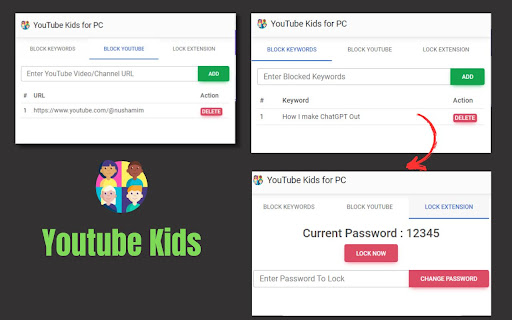
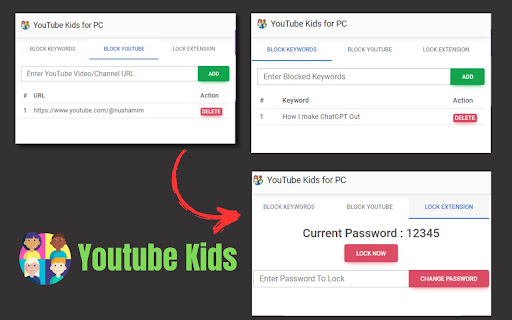
Our "YouTube kids on PC, Windows, and Mac" extension offers three essential features for a safer youtube browsing. You can easily block keywords to filter out inappropriate content, prevent access to specific YouTube video or channel URLs, and even have the option for parents to lock the extension with a password, ensuring a secure environment for kids while browsing YouTube.

✅ YouTube kids Extension Features

✔️Keyword Blocking: Filter out unwanted content by blocking specific keywords.
✔️URL Blocking: Prevent access to designated YouTube video or channel URLs.
✔️Extension Lock: Enable a password-protected lock feature for parents to control access to the extension, ensuring child safety online.
✔️Easy To use
✔️Simple Extension


✅ How To Use YouTube kids on PC?

Step 1: Start by adding this extension to your Chrome browser by clicking "Add to Chrome."

Step 2: Next, click on the Extension icon.

Step 3: You will see three tabs:

"Blocked Keywords"
"Blocked YouTube"
"Lock Extension"
Step 4: In the first tab, you can add keywords to block specific videos. In the second tab, you can block video URLs or channel URLs. To secure your extension, use the third tab. The default password is "12345," but you can change it by clicking the "Change Password" button.

Step 5: Enjoy a safer browsing experience!

✅ Disclaimer:

Please note that "YouTube kids for PC, Windows, and Mac" Chrome Extension is an independent product and is not associated, affiliated, or endorsed by the YouTube kids Android app or its developers. We respect intellectual property rights and make no claim to any copyrights associated with the YouTube Android app.
Technical
- Version
- 1.0.0
- Manifest
- V3
- Size
- 140KiB
- Min Chrome
- 88
- Languages
- 1
- Featured
- No
Metadata
- ID
- hebhfkkhmllaocgpkadghggolpnkmfhe
- Developer ID
- ub7d4d4cea561015c553501b989ff18a7
- Developer Email
- [email protected]
- Created
- Oct 12, 2023
- Last Updated (Store)
- Oct 13, 2023
- Last Scraped
- May 26, 2026
- Website
- youtubekidsforpcandmac.blogspot.com
Similar extensions
Alternatives to Download YouTube Kids for PC, Mac And Windows, ranked by description similarity.

GuardianTube
A parental control extension that requires a PIN to access YouTube
6
★ 5.0

Readera For PC,Windows and Mac (Free Use)
You can easily search books by any author name
8.0K
★ 1.4

My YT Blocker
Blacklist words and topics from your YouTube feed.
6

siriusxm app for pc,windows and Mac (Safe Download)
User Can Search Any Song Info
3.0K

Netflix Kids in Hebrew
Filter and sort Hebrew-dubbed kids content on Netflix
1

YouTube Watchlist
Easily create a watchlist of YouTube videos and watch Ad free
72
★ 4.0

RemotePlayback
Turn your browser into a YouTube TV cast receiver
141
★ 5.0

Countdown timer For PC,Windows and Mac (Update)
Simple countdown timer extension For PC
50
Data sourced from the Chrome Web Store · last verified May 26, 2026.