
StacTab
Auto-groups tabs by domain, sleeps inactive tabs, deduplicates, and archives sessions to a searchable Workspace Vault.
As of June 2026, StacTab has — users in the Productivity category.
Usersno change0%
—
—
Ratingno change0%
—
— reviews
Reviewsno change0%
—
Version
1.6.0
Manifest V3
History
1 snapshotsTracking since Jun 24, 2026.
Not enough history yet for this metric — the chart fills in as we collect more snapshots.
View as table
| Date | Users | Rating | Reviews | Version |
|---|---|---|---|---|
| Jun 24, 2026 | — | — | — | 1.6.0 |
| Now | — | — | — | 1.6.0 |
Permissions & access
- Permissions
- tabstabGroupsstoragecontextMenuswindows
- Host access
- None declared
Screenshots



About
If you have more than 15 tabs open every now and then, StacTab is for you.

There's no good reason your Gmail, Instagram, Netflix, and three YouTube videos should be sitting in a flat pile. StacTab groups tabs by domain automatically as you browse. Open two or more tabs from the same site and they get pulled into a named, color-coded group. You set the threshold anywhere from 2 to 5 tabs.

> Automatic Tab Grouping
Runs in the background, no clicks needed. Tabs from the same domain get grouped the moment you hit the threshold. You can disable it and do it manually whenever you want.

> Manual Organize
Press Alt+G (Option+G on Mac) to sort everything that's currently open into groups by domain. One shortcut, done.

> Live Tab Search
Alt+S (Option+S on Mac) searches every open tab by title or URL as you type. No hunting through windows, no squinting at favicons. Type a word, jump to the tab.

> Sleep Tabs
Background tabs eat RAM even when you haven't looked at them in hours. Sleep Tabs unloads them from memory without closing them. Click back to any sleeping tab and it reloads instantly.

> Dedupe Tabs
Closes every duplicate URL across your browser in one click. If you've ever opened the same page three times by accident, this is for you.

> Merge Windows
Pulls every tab from every open Chrome window into one. Useful when you've ended up with four separate windows and no idea how.

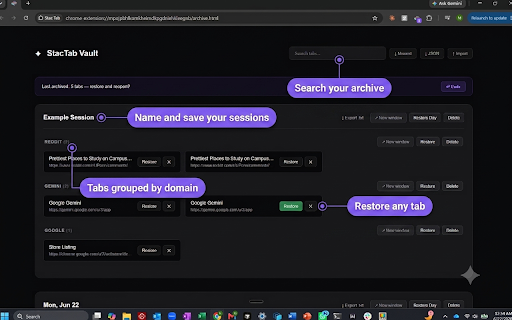
> Workspace Vault
Save sessions before you close them. Archive a full window, individual tabs, or a tab group, name it, and restore it any time. Export sessions to JSON or plain text if you want a backup. Archived something by mistake? There's a 30-second undo.

> Tab Count Badge
Live tab count on the extension icon. Small, but you'll miss it if it's gone.

> Fully Private
No network requests. No analytics, no tracking. Everything stays in your browser, stored locally via Chrome storage.

> Open Source
Free and MIT licensed. Full source code on GitHub.

> Keyboard shortcuts:
Alt+S / Option+S: Search tabs
Alt+G / Option+G: Group all tabs by domain
Technical
- Version
- 1.6.0
- Manifest
- V3
- Size
- 694KiB
- Min Chrome
- 88
- Languages
- 1
- Featured
- No
Metadata
- ID
- hdfcdcoogjkdogmnhhopkekanpldoefh
- Developer ID
- u462680805d3f83eb8ed85ab108351aea
- Developer Email
- [email protected]
- Created
- Jun 23, 2026
- Last Updated (Store)
- Jun 23, 2026
- Last Scraped
- Jun 24, 2026
- Website
- —
- Support URL
- —
- Privacy Policy
- https://manan-s26.github.io/StacTab/privacy
Data sourced from the Chrome Web Store · last verified Jun 24, 2026.