
OpenScreenShot
Open-source screenshot tool — full-page, region, and visible-area capture with annotation and PDF export.
As of July 2026, OpenScreenShot has — users in the Productivity category.
Usersno change0%
—
—
Ratingno change0%
—
— reviews
Reviewsno change0%
—
Version
0.1.0
Manifest V3
History
1 snapshotsTracking since Jul 6, 2026.
Not enough history yet for this metric — the chart fills in as we collect more snapshots.
View as table
| Date | Users | Rating | Reviews | Version |
|---|---|---|---|---|
| Jul 6, 2026 | — | — | — | 0.1.0 |
| Now | — | — | — | 0.1.0 |
Permissions & access
- Permissions
- activeTabscriptingstorageunlimitedStoragedownloads
- Host access
- None declared
Screenshots


About
OpenScreenShot is a free, open-source screenshot extension — zero data leaves your device, no account needed, no telemetry, no third-party services.

### Privacy

OpenScreenShot is privacy-first unlike the other tools:
 - All capture, annotation, and export happens entirely locally in your browser
 - No data is ever uploaded, collected, or transmitted
 - No analytics, no ads, no third-party services
 - The extension uses only the permissions it needs: activeTab (current page), scripting (scroll measurement), storage +
   unlimitedStorage (settings + image handoff), downloads (save files)
 - Never requests broad <all_urls> host permissions

### Capture modes

 - 📄 Full Page — Scrolls and stitches the entire page into one seamless image. Fixed headers appear once at the top. Live progress
   bar shows capture status.
 - 👁 Visible Area — Captures exactly what's on screen now. Instant.
 - ✂️ Selected Region — Click and drag to select any area on the page. Supports resize handles, keyboard nudging (arrow keys, Shift =
   ×10), cancel (Esc) and confirm (Enter).

### Annotation editor

After every capture, the full-screen editor opens in a new tab. Annotate your screenshot before exporting:

 - Drawing tools: Rectangle, Arrow, Freehand pen, Text (click-to-type overlay), Blur (pixelate an area), Crop (drag a region and
   apply)
 - Style controls: Pick from 8 colors, adjust stroke width (3/6/12), and font size (12–96px) — your settings are remembered across
   sessions
 - Editing: Select, move, and resize annotations with corner/edge handles; undo/redo (⌘Z/⌘⇧Z); delete (⌫)
 - Navigation: Scroll-wheel zoom toward cursor, space-drag or middle-click to pan, fit/100% zoom buttons

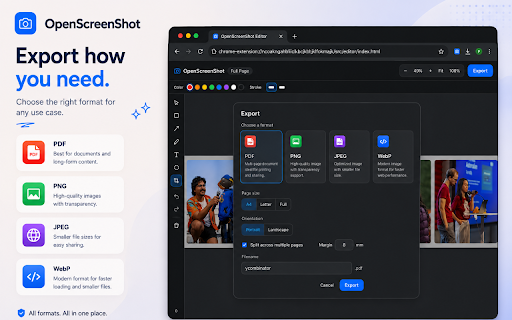
### Export

Export your annotated screenshot from the editor:

### Settings

 - Theme: Light, Dark, or System-following
 - Default format: PNG / JPEG / WebP / PDF
 - Quality: Adjustable slider for JPEG/WebP/PDF
 - Filename template: Customizable with {date}, {time}, {title}, {w}, {h} tokens
 - PDF defaults: Page size, orientation, multi-page, margin

### Open source

MIT licensed. Source code on GitHub. Contributions welcome.


### Category

Productivity
Technical
- Version
- 0.1.0
- Manifest
- V3
- Size
- 278KiB
- Min Chrome
- 88
- Languages
- 1
- Featured
- No
Metadata
- ID
- hdabbojjccojlapnfjpdppcpfcnhgmdp
- Developer ID
- ucb39086edf78bf7fd1eb53810bf74945
- Developer Email
- [email protected]
- Created
- Jul 5, 2026
- Last Updated (Store)
- Jul 5, 2026
- Last Scraped
- Jul 6, 2026
- Website
- openscreenshot.app
- Support URL
- https://openscreenshot.app/support
Data sourced from the Chrome Web Store · last verified Jul 6, 2026.