
Calculator
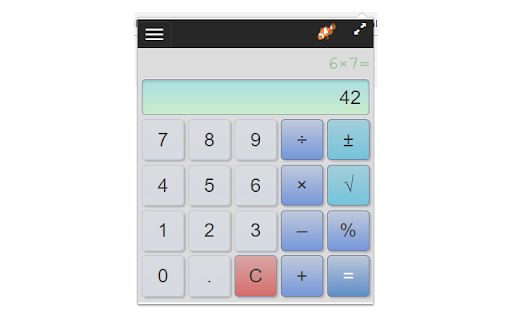
A simple calculator that remembers your last calculation. You can close it at any time, and reopen it without losing your work.
As of June 2026, Calculator has 80,000 users and a 4.10/5 rating from 124 reviews in the Workflow & Planning category.
Usersdown 11.1 percent−11.1%
80.0K
80,000
Ratingdown 0.2 percent−0.2%
4.10
124 reviews
Reviewsup 0.8 percent+0.8%
124
Version
1.8.3
Manifest V3
90-day change · In the last 90 days this extension lost 10.0K users.
History
5 snapshotsTracking since Apr 5, 2026.
View as table
| Date | Users | Rating | Reviews | Version |
|---|---|---|---|---|
| Apr 5, 2026 | 90.0K | 4.11 | 123 | 1.8.3 |
| Apr 8, 2026 | 70.0K | 4.11 | 123 | 1.8.3 |
| Apr 16, 2026 | 80.0K | 4.11 | 123 | 1.8.3 |
| May 7, 2026 | 90.0K | 4.11 | 123 | 1.8.3 |
| Jun 1, 2026 | 90.0K | 4.10 | 124 | 1.8.3 |
| Now | 80.0K | 4.10 | 124 | 1.8.3 |
Permissions & access
- Permissions
- None declared
- Host access
- None declared
Screenshots

About
A simple calculator for basic arithmetic.

Adds a calculator icon to your browser toolbar. You can open the calculator while browsing any web page. It remembers your last calculation so you can close it at any time and reopen without losing your work.

Features:

• Compact and available when you need it right from the Chrome toolbar
• Remembers your previous calculation when re-opened
• A selectable history records your last 10 calculations
• Use the keyboard number pad for calculations
• Enter key for "=" and "c" for clear
• Del/Backspace key to edit calculation
• Copy results or calculations to the clipboard
• Re-sizable - remembers you setting when you close the calculator
• It's Free!

Functions (keyboard shortcuts):

• Number Pad or 0-9 for Number Entry
• Equals (= or Enter)
• Clear ("c")
• Delete (del/backspace) - removes last character you typed
• Copy to clipboard (ctrl-c)
• Divide (/)
• Times (*)
• Minus (-)
• Plus (+)
• Percent (% or F1).
     Examples:
       50x20% means 20 percent of 50 (or use the shorthand 50%20) = 10
       10-20% means subtract 20% of 10 from 10 = 8
       10+12% means add 12% of 10 to 10 = 11.2
• Square Root (F2).
      Example, 9√  = 3, or 3+9√ = 9
• Square x²
     Example, 9² = 81
• Reciprocal ⅟x
      Example, ⅟4 = 0.25
• +/- (F3) - negates the value
• Parentheses to control order of calculations.
      Example:  (3+2)*4  = 20  without parenthesis the multiplication happens first: 3+2*4= 11
• Decimal point

Changes:
• 1.8.3 - Minor fixes
• 1.8.2 - Improved layout for history menu
• 1.8.0 - New functions squared and reciprocal, parenthesis to control order of calculations, user experience updates
• 1.7.9 - update to manifest V3
Technical
- Version
- 1.8.3
- Manifest
- V3
- Size
- 2.29MiB
- Min Chrome
- 88
- Languages
- 1
- Featured
- Yes
Metadata
- ID
- hcpbdjanfepobbkbnhmalalmfdmikmbe
- Developer ID
- u0d278c1b85dfdeb85a4ec169d3ee8c1f
- Developer Email
- [email protected]
- Created
- Dec 8, 2015
- Last Updated (Store)
- Mar 10, 2026
- Last Scraped
- Jun 10, 2026
- Website
- https://linangdata.com/
- Support URL
- https://linangdata.com/calculator/
- Privacy Policy
- https://linangdata.com/privacy.html
Similar extensions
Alternatives to Calculator, ranked by description similarity.

Calculator-kit
Calculate Anywhere
1
★ 4.0

Pocket Calc
A simple and clean calculator extension for your browser
68
★ 5.0

Day2Day Calculator
A no BS calculator for day-to-day use inside your Chrome
9

Discount Calculator
A basic caculator that also allows you to calculate common price discounts and tips with a single click.
2.0K
★ 4.4

Easy Calculator
A simple calculator for basic arithmetic operations.
172
★ 4.5

Quick Fast Calculator
Chrome browser quick calculator extension
4

Calculator
Apple-style calculator extension
83
★ 5.0

Calculator
A simple and intuitive calculator to help you with your work. Opens directly on the site page
50.0K
★ 4.2
Data sourced from the Chrome Web Store · last verified Jun 10, 2026.